Best answer

Not receiving WhatsApp notifications for leads from Meta

  • November 11, 2025
  • 2 replies
  • 38 views

We receive leads from meta and we used to receive a whatsapp notification but we aren't getting the notification. There's just one phone number that is working and 3 others that aren't receiving it. There is no error message during the process. ¿Has someone already been through this recently and found the solution?

Best answer by SamB

Hey ​@Alozano 👋

Just following up to share that this appears to be related to a bug that’s being discussed over here: 

So I’ve added you to the list of users being impacted by that bug. I can’t share any ETA on when it will be fixed but you’ll get an email notification from us as soon as it’s resolved.

​As there’s another topic tracking community members affected by this issue we’re going to close this topic to further discussion so that folks can follow along with any updates in a single place. For anyone that comes across this post and wants to be added to the bug report please reach out on the main topic and we’ll take care of that.

This post has been closed for comments. Please create a new post if you need help or have a question about this topic.

2 replies

SamB
Community Manager
Forum|alt.badge.img+11
  • Community Manager
  • November 12, 2025

Hi there ​@Alozano, welcome to the Community! 🎉

Sorry to hear not all the WhatsApp numbers are receiving a notification. Is there any difference in the templates that have been selected for the messages that aren’t being sent to the other numbers? 

It looks like WhatsApp can pause certain templates so if the numbers that aren’t receiving notifications are using different templates, then that might be why the messages aren’t going through. 🤔 

And if they’re all using the same template, can you give the following steps a try:

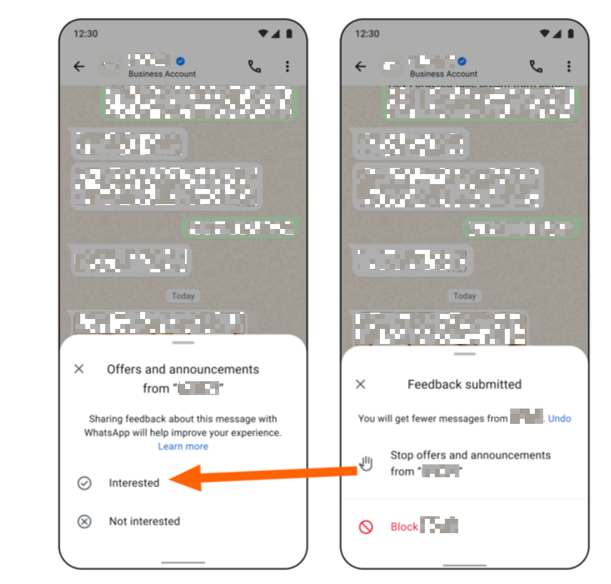
  1. Go into WhatsApp account for the other numbers and mark the business account that's sending the messages as interested. For example:
    0e99ed90d7cc5627e027b13528572af1.png

  2. If that doesn't work, try turning off all Zaps that use this template for 24 hours (this is the time-period they allow users to reply to messages) and then turn them back on. 

  3. And if that doesn’t work either, try replying back to the business account’s last message with just the word “interested” (with out the quote marks).


Keep us posted on how it goes!​​


SamB
Community Manager
Forum|alt.badge.img+11
  • Community Manager
  • Answer
  • November 25, 2025

Hey ​@Alozano 👋

Just following up to share that this appears to be related to a bug that’s being discussed over here: 

So I’ve added you to the list of users being impacted by that bug. I can’t share any ETA on when it will be fixed but you’ll get an email notification from us as soon as it’s resolved.

​As there’s another topic tracking community members affected by this issue we’re going to close this topic to further discussion so that folks can follow along with any updates in a single place. For anyone that comes across this post and wants to be added to the bug report please reach out on the main topic and we’ll take care of that.