Question

"No options available" error when linking Instagram business account to Facebook page

  • Mar 29, 2024 7:38 AM UTC
  • 19 replies
  • 1857 views

i have follow all the steps and linked my instagram account through Facebook giving all the permisions, I an administrator of th page and my instagram account is for businesses and when I am about to choose the account this problem appears

All results were loaded.

No options are available.Some reasons this could be happening:

  • Confirm if you connected the right account.
  • Confirm that there is data in the partner app.
  • Confirm that you have permission to the data in the partner app.
  • There was an issue retrieving data from the partner app. Please try again later.

please help

This post has been closed for comments. Please create a new post if you need help or have a question about this topic.

19 replies

ken.a
Forum|alt.badge.img+6
  • Zapier Staff
  • Apr 2, 2024 5:57 AM UTC

Hi there @amaliogigu,

Welcome to the Community! 🎉

You'll want to make sure the “Access profile and posts from the Instagram account connected to your Page”  and “Upload media and create posts for the Instagram account connected to your Page” options are toggled on. 

https://www.facebook.com/settings?tab=business_tools&ref=settings
8858624c5e104ae6e296e6994ccaa896.png
(view larger)

If the permissions are correct, you can try using your Instagram account ID in the “Instagram Account to Use” field as a custom value. You can find the Instagram account ID here:

525b42632bcbb19408c851bf8929723b.png
(view larger)

Hopefully, this helps!


  • New
  • Apr 19, 2024 10:24 PM UTC

Hi, 

I hace checked evrything from Meta end, I called their customer service to mannually check my permissions and linked accounts, everthing looks good. But the message remains on Zapier side, please help.

*My business is underview on FB, but all my accounts are linked. Would that be the cause? I can see Zapier on FB but not IG business intergrations. 


ken.a
Forum|alt.badge.img+6
  • Zapier Staff
  • Apr 22, 2024 9:21 AM UTC

Hi @Archiex8,

The under review message could be the issue. However, have you tried inputting the Instagram account ID as a custom value? You should see your Instagram account ID when connecting your Instagram account to Zapier.

525b42632bcbb19408c851bf8929723b.png
(view larger)

Hopefully, this helps.


  • New
  • Apr 24, 2024 11:35 PM UTC

Hi Ken,


Thanks for the response.

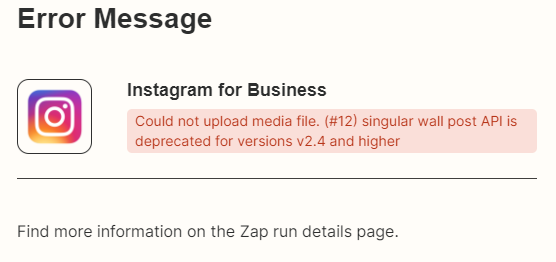
I tried put in account number then rerun the Zap, now it stucks on below - 


ken.a
Forum|alt.badge.img+6
  • Zapier Staff
  • Apr 25, 2024 6:13 AM UTC

Hi @Archiex8,

Unfortunately, I have have exhausted my resources regarding the error you’re running into. I’d recommend reaching out to our Support Team since they have the correct tools to look closer at the Zap and its logs and determine the cause of this error.

You can reach our Support Team here: https://zapier.com/app/get-help

I appreciate your patience and understanding.


  • New
  • Apr 25, 2024 10:16 AM UTC

I’m having the exact same issue. Can you post your solution here if you get it from support please.


  • Beginner
  • May 29, 2024 12:20 PM UTC

I have connected the app with my Facebook Business Account, which is linked to my Instagram accounts. I have granted all permissions during the connection process and selected all my Instagram accounts. However, I still receive the error message: "No options are available" under "Instagram Account to Use."

Can anyone help me resolve this issue? I've been struggling with it for a long time.


ken.a
Forum|alt.badge.img+6
  • Zapier Staff
  • Jun 21, 2024 6:12 AM UTC

Hi @Amir.MT,

I’m so sorry for the delayed response here.

Have you tried inputting the Instagram account ID to the “Instagram Account to Use” field as a custom value? You should see your Instagram account ID when connecting Instagram to Zapier. Like so:

525b42632bcbb19408c851bf8929723b.png
(view larger)

Kindly give it a try and let me know how it goes? I'll keep an eye out for your response!


  • New
  • Jun 24, 2024 7:25 PM UTC

Unfortunately I haven’t recieved response from support team on time and my membership has expired. Hopefully they will fix this issue in the future. All support team membbers were asking me to do the exact same process as in this post, I had to explain multiple times the same thing.


ken.a
Forum|alt.badge.img+6
  • Zapier Staff
  • Jun 25, 2024 9:23 AM UTC

Hi @Archiex8,

I’m so sorry for the inconvenience this has caused you.

Could you please send an updated screenshot of your Instagram for Business action step? Please ensure that the fields are showing in the screenshot.

Thank you!


  • New
  • Jun 25, 2024 6:47 PM UTC


ken.a
Forum|alt.badge.img+6
  • Zapier Staff
  • Jun 26, 2024 6:56 AM UTC

Hi there @Amir.MT,

Thanks for the screenshot.

Could you please try pasting your Instagram account ID in the “Instagram Account to Use” field. Like so:

f5bcbb02b4c499abadef73b5bb3c3712.png
(view larger)

After that, please finish setting up the Instagram for Business action step and test the action.

I'll be keeping an eye out for your response!


  • New
  • Jun 26, 2024 9:50 PM UTC

I tried and it gave me same error as in the earlier posts, every staff is asking me to repeat the steps, now my membership is expired I cannot try no more. Please try internally and find the issue.


  • New
  • Jun 27, 2024 3:57 AM UTC

I have the same issue, staff just keeps repeating same solutions… I don't know how you expect us to use your service if basic functions like connecting your instagram don't work 


  • New
  • Jun 27, 2024 4:55 AM UTC

Found the error!

They mean the ID that is shown when connecting your IG and giving the permissions on facebook (id under IG name) Not the actual Instagram ID, very confusing.


  • Beginner
  • Jul 5, 2024 3:18 AM UTC


ken.a
Forum|alt.badge.img+6
  • Zapier Staff
  • Jul 5, 2024 10:09 AM UTC

Hi @HSS,

Could you please try clicking on the “Link an Account” button to see if it’ll connect the correct Instagram account?

I'll be keeping an eye out for your response!


  • New
  • Jul 29, 2024 2:09 AM UTC

there’s still no answer for this problem yet can anybody tell me a workaround or anything? I’m losing money here.


ken.a
Forum|alt.badge.img+6
  • Zapier Staff
  • Jul 29, 2024 9:10 AM UTC

Hi @Tone,

Have you tried inputting the Instagram account ID to the “Instagram Account to Use” field as a custom value? You should see the Instagram account ID when you connect your Instagram account to Zapier:

525b42632bcbb19408c851bf8929723b.png
(view larger)

I'll be keeping an eye out for your response!