Question

My auto-generated inbound email address starts with an invalid leading dot

  • July 14, 2026
  • 6 replies
  • 38 views

Bug found: My auto-generated inbound email address starts with an invalid leading dot: ".XXXXXX@zapiermail.com". This is not a valid email address format (leading dot in local-part), which is why forwarding test emails fails and the "Continue" button on the "New Inbound Email" trigger setup stays disabled. Please regenerate a valid address for my account. Zap ID: XXXXXXXXX.

This post has been edited by a moderator to remove email and Zap ID information. Please remember that this is a public forum and avoid sharing personal or potentially sensitive details like Zap IDs.


6 replies

Forum|alt.badge.img+4
  • Zapier Solution Partner
  • July 14, 2026

Hi ​@LuXtz 

Submit your ticket directly through the contact form: https://zapier.com/app/get-help 


Troy Tessalone
Zapier Orchestrator & Solution Partner
Forum|alt.badge.img+14
  • Zapier Orchestrator & Solution Partner
  • July 14, 2026

Hi ​@LuXtz 

You need to add a manual custom value before the .XXX@

Help links: https://zapier.com/apps/email/integrations#help


Forum|alt.badge.img+4
  • Zapier Solution Partner
  • July 20, 2026

Hi ​@LuXtz just checking in — did you manage to resolve this?


SamB
Community Manager
Forum|alt.badge.img+11
  • Community Manager
  • July 21, 2026

Hey ​@LuXtz 👋

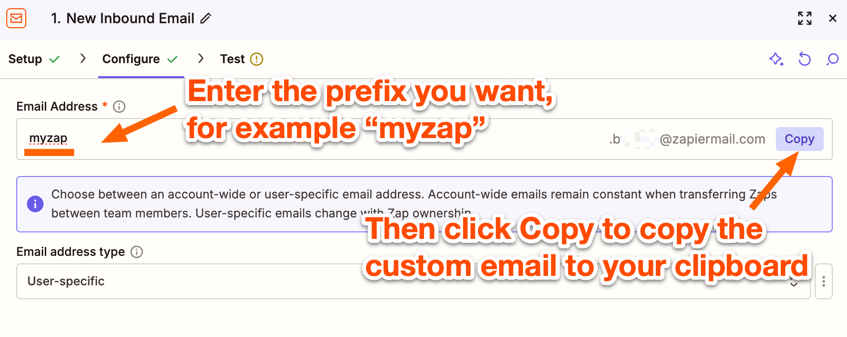
Thanks for flagging this! The leading dot is intentional, and as Troy mentioned, you’d just need to add your own prefix before it when setting up the trigger.

To do that, enter a value into the Email Address field, then click the Copy button to copy the full email (which would look something like yourchosenprefix.XXXXXX@zapiermail.com) to your clipboard:
76b2fd7869bb451ca5d8d397789ab995.png

Once you've entered a prefix value there, that will enable the Continue button so you can move on to the Testing tab.

Let us know how it goes!


Samuel Dansaki

That definitely looks like a Zapier bug rather than a user configuration issue. Since the generated inbound email starts with a leading . in the local part, it fails email validation, so the Continue button stays disabled.

Support should be able to regenerate the inbound email address for your account. If anyone is stuck or wants help troubleshooting Zapier automations while waiting for a fix, I'm happy to help. You can book a free call here: --Link removed by moderator--

This post has been edited by a moderator to remove self-promotional Calendly booking link as per our Community Code of Conduct.


SamB
Community Manager
Forum|alt.badge.img+11
  • Community Manager
  • July 29, 2026

Just checking in ​@LuXtz, did adding the prefix value into the Email Address field resolve it?

Want to make sure you’re all set! 🙂