Question

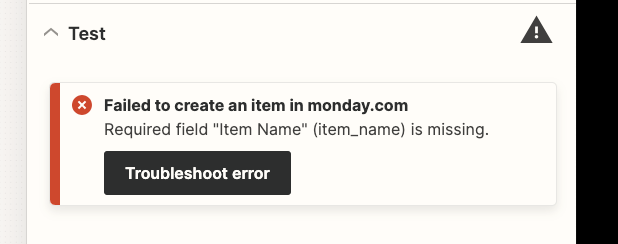
Monday.com error: Required field "Item Name" (item_name) is missing.

  • Oct 16, 2023 10:22 AM UTC
  • 10 replies
  • 359 views

I would like to add candidates from a BreezyHR pipeline to a recruitment pipeline board on Monday.com and keep getting the same failed message and have added a name



This post has been closed for comments. Please create a new post if you need help or have a question about this topic.

10 replies

Troy Tessalone
Zapier Orchestrator & Solution Partner
Forum|alt.badge.img+14
  • Zapier Orchestrator & Solution Partner
  • Oct 16, 2023 4:19 PM UTC

Hi @StacyP 

Good question.

We would need to see screenshots with how your Zap steps are configured to have more context.


  • Author
  • Beginner
  • Oct 16, 2023 6:58 PM UTC

Hi Troy,


Thanks for replying. Thought I would make it easier and send you a loom video.


Troy Tessalone
Zapier Orchestrator & Solution Partner
Forum|alt.badge.img+14
  • Zapier Orchestrator & Solution Partner
  • Oct 16, 2023 7:27 PM UTC

@StacyP 

In Step 1, make sure to select a Pipeline Stage.


In Step 2, you need to choose a variable for the Item Name that has a value populated. ( ! ) indicates a mapped variable that may need to be remapped.


  • Author
  • Beginner
  • Oct 16, 2023 7:56 PM UTC

Thanks @Troy Tessalone - so that I know what Im asking is, we are a recruitment agent and have like 20 live positions, so wanted to know how I can select more then 1 position at a time, otherwise I need to create a new integration for every position?


Troy Tessalone
Zapier Orchestrator & Solution Partner
Forum|alt.badge.img+14
  • Zapier Orchestrator & Solution Partner
  • Oct 16, 2023 8:04 PM UTC

@StacyP 

Require fields must be populated in Zap steps.

If you can’t select more than one option for a field or there is not an option to select that covers, then you would need to create a Zap for each.


  • Author
  • Beginner
  • Oct 16, 2023 8:12 PM UTC

Ok great thank you


ken.a
Forum|alt.badge.img+6
  • Zapier Staff
  • Oct 17, 2023 7:07 AM UTC

That’s awesome @StacyP! Big thanks to Troy for pointing you in the right direction!

If you have any other questions, please don’t hesitate to reach out to the Community. We’re always happy to help! 🤗


  • Author
  • Beginner
  • Oct 17, 2023 8:51 AM UTC

Thank @ken.a - where can I get tutorial/videos for breezyHR and Monday.com integrations ?


ken.a
Forum|alt.badge.img+6
  • Zapier Staff
  • Oct 18, 2023 7:39 AM UTC

Hi there @StacyP,

There’s no tutorial or videos for integrating Breezy HR and monday.com specifically, but we have a list of help articles that should help you get started on how to setup your Zap.

You can read them here:

I also want to share this amazing Community post that might help with your workflow:

Hopefully, this helps! 😊


Troy Tessalone
Zapier Orchestrator & Solution Partner
Forum|alt.badge.img+14
  • Zapier Orchestrator & Solution Partner
  • Oct 18, 2023 7:02 PM UTC

@StacyP

In the screenshot below it shows a mapped dynamic variable from “Candidate Name” from step 1.

If you were to test the Zap step, it would use the value shown to the right of the :

If you were to change the Zap trigger step example being used to configure/test the Zap action steps, then it would show a different variable value.


NOTE: Make sure to remove the line break you have in the Item Name field.


When in doubt, test it out.

Try turning the Zap ON and testing live.

Then check your Zap Runs to see the DATA IN/OUT for each Zap step to help you trace and troubleshoot.

https://zapier.com/app/history/