



Answer

Microsoft Dynamics 365 CRM does not load fields under Action

  • May 8, 2023
  • 5 replies
  • 319 views

HSBA
Forum|alt.badge.img

Hello,

the App of Microsoft Dynamics 365 CRM currently works differently than usual.

A participant of an event via Eventbrite should be transferred directly into the CRM.

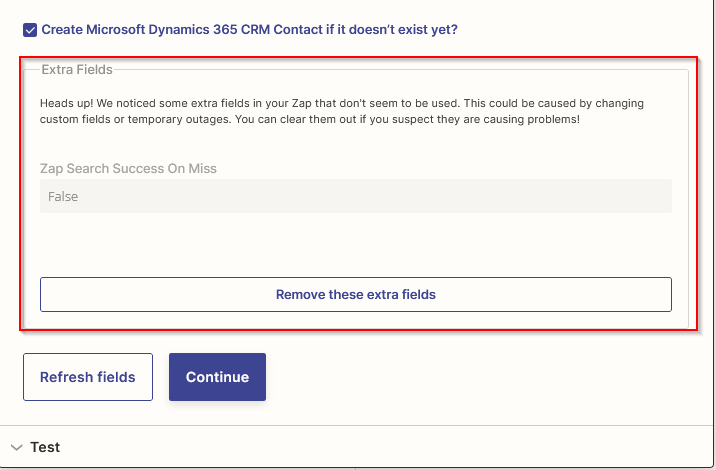
To do this, I use the "Find Contact" event in the app. Under Action, I then select "Create Microsoft Dynamics 365 CRM Contact if it doesn't exist yet? Normally, all fields of the Contact entity open here and I can fill them in manually or specify a field from Eventbrite.

However, the fields for selection are no longer loaded. Is it a problem with the app or the CRM?

Many thanks in advance
Best answer by HSBA

Hey,

The problem is fixed. It seems that sometimes the connection is the problem. Sometimes the fields are not loading. When I wait a day, it works again. Could be a problem with our “outdated” Dynamics.

This post has been closed for comments. Please create a new post if you need help or have a question about this topic.

5 replies

HSBA
Forum|alt.badge.img
  • Author
  • Beginner
  • May 8, 2023

Hello,

the App of Microsoft Dynamics 365 CRM currently works differently than usual.

A participant of an event via Eventbrite should be transferred directly into the CRM.

To do this, I use the "Find Contact" event in the app. Under Action, I then select "Create Microsoft Dynamics 365 CRM Contact if it doesn't exist yet? Normally, all fields of the Contact entity open here and I can fill them in manually or specify a field from Eventbrite.

However, the fields for selection are no longer loaded. Is it a problem with the app or the CRM?

Many thanks in advance


The Action to create a contact works. Here I had to wait 20 minutes before somthing happens. The connection to the server is really slow. Seems to be a problem with our web hosted version of the CRM.

A note in Zapier that not everything has been loaded or that it is still working would be very helpful.

But the Action Find a Contact normally loads all fields here:


chanelle
Forum|alt.badge.img+8
  • Zapier Staff
  • May 8, 2023

Hmm @HSBA -

This sounds like it can be a bug. I did do some digging in our system and did not find any information on this. With your Zap user plan, I’d recommend reaching out to Support to get this documented and fixed so you do not have to encounter this in the future! 


jesse
Forum|alt.badge.img+9
  • Architect
  • May 12, 2023

Hey @HSBA Just wanted to check in here! If you click to remove those extra fields and then refresh the page, does anything appear? If not, then I agree, you might want to contact support about this one. Keep us posted either way - we want to make sure you’re good to go here!


HSBA
Forum|alt.badge.img
  • Author
  • Beginner
  • Answer
  • November 6, 2023

Hey,

The problem is fixed. It seems that sometimes the connection is the problem. Sometimes the fields are not loading. When I wait a day, it works again. Could be a problem with our “outdated” Dynamics.


ken.a
Forum|alt.badge.img+6
  • Zapier Staff
  • November 8, 2023

That’s fantastic news @HSBA! Thank you for taking the time to give us an update!

If you have any other questions, please don’t hesitate to reach out to the Community. We’re always happy to help! 😊




