
I created a Zap where new tweets I post automatically post in my #tweets discord channel. Some of the Discord postings don't come with a twitter preview and most have broken links to the original tweet. Any suggestions?
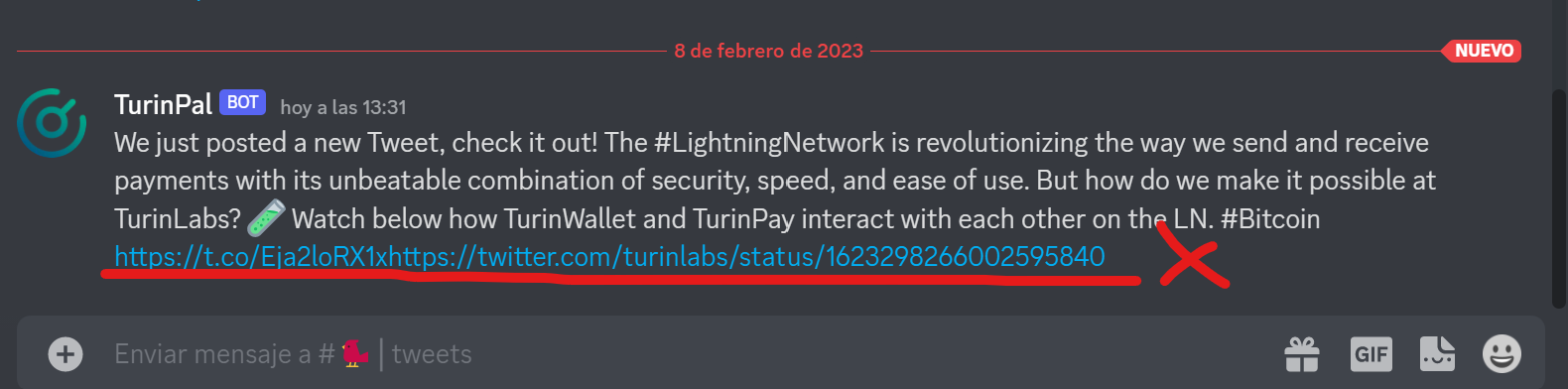

I created a Zap where new tweets I post automatically post in my #tweets discord channel. Some of the Discord postings don't come with a twitter preview and most have broken links to the original tweet. Any suggestions?
Best answer by SamB
Welcome to the Community,
Hmm, there’s two instances of https:// in the link so there may have been two separate Twitter links selected, but without a space put in between them to separate them. If so, then that could be why the link isn’t working as it’s seems to be trying to read both links as a singular link. Is that the case here?
If not, would you mind sharing a quick screenshot of the settings for the Discord action so we can see what fields have been selected to generate the message and link? Please remember to remove or hide any private information like emails, names etc. from it first.
Looking forward to hearing from you!

Build and deploy automations from AI tools you already use. With Agentic Management, if anything breaks, the agent diagnoses the issue and proposes a fix.
Enter your E-mail address. We'll send you an e-mail with instructions to reset your password.



