

Question

Lead Assignment isn't displaying on Slack

  • July 3, 2026
  • 1 reply
  • 8 views

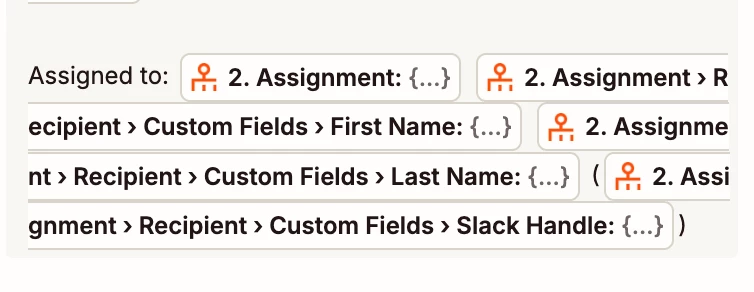
I’ve created a zap that send a slack message to my sales team any time someone downloads a guide from Instagram or FB. The leads are getting assigned to specific BDRs using the Zapier lead router. I’ve tested this and their Round Robin assignment works perfectly. The thing is, whenever they get notified in Slack, the assignment section shows up blank. I’ve inserted every field I can think of and they all show up blank. What am I doing wrong here?

 

1 reply

SamB
Community Manager
Forum|alt.badge.img+11
  • Community Manager
  • July 6, 2026

Hi ​@BaselineJaseline, welcome to the Community! 😁

The selected fields in the screenshot seem to be showing a preview value of “{...}” which is odd. If the selected field was blank then I’d expect it to say No data instead. I did a quick test in my own Zap just now and was able to see the test value I’d created, and in a blank field a No data instead of {...}:

1f00ebac79fb4b6625d8ef06e441d62d.png

On the Testing tab of the Lead Router action in your Zap, can you click on the Test with real data button to test the action again? Then, go to the Slack action and re-select the relevant assignee fields that you want to have in the Slack message. Let me know if that gets the values coming through! 🤞



