Question

Jotform to Zapier to Salesforce: "you're not authorized" error

  • April 29, 2026
  • 4 replies
  • 72 views

Hi.

I have been having some issues with my jotforms uploading to Zapier and then to Salesforce. I keep getting error  message, The app returned "you're not authorized".  The field values are going through to Salesforce but the files are not uploading.

Thank you for your help.

This post has been closed for comments. Please create a new post if you need help or have a question about this topic.

4 replies

Troy Tessalone
Zapier Orchestrator & Solution Partner
Forum|alt.badge.img+14
  • Zapier Orchestrator & Solution Partner
  • April 29, 2026

Hi ​@ElderHelp 

In Jotform, try adjusting your Security settings here: 

https://www.jotform.com/myaccount/security


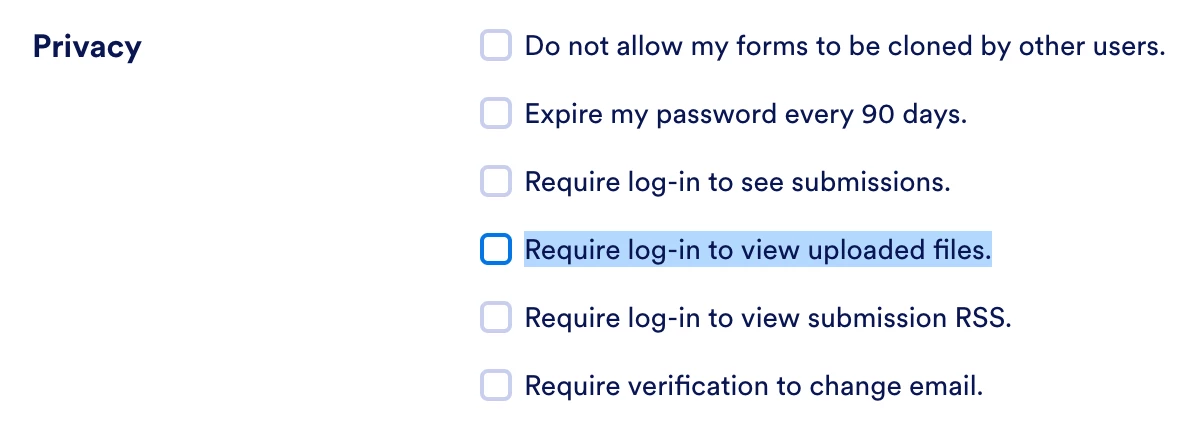
Make sure to uncheck “Required log-in to view uploaded files.”


  • Author
  • New
  • April 29, 2026

@Troy Tessalone 


Thanks for your suggestion, Troy. Unfortunately, that didn’t fix the issue, but I appreciate your help.


Troy Tessalone
Zapier Orchestrator & Solution Partner
Forum|alt.badge.img+14
  • Zapier Orchestrator & Solution Partner
  • April 29, 2026

@ElderHelp 

For us to have more info, post screenshots showing how your Zap steps are outlined/configured along with the encountered error.


Help link for using files in Zaps: https://help.zapier.com/hc/en-us/articles/8496288813453-Send-files-in-Zaps


Forum|alt.badge.img+4
  • Zapier Solution Partner
  • May 4, 2026

Hi ​@ElderHelp, just checking in — did you manage to resolve this? If not, posting screenshots of your Zap steps and the full error would really help folks troubleshoot further.