

Best answer

Issue Setting Up Perplexity API Connection

  • Sep 21, 2026 6:56 PM UTC
  • 5 replies
  • 69 views

cskomra

Is anyone else having trouble setting up a basic Perplexity API connection in Zapier Connections?

I have a Pro account with $10 API credits.

I’m getting this error:
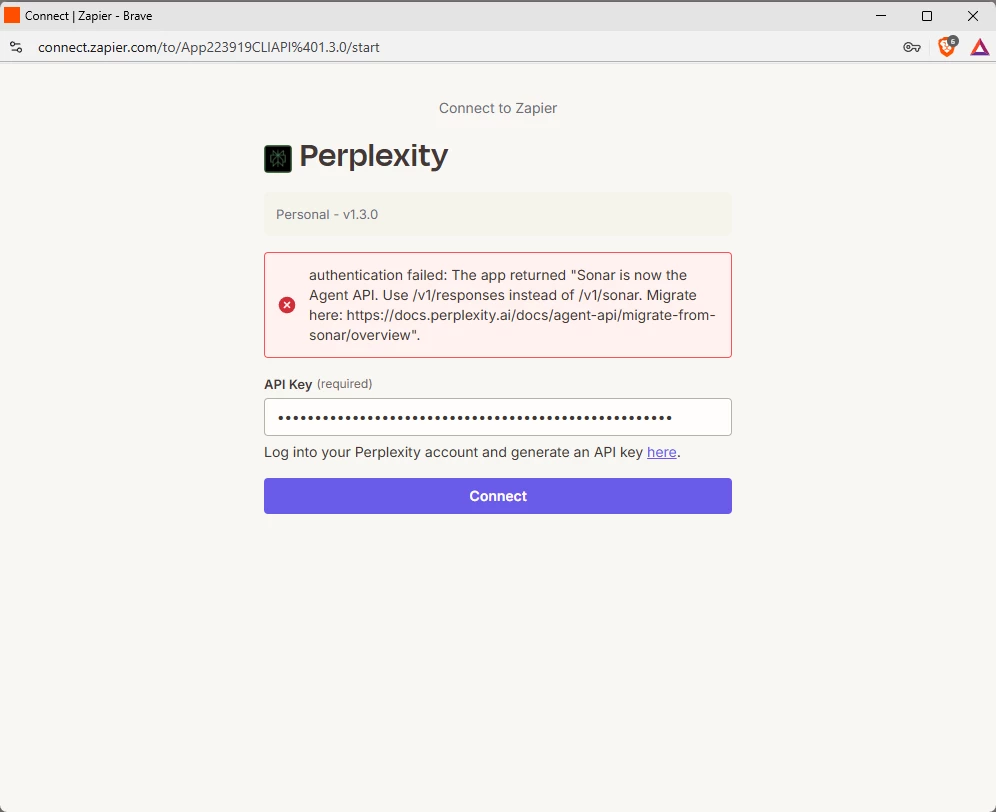
 

Here’s a clickable version of the Migration page it’s referring to:

https://docs.perplexity.ai/docs/agent-api/migrate-from-sonar/overview


When I researched where to go to “update the endpoint”, it said:


If you're using Zapier's native Perplexity integration… (which I believe that I am)
 

You can't change the endpoint yourself— it's baked into Zapier's integration. You'd need to wait for Zapier to update the integration to the new Agent API, or replace the Perplexity step with a manual API call.

I can do a manual API call, but is Zapier going to “update the integration” soon? Or am I just doing this all wrong? Or, is there a better way?

Thank you for your help

Best answer by SamB

Hi and welcome to the Community ​@cskomra! 👋

I checked on this end and found there’s a bug report for that error you’re seeing when attempting to connect. I can’t give an ETA on when it will be resolved but I’ve added you to the list of folks being affected by it so you’ll get an email notification from us as soon as it’s fixed.

In the meantime, you could try connecting your Zap to Perplexity’s API using our Webhooks or API by Zapier apps instead. They’re a little different from regular app actions, so if you’ve not used either of them before these guides should help:

If you give either of those a try and get stuck at all just let us know!

View original

5 replies

Troy Tessalone
Zapier Orchestrator & Solution Partner
Forum|alt.badge.img+14
  • Zapier Orchestrator & Solution Partner
  • Sep 21, 2026 10:07 PM UTC

Hi ​@cskomra 

Try opening a ticket with Zapier Support to report the issue: https://zapier.com/app/get-help


NOTE: Most Zap app integrations are created and managed by the app developer (not Zapier) using the Zapier Developer Platform.


If Zapier owns the Perplexity Zap app integration, no timeline will be provided about when that will be updated.


SamB
Community Manager
Forum|alt.badge.img+11
  • Community Manager
  • Answer
  • Sep 22, 2026 9:40 AM UTC

Hi and welcome to the Community ​@cskomra! 👋

I checked on this end and found there’s a bug report for that error you’re seeing when attempting to connect. I can’t give an ETA on when it will be resolved but I’ve added you to the list of folks being affected by it so you’ll get an email notification from us as soon as it’s fixed.

In the meantime, you could try connecting your Zap to Perplexity’s API using our Webhooks or API by Zapier apps instead. They’re a little different from regular app actions, so if you’ve not used either of them before these guides should help:

If you give either of those a try and get stuck at all just let us know!


cskomra
  • Author
  • Beginner
  • Sep 22, 2026 12:33 PM UTC

Thank you, ​@SamB and ​@Troy Tessalone! I will try these other approaches.

Your kind welcome and helpful support are greatly appreciated!


Forum|alt.badge.img
  • Beginner
  • Sep 22, 2026 11:43 PM UTC

Hi,
Just wondering, for those who have used API by Zapier for this, do you still get the same Perplexity features and response format as with the native integration? I’m particularly wondering if anything changes when passing the result into the next steps of the Zap.


WebhookEngineer
Forum|alt.badge.img+1

@Danny514 I’d check feature support separately from the output your later steps need. Both routes use Perplexity, but that alone doesn’t establish that they provide the features you need or return data in the format your next steps expect.

With API by Zapier, compare the endpoint, model and request options against what you need from the native action. Run a non-sensitive test and inspect the returned data. Don’t assume the native action’s field names or structure carry over.

Then check each field your next steps use, remap where needed, and retest those steps before enabling the replacement. I’d use the same checks for the Webhooks workaround.

Which fields does your next step use: just the answer text, or sources and other metadata too?