Best answer

HubSpot error: Invalid input JSON on line 1, column 40: Cannot deserialize value of type 'long' from String

  • Jan 23, 2024 9:14 PM UTC
  • 3 replies
  • 407 views

I am trying to use a Zapier table to reference a specific email based off the extension that answers when a call comes in.

This then is supposed to assign the engagement in Hubspot to that persons email.

I get the data fine from the table part of the Zap, but I get an error when I try to send the data to Hubspot.
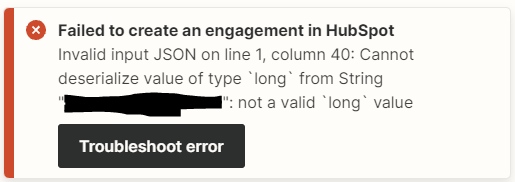
Here is where I have the info placed in the Zap:

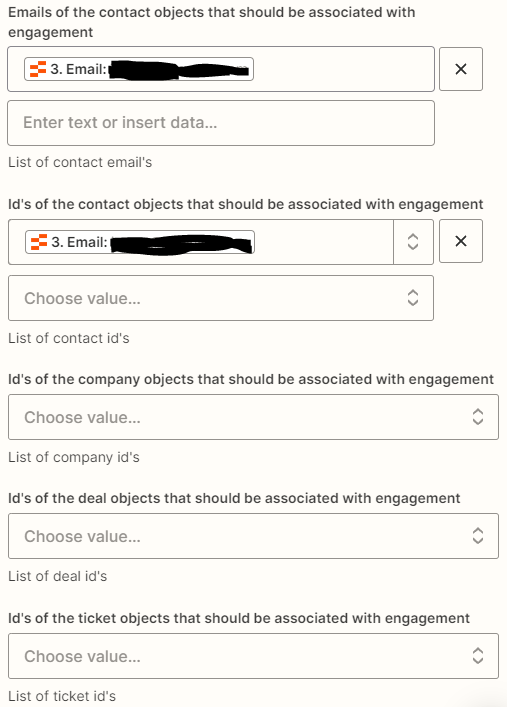
I have made sure the format matches that of the Assigned to field when the data is to be sent.

Does anyone have any idea what I need to do to get this working?

Best answer by Troy Tessalone

Hi @Drakulahn 

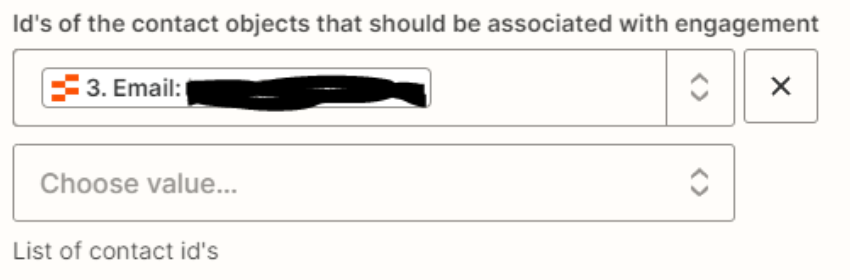
These are dropdown fields which have expected values. (e.g. internal IDs)

Follow this help article for guidance: https://help.zapier.com/hc/en-us/articles/8496241696141-Add-custom-values-to-dropdown-menu-fields-in-Zaps#01H7FR09FBEAKK4ZZP678QDE9T


View original
This post has been closed for comments. Please create a new post if you need help or have a question about this topic.

3 replies

Troy Tessalone
Zapier Orchestrator & Solution Partner
Forum|alt.badge.img+14
  • Zapier Orchestrator & Solution Partner
  • Answer
  • Jan 23, 2024 10:00 PM UTC

Hi @Drakulahn 

These are dropdown fields which have expected values. (e.g. internal IDs)

Follow this help article for guidance: https://help.zapier.com/hc/en-us/articles/8496241696141-Add-custom-values-to-dropdown-menu-fields-in-Zaps#01H7FR09FBEAKK4ZZP678QDE9T


  • Author
  • Beginner
  • Jan 24, 2024 3:55 PM UTC

Perfect, this solved exactly what I needed. Thank you!


ken.a
Forum|alt.badge.img+6
  • Zapier Staff
  • Jan 26, 2024 9:38 AM UTC

That’s awesome @Drakulahn! A big thanks to Troy for pointing you in the right direction!

If you have any other questions, please don’t hesitate to reach out to the Community. We’re always happy to help! 🤗