Question

How to Upload File to Newly Created Folder Google Drive

  • February 14, 2023
  • 4 replies
  • 90 views

wbk

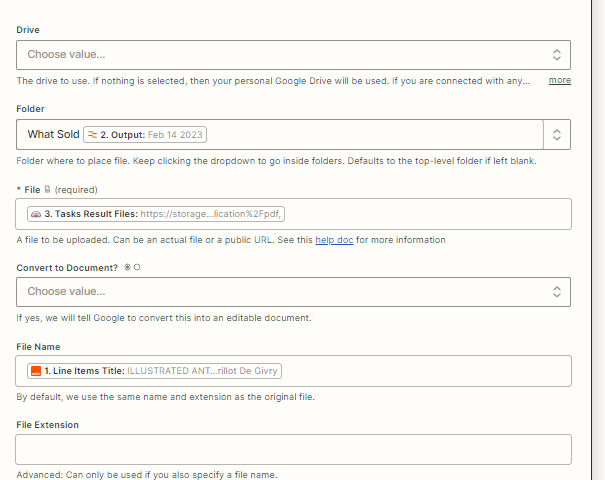
I am having an issue uploading a screenshot to a newly created folder. 

It says “file not found” although there has been a file created with that exact name


This post has been closed for comments. Please create a new post if you need help or have a question about this topic.

4 replies

Troy Tessalone
Zapier Orchestrator & Solution Partner
Forum|alt.badge.img+14
  • Zapier Orchestrator & Solution Partner
  • February 14, 2023

Hi @wbk 

Good question.

Looks like an invalid file url because there is a trialing , at the end.

Based on the field name it appears there could be 1+ files.


wbk
  • Author
  • New
  • February 14, 2023

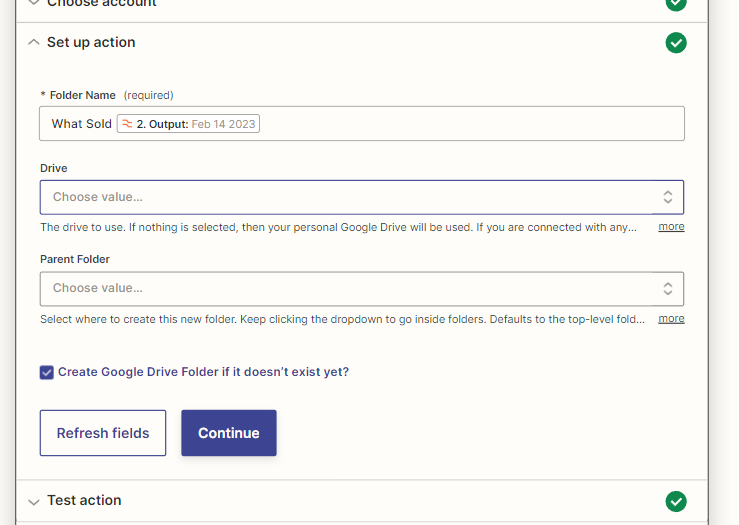
Thank you for the reply- the file is not having a problem uploading when I use a folder from the dropdown list, the issue is that zapier is not recognizing the “what sold 2. output” command. 


The above screenshot is from the step before the step in the initial post. I want to upload the file to the folder created with reformatted output. 


Troy Tessalone
Zapier Orchestrator & Solution Partner
Forum|alt.badge.img+14
  • Zapier Orchestrator & Solution Partner
  • February 14, 2023

@wbk 

This field expects the Folder ID, instead of the Folder Name.

You need to map the Folder ID from the previous step.


chanelle
Forum|alt.badge.img+8
  • Zapier Staff
  • February 27, 2023

Hi @wbk, wanted to check back in 👋. Were you able to map the Folder ID from your previous step? Did you need any additional info or instruction on this? If yes, feel free to jump back over and ask away or you can check out this article on Mapping of Fields