


Question

How to update an invoice in QuickBooks Online when adding a new registrant in Swoogo

  • September 3, 2025
  • 1 reply
  • 31 views

lflynn72

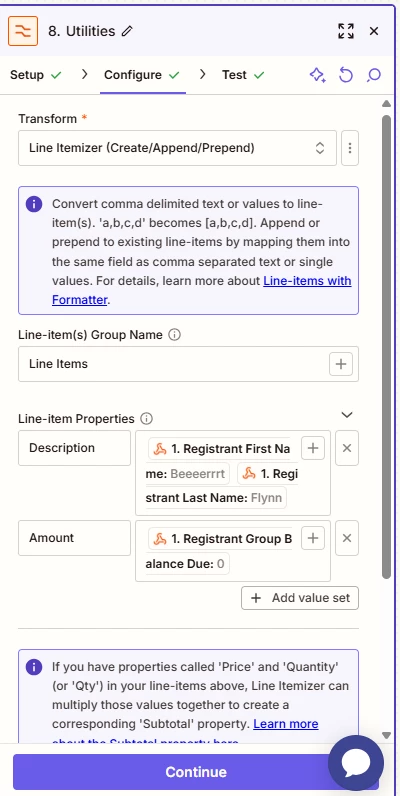
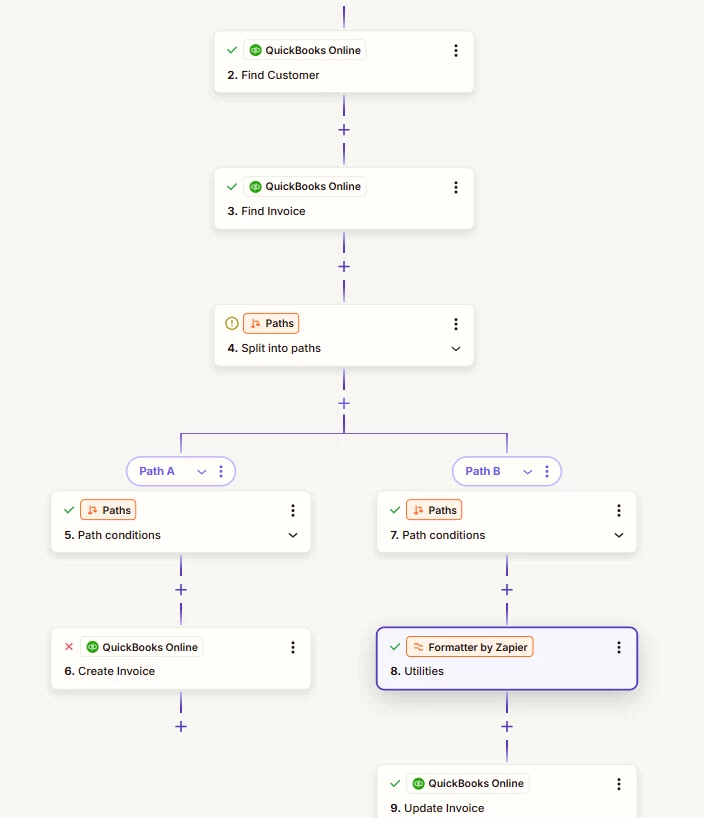
Hi, I am using Swoogo for event registration; I am sending an invoice to QB online which is working; when someone updates their registration and adds another person I want to update the invoice with the additional person, instead it keeps replacing the line; I am using the Formatter, but it will not add to it, just replace, not sure what I’m doing wrong! The yellow should be another line item with another person. Any guidance would be appreciated, I feel I’m close!
 

This post has been closed for comments. Please create a new post if you need help or have a question about this topic.

1 reply

SamB
Community Manager
Forum|alt.badge.img+11
  • Community Manager
  • September 9, 2025

Hi there ​@lflynn72 👋

If it’s overwriting the existing line item, instead of appending the new one then you might need to also add the previous line item data so that both are added when the invoice is updated.

To do that, in that Update Invoice action can you map the existing line item fields that are output by the Find Invoice action as well.  

That should help to ensure that both line items are added to the invoice. Let us know how it goes!



