Question

How to tag someone in a Slack thread reply using Zapier

  • February 20, 2026
  • 4 replies
  • 37 views

Everytime a new message is send to a private Slack Channel, I want Zapier to analyse who is responsible for this message and then tag that person in a thread reply underneath the message. It’s working pretty well, but unfortunately, Zapier is not really tagging the person, it only writes down @XY but the name is not blue and the person is not beeing notified. 

I have already activated the option “Link Usernames and Channel Names?”. So that’s not the issue.

I’m now wondering if I might need to use the Slack member ID of the person I want to tag instead of the name.

Can someone help me? Thank you already.
4 replies

DavidLGS
Forum|alt.badge.img+6
  • Zapier Solution Partner
  • February 20, 2026

Yes, you are correct. You need to “Find” the Slack member first, and then use their ID.

If you have a relatively small team using Slack, you can also use a Formatter > Utilities > Lookup Table action. Put the text-based name in the key column and their numeric ID in the value column, and then run that right before your existing slack step.


If you have a lot of people in your Slack, then you’ll have to figure out how to utilize the “Find User” action prior to the tagging step.


  • Author
  • New
  • February 20, 2026

Yes, you are correct. You need to “Find” the Slack member first, and then use their ID.

If you have a relatively small team using Slack, you can also use a Formatter > Utilities > Lookup Table action. Put the text-based name in the key column and their numeric ID in the value column, and then run that right before your existing slack step.


If you have a lot of people in your Slack, then you’ll have to figure out how to utilize the “Find User” action prior to the tagging step.

Thank you David! 

I have specific cases, where Zapier needs to tag specific persons.


So probably I can simply tell Zapier, e.g. if the message includes the word “refund”, please tag member ID XY and the message from Zapier could look like this right?: 


@U05XXXXXEH3 - This is a refund request. Can you please take over? :)
If you were tagged incorrectly, please forward it to the correct person. Thank you!


DavidLGS
Forum|alt.badge.img+6
  • Zapier Solution Partner
  • February 20, 2026

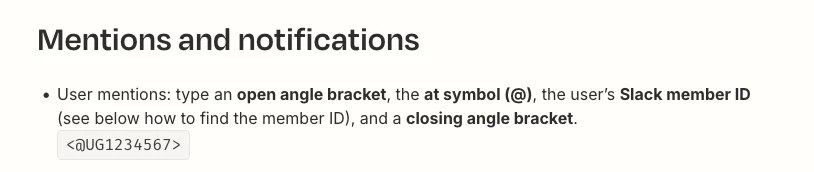
The tagging is slightly different. Here’s a screenshot from the Zapier help document.


SamB
Community Manager
Forum|alt.badge.img+11
  • Community Manager
  • February 27, 2026

Hey there ​@S.B. 👋 Did the suggestions from DavidLGS help to point you in the right direction?

Let us know if you were able to get it sorted, or if you could do with some more help at all. Want to make sure you're all set! 🙂