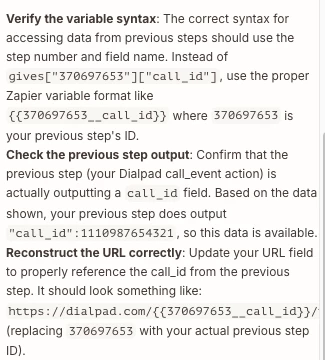
I am struggling to correctly structure the URL for the API request between DialPad and Zapier. I am not even sure the “Call ID” field from my previous step is teh correct one that this step is asking for. Please help!
This post has been closed for comments. Please create a new post if you need help or have a question about this topic.
I’d separate the two questions first: (1) which Dialpad endpoint are you calling, and (2) which identifier that endpoint expects.
In the step before the API request, open the real run data and confirm the field is Dialpad’s immutable call ID—not a display name, phone number, Zap run ID, or recording ID. Then build the request from the endpoint template in Dialpad’s docs and map only that ID into the path or query parameter. Start with a read-only GET for call details; once that returns the expected call, reuse the same ID for transcript/recording endpoints. Also log the resolved URL, HTTP status, and response body in Zap History, but never the auth token.
We hit this exact class of issue while building Atlantic’s call-to-CRM workflow: the durable fix was to store provider_call_id, provider, and Zap run ID as separate fields, then validate the provider_call_id before any downstream write. That prevents a successful test using sample data from hiding a bad live mapping.
I’m Ege, co-founder of Atlantic, so that’s our implementation experience rather than an official Dialpad/Zapier answer. If you share the endpoint name (not credentials or account data), the expected URL shape can be narrowed down safely.
Early access
Next Gen Zaps
Build and deploy automations from AI tools you already use. With Agentic Management, if anything breaks, the agent diagnoses the issue and proposes a fix.