Question

How to stop duplicate WhatsApp messages when publishing or updating WordPress posts

  • September 16, 2025
  • 2 replies
  • 16 views

I have two different Zaps. 

1 should send a message to a WhatsApp group when a new WordPress post is published.

2 should send a message to a WhatsApp group after an existing post has been changed.

When a new post is published, a message is also sent by the update zap. Can anyone tell me why and how I can change this?


This post has been closed for comments. Please create a new post if you need help or have a question about this topic.

2 replies

Sparsh from Automation Jinn
Forum|alt.badge.img+6

Hey ​@TomHH,

Please post screenshots of Data In and Data out for us to have more context. Also what exactly you want to change?


SamB
Community Manager
Forum|alt.badge.img+11
  • Community Manager
  • October 8, 2025

Hi ​@TomHH 👋 Just wanted to check in as it’s been a while since you posted here. Were you able to get things sorted?

If not, is the issue that both Zaps being triggered at the same time? Or is one of the Zaps triggering twice for the same new or updated post?

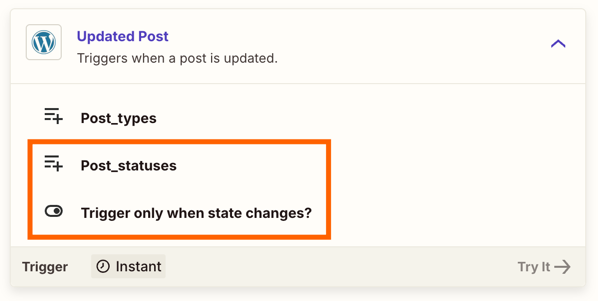
If they are both triggering for all updates to a post it may be there’s an issue with what’s been selected for the Post_statuses and Trigger only when a state changes fields:

f60fa78d71c71893d184a2e9b6031a7e.png
 

In which cases you’d want to ensure that both Zaps have different statuses selected. Alternatively, if the second Zap needs to trigger for multiple statuses then you could try adding a filter to not allow the Zap to continue if the status was changed to published.

Keep us posted on how things are going, want to make sure you’re all set! 🙂