I have Zap setup to pull data from SimpleText and send to Jobber. I am trying to grab the User contact phone number and then search Jobber for the client and place a new request and note (SMS) message into the Jobber Request area.

I have Zap setup to pull data from SimpleText and send to Jobber. I am trying to grab the User contact phone number and then search Jobber for the client and place a new request and note (SMS) message into the Jobber Request area.
Best answer by SamB
Hey
Looks like our Support team were able to help get this sorted. Sharing the steps here in case it helps anyone else running into the same thing:
How to fix it
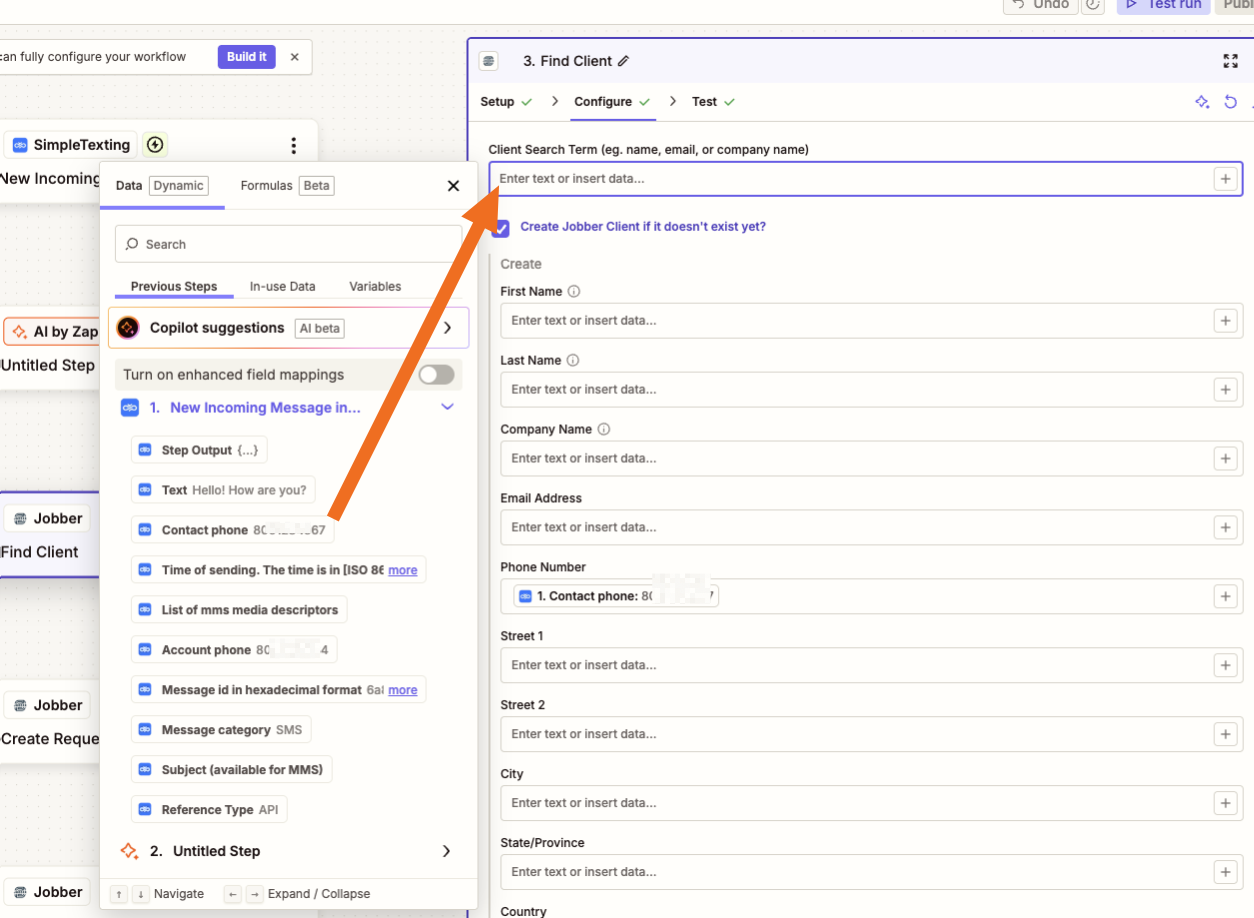
You'll want to map the phone number from the trigger step into that search field instead of typing text. When you click into the field, choose the phone number field coming from your SimpleTexting trigger, like this:
Once that's mapped, the Find Client step will look up the actual number from each incoming message. If the number matches an existing client, Jobber returns that client's info; if it doesn't, your step is set up to create the client instead — so either way the request will attach to the right person.
After you update that field, run a fresh test and check your Zap History to confirm each message is now pulling the correct client.
I'll mark this as the best answer since that seems to have got the correct Jobber client found. Let us know if you run into anything else! 🙂

Build and deploy automations from AI tools you already use. With Agentic Management, if anything breaks, the agent diagnoses the issue and proposes a fix.
Enter your E-mail address. We'll send you an e-mail with instructions to reset your password.