Question

How to create a zap to forward emails with PDF attachments in Gmail

  • December 6, 2025
  • 3 replies
  • 20 views


Hi Im new to Zapier and struggling.

Mailbox is Gmail. I need to set up a zap that - when an email arrives with a PDF attachment, it forwards that email onto another email address, and then files that email in one of the Inbox folders of my choosing. Just like a rule does in MS Outlook. 


I’ve asked chatGPT but the instructions don’t seem to work.

Can anyone help me? Thanks

3 replies

AndrewJDavison
Forum|alt.badge.img+11
  • Zapier Solution Partner
  • December 6, 2025

@Eles 

If the emails only ever contain a single attachment, then you can use a filter step to check if the attachment file extension is “.pdf” and only continue if so.

It gets tricky if there are multiple attachments because then they get compiled into a single .zip file.

In that case you’d need to add a tool like ConvertAPI to your zap to first unzip the file, then loop through the attachments to search for any zip files.

I can help you build this. I’ll send a DM.


Troy Tessalone
Zapier Orchestrator & Solution Partner
Forum|alt.badge.img+14
  • Zapier Orchestrator & Solution Partner
  • December 6, 2025

Hi ​@Eles 

Help link for Gmail search operators: https://support.google.com/mail/answer/7190?hl=en


Try these Zap steps:

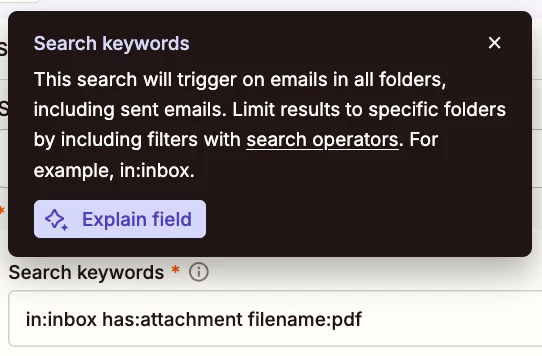
  1. Action: Gmail - New Email Matching Search
    1. Search Keywords
      1. in:inbox has:attachment filename:pdf


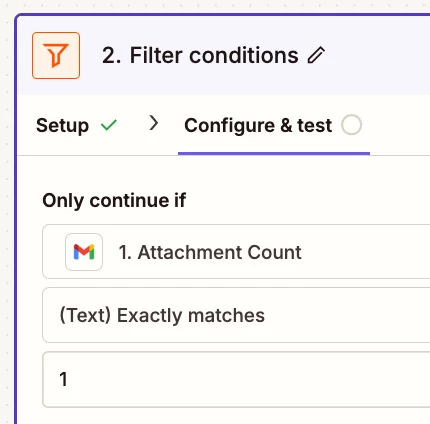
  2. Action: Filter
    1. If you need to filter by the # of Attachments
    2. Variable: Attachments Count
      1. See screenshot below
  3. Action: Gmail - Send Email
    1. Map the fields
      1. Subject
      2. Body
      3. Attachments
        1. See screenshot below for variable to map
  4. Action: Gmail - Add Label to Email


Sparsh from Automation Jinn
Forum|alt.badge.img+6

Hey ​@Eles,

What exact problem are you running into? Please post screenshots of Data In, Data Out as well as how each Zap step is being configured for us to have more context.

Here all the triggers/ actions for Gmail in Zapier- https://zapier.com/apps/gmail/integrations

For your usecase, the New attachment trigger with Filter action will be useful. Here is a helpful article about Filter action in Zapier- https://help.zapier.com/hc/en-us/articles/8496276332557-Add-conditions-to-Zaps-with-filters. Hope it helps!

PS: If you need more active help, I’m happy to connect through my Zapier Solution Partner page if you’d like to reach out here- https://zapier.com/partnerdirectory/automation-jinn