Question

How do I add multiple emails to a Xero Invoice through Zapier?

  • April 3, 2026
  • 5 replies
  • 35 views

I want to pull email addresses from two separate fields into the “Email to” field on Xero. I have tried separating the emails with , and ; so far, but no luck.
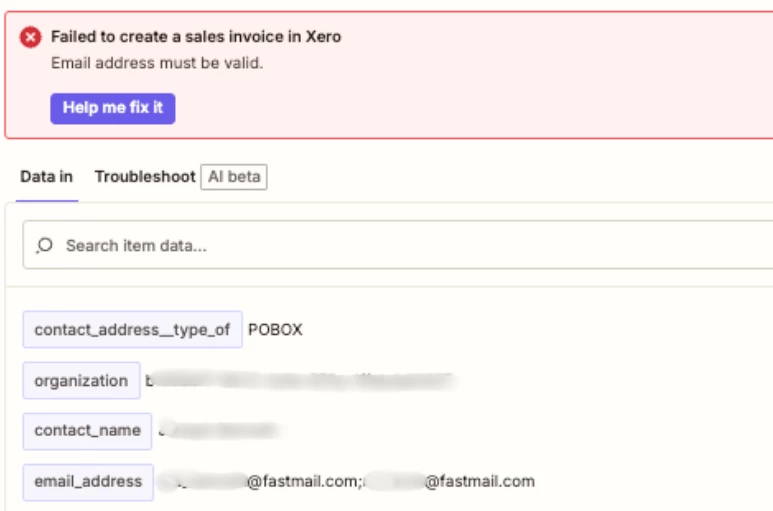
 

Any suggestions - or does this need to be a second “Send the Invoice” step with the Secondary contact email on the duplicated next step?


5 replies

wisdomdavid
Forum|alt.badge.img

Hi ​@Jack_Lenton 

Unfortunately Xero's API only accepts a single email address in the Email to field, so comma or semicolon separation won't work. Your instinct about duplicating the step is the right approach, create two separate Send Invoice steps, one mapped to the primary email and one to the secondary. It's a bit repetitive but it's the only reliable way to do it within Zapier's Xero integration.


Forum|alt.badge.img+2
  • Zapier Solution Partner
  • April 3, 2026

Hi ​@Jack_Lenton 

You cannot send a Xero invoice to multiple email addresses in a single Zapier action. The Xero API only accepts one email address in the Email to field—using commas or semicolons will trigger the "Email address must be valid" error.

Why this happens:
Xero's "New Invoicing" system explicitly rejects pasted lists of multiple email addresses, even within Xero itself . This limitation carries over to the API that Zapier uses.

Solution: Use two separate "Send Sales Invoice by Email" actions

  1. First action: Create the invoice in Xero

  2. Second action: Send invoice to primary email address

  3. Third action: Send same invoice to secondary email address (using the same Invoice ID from step 1)

Alternative workaround (for more control):
Use Email by Zapier instead of Xero's email action. You can send to multiple recipients (To, CC, BCC) and attach the invoice PDF, though this won't mark the invoice as "Sent" inside Xero's activity history 

If you're still running into issues, drop a screenshot of the error and a quick description of what your Zap is doing, happy to take a look!

And if you'd rather just get it sorted quickly, I offer a free 20-min Zapier troubleshooting call. Book it under Resources on my Zapier Directory profile: https://zapier.com/partnerdirectory/automatemybiz

!-->


Sparsh from Automation Jinn
Forum|alt.badge.img+6

Hey ​@Jack_Lenton,

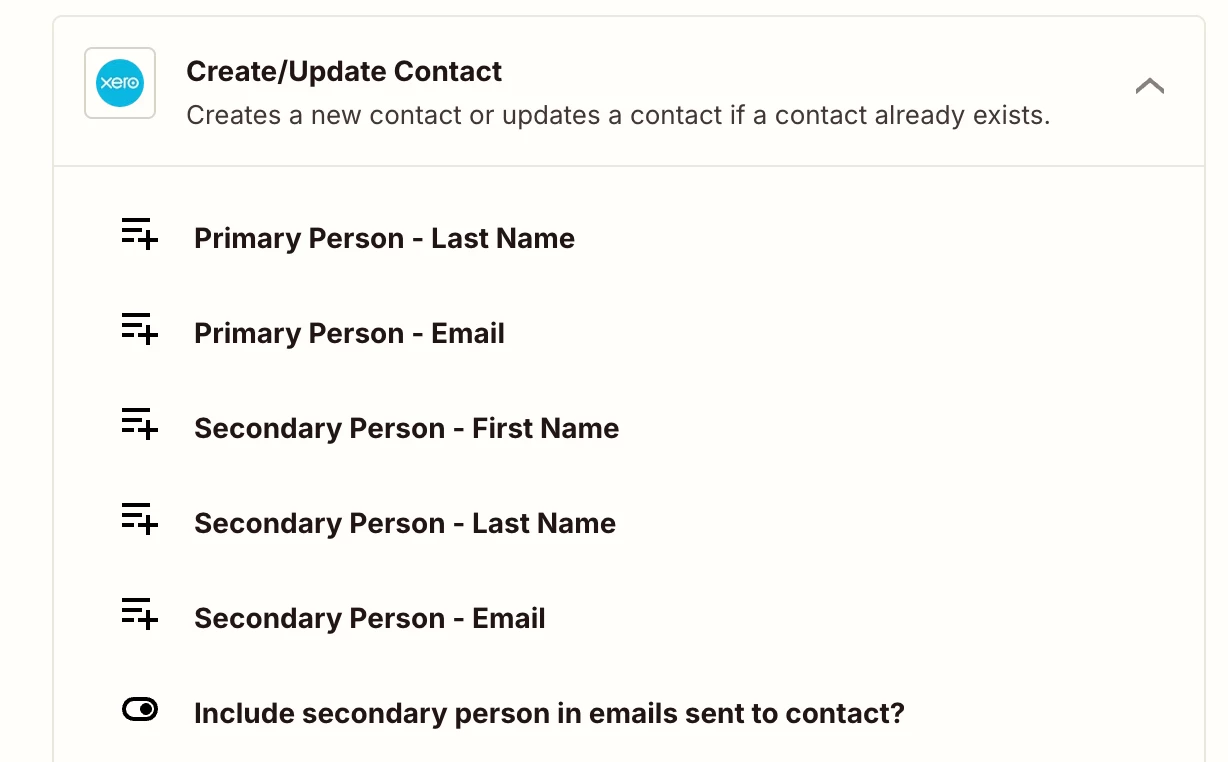
It’s because this Xero zapier action can only accept one email id. I would recommend setting that as a secondary contact in Xero create contact action and ticking the option that says Include secondary person in emails sent to contact. 


After that you can just select that contact to send the invoice. Hope it helps!

PS: If you need more active help, I’m happy to connect through my Zapier Solution Partner page if you’d like to reach out here- https://zapier.com/partnerdirectory/automation-jinn


Forum|alt.badge.img+2

The Email to field in the Xero Zap step usually wants one valid email only.
So putting 2 emails together with , or ; makes Xero reject it as invalid.

Simple answer:
No, don’t put both emails in one field in that Zap step.

Better options:

  1. Use one main email in the Xero invoice step
  2. Then send the invoice again with a separate email step to the second person
  3. Or first create/update the Xero contact, then use that contact when making the invoice. That is the fix suggested in the Zapier Community reply.

So the easiest workaround is:

Create Invoice in Xero
Send Email step to extra recipient(s)

If you need the same invoice to go to many people, using a normal email app after Xero is the cleaner way.


Forum|alt.badge.img+2
  • Zapier Solution Partner
  • April 7, 2026

Hi ​@Jack_Lenton 

Just checking in — did you get this sorted with the duplicate step approach, or do you still need help with this?

Happy to take a look if you're still stuck.