Question

Greenhouse to Slack Greenhouse to Zapier Workflow Issue: Slack Notifications for Internal Job Openings

  • December 18, 2025
  • 9 replies
  • 39 views

Found a post from 3 years ago, and I’m facing a similar problem - Has anyone been able to make this work? The comments on the original post were not the solution, nor was a working solution ever posted.
 

I'm currently experiencing an issue with an automation workflow between Greenhouse and Zapier. The workflow is designed to create a Slack notification whenever there's a new internal job opening in Greenhouse. Despite my Greenhouse API key having all the necessary permissions (which I have double-checked), the "New Job" trigger in Greenhouse is not sending data to Zapier as expected. This is preventing the intended notifications from being posted on Slack.
 

I'm interested in hearing from anyone who has faced similar issues with the integration of Greenhouse and Zapier, particularly with the "New Job" trigger. Any advice or suggestions for troubleshooting this problem would be greatly appreciated. Keeping our team promptly informed about new internal opportunities is a priority for our operations, and this automation plays a significant role in that process. Thank you in advance for your help and insights!


Essentially new jobs are not pulling through at all, and when looking at the test data, it’s 3 jobs from 2+ years ago.

Thanks

9 replies

Troy Tessalone
Zapier Orchestrator & Solution Partner
Forum|alt.badge.img+14
  • Zapier Orchestrator & Solution Partner
  • December 18, 2025

Hi ​@JAmerena 

Try this workaround using a live Zap Run: https://help.zapier.com/hc/en-us/articles/35632951078029-Use-previous-Zap-runs-as-trigger-test-records


Help links for using Greenhouse in Zaps: https://zapier.com/apps/greenhouse/integrations#help


  • Author
  • New
  • December 18, 2025

Hi ​@JAmerena 

Try this workaround using a live Zap Run: https://help.zapier.com/hc/en-us/articles/35632951078029-Use-previous-Zap-runs-as-trigger-test-records


Help links for using Greenhouse in Zaps: https://zapier.com/apps/greenhouse/integrations#help

I’m not too sure how this would help? Can you please clarify?

Thanks


Sparsh from Automation Jinn
Forum|alt.badge.img+6

Hey ​@JAmerena,

I would recommend checking the Zap history(https://zapier.com/app/history) to spot any issues there. 

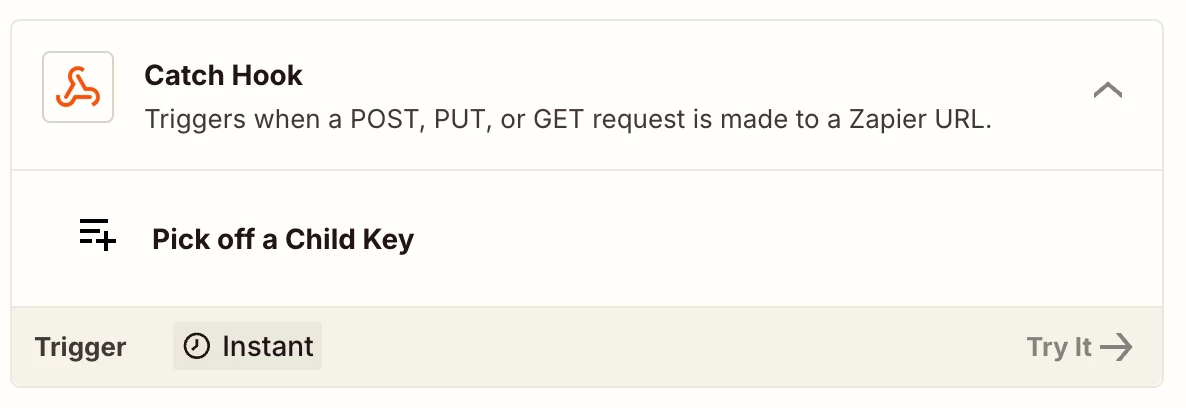
There might be some problem with the trigger. The workaround could be directly creating a Webhook in Greenhouse and catching that in Zapier using Catch hook. Here is the documentation about creatin Webhooks in Greenhouse- https://developers.greenhouse.io/webhooks.html. Here is a helpful article for Webhooks in Zapier action- https://help.zapier.com/hc/en-us/articles/8496083355661-How-to-get-started-with-Webhooks-by-Zapier


I know it can get a bit more technical and complex but if it’s important for you, you can give this approach a try. Hope it helps!


  • Author
  • New
  • December 18, 2025

Hey ​@JAmerena,

I would recommend checking the Zap history(https://zapier.com/app/history) to spot any issues there. 

There might be some problem with the trigger. The workaround could be directly creating a Webhook in Greenhouse and catching that in Zapier using Catch hook. Here is the documentation about creatin Webhooks in Greenhouse- https://developers.greenhouse.io/webhooks.html. Here is a helpful article for Webhooks in Zapier action- https://help.zapier.com/hc/en-us/articles/8496083355661-How-to-get-started-with-Webhooks-by-Zapier


I know it can get a bit more technical and complex but if it’s important for you, you can give this approach a try. Hope it helps!


That also doesn’t seem to work, as the webhook does not trigger on live Job Post (only Job Post creation), nor have the appropriate fields available.


Sparsh from Automation Jinn
Forum|alt.badge.img+6

Hey ​@JAmerena,

But you can just add a filter for Live posts and use the Job Post created webhook.


Hope it helps!

PS: If you need more active help, I’m happy to connect through my Zapier Solution Partner page if you’d like to reach out here- https://zapier.com/partnerdirectory/automation-jinn


Troy Tessalone
Zapier Orchestrator & Solution Partner
Forum|alt.badge.img+14
  • Zapier Orchestrator & Solution Partner
  • December 18, 2025

@JAmerena 

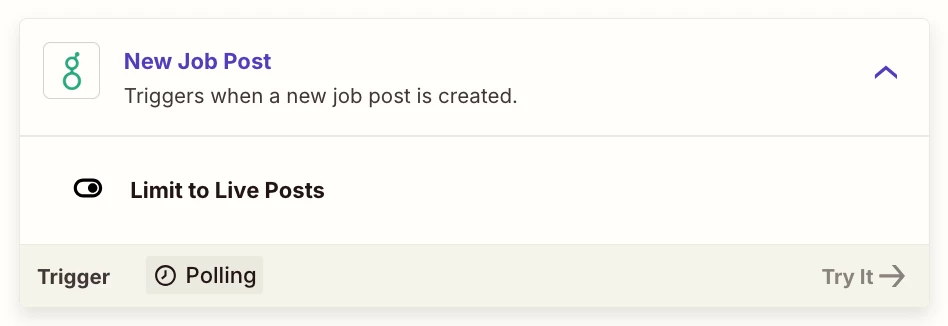
Zap trigger: Greenhouse - New Job Post

Field: Limit to Live Posts

Value: True/False


If you are stuck since the Greenhouse Zap trigger step is only returns old job record data or different job record data than you are trying to use to configure the Zap actions.

You can configure a Zap and turn it ON, then test live, which will trigger a Zap Run.

You can see your Zap Runs here: https://zapier.com/app/history/

From there you can select a live Zap Run to then use as your Zap trigger example record to help you configure your Zap action steps.

Reference the help link below:

Try this workaround using a live Zap Run: https://help.zapier.com/hc/en-us/articles/35632951078029-Use-previous-Zap-runs-as-trigger-test-records


  • Author
  • New
  • December 18, 2025

Hey ​@JAmerena,

But you can just add a filter for Live posts and use the Job Post created webhook.


Hope it helps!

PS: If you need more active help, I’m happy to connect through my Zapier Solution Partner page if you’d like to reach out here- https://zapier.com/partnerdirectory/automation-jinn


The Job Post Created is live is automatically false, and cannot be switched on until it is created. Therefore I don’t believe this as a possible resolution.


@JAmerena 

Zap trigger: Greenhouse - New Job Post

Field: Limit to Live Posts

Value: True/False


If you are stuck since the Greenhouse Zap trigger step is only returns old job record data or different job record data than you are trying to use to configure the Zap actions.

You can configure a Zap and turn it ON, then test live, which will trigger a Zap Run.

You can see your Zap Runs here: https://zapier.com/app/history/

From there you can select a live Zap Run to then use as your Zap trigger example record to help you configure your Zap action steps.

Reference the help link below:

Try this workaround using a live Zap Run: https://help.zapier.com/hc/en-us/articles/35632951078029-Use-previous-Zap-runs-as-trigger-test-records


The Zap is not being triggered at all despite a job being posted (and Zap is turned on), therefore I cannot even get a new test record.


Troy Tessalone
Zapier Orchestrator & Solution Partner
Forum|alt.badge.img+14
  • Zapier Orchestrator & Solution Partner
  • December 18, 2025

@JAmerena 

Try reaching out to Greenhouse Support for help with their Zap app integration.

Try opening a ticket with Zapier Support: https://zapier.com/app/get-help


Sparsh from Automation Jinn
Forum|alt.badge.img+6

Hey ​@JAmerena,
 

The Job Post Created is live is automatically false, and cannot be switched on until it is created. Therefore I don’t believe this as a possible resolution.


It’s not automatically false but just the payload information. It’s just the same as the trigger and you just have to add Filter for limiting to live posts. I can understand it can get a bit more technical and I suggested this only if it was important and urgent for you, otherwise feel free to contact the support so you can use the native trigger. Hope it helps!