


Best answer

GoTo Connect account connection not finding any calls

  • March 13, 2025
  • 9 replies
  • 99 views

Forum|alt.badge.img

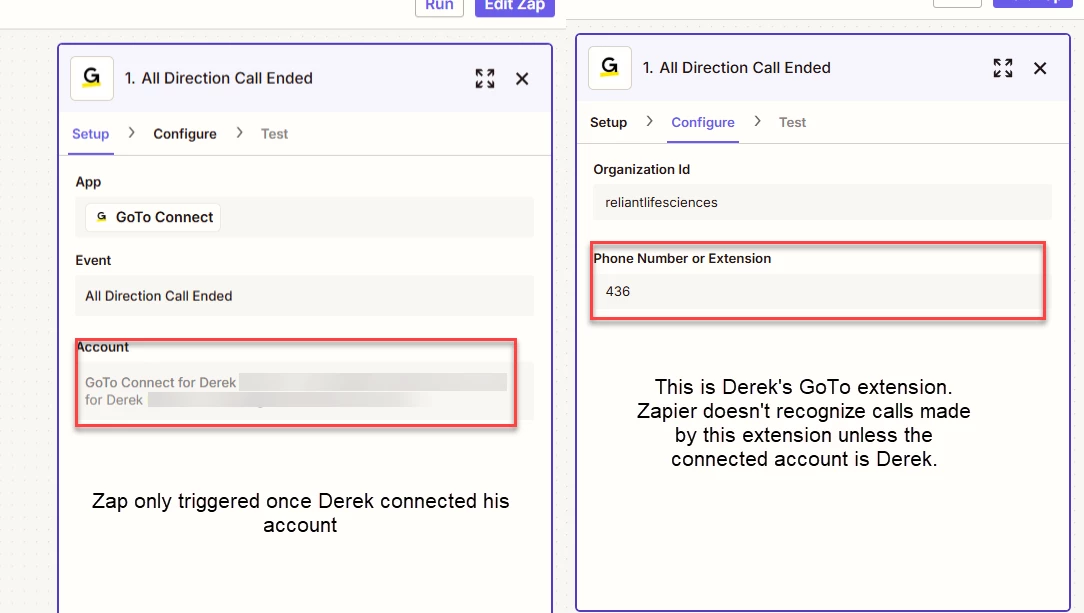
I am creating zaps that will be triggered by the GoTo Connect action of All Direction Call Ended. In the setup it asks you to connect your GoTo account and then in the configuration it asks for a phone number or extension. When I connected my account and configured using my extension, the zap triggers. When I try to configure using someone else’s extension, the zap doesn’t find any calls. I had another user log into Zapier and connect their GoTo account, and after doing so, Zapier was able to recognize calls from him. So, it seems like I need each user with a GoTo account to provide me their credentials in order to create a zap that will capture their calls. 
 

Best answer by jdanielson

Sure! Here’s what ​Global Support said: 


From what you've described, it seems that the Zaps are only triggering for phone numbers associated with the connected GoTo account. To ensure Zapier recognizes calls from different users, each user will need to connect their GoTo account to their respective Zap. This setup was likely put in place by GoTo Connect for security reasons, ensuring that only authorized accounts can trigger actions.

This post has been closed for comments. Please create a new post if you need help or have a question about this topic.

9 replies

Troy Tessalone
Zapier Orchestrator & Solution Partner
Forum|alt.badge.img+14
  • Zapier Orchestrator & Solution Partner
  • March 13, 2025

Hi ​@jdanielson 

Seems like the connected GoTo Connect app account may need to be an admin to be access data for other extensions.


Help link from GoTo Connect for using their Zap app integration: https://support.goto.com/connect/help/how-do-i-integrate-with-zapier


Forum|alt.badge.img
  • Author
  • Beginner
  • March 13, 2025

Thanks for the quick reply, Troy! I am a Super Admin in the GoTo connect app.


Troy Tessalone
Zapier Orchestrator & Solution Partner
Forum|alt.badge.img+14
  • Zapier Orchestrator & Solution Partner
  • March 13, 2025

@jdanielson 

Try reaching out to GoTo Connect Support to get clarification about their Zap app integration and how it is configured on the backend to work since there is limited documentation.


Forum|alt.badge.img
  • Author
  • Beginner
  • March 13, 2025

@Troy Tessalone Wil do. I appreciate the help!


SamB
Community Manager
Forum|alt.badge.img+11
  • Community Manager
  • March 19, 2025

Hey ​@jdanielson, just checking in—were you able to get this sorted? 

Let us know if you still need any help! 🙂


Forum|alt.badge.img
  • Author
  • Beginner
  • March 19, 2025

Yes, all set. Thank you!


SamB
Community Manager
Forum|alt.badge.img+11
  • Community Manager
  • March 20, 2025

That’s awesome news, ​@jdanielson! 🎉 If you’re up for sharing, I’d love to know what the solution was—it might help other community members facing the same issue! 🙏


Forum|alt.badge.img
  • Author
  • Beginner
  • Answer
  • March 20, 2025

Sure! Here’s what ​Global Support said: 


From what you've described, it seems that the Zaps are only triggering for phone numbers associated with the connected GoTo account. To ensure Zapier recognizes calls from different users, each user will need to connect their GoTo account to their respective Zap. This setup was likely put in place by GoTo Connect for security reasons, ensuring that only authorized accounts can trigger actions.


SamB
Community Manager
Forum|alt.badge.img+11
  • Community Manager
  • March 21, 2025

Thanks so much for sharing those details, ​@jdanielson! 🤗 I’ll mark your post as the best answer to help highlight the solution for others. Thanks again! 🧡




