Question

Google Ads Offline Conversion import - "Date is after allowed maximum., at conversions[0].conversion_date_time" error

  • February 13, 2026
  • 4 replies
  • 17 views

Hi guys,

It's my first time implementing offline conversions to Google Ads.
 

I have quite a simple setup where I made a connection between the CRM (Odoo) and Google Ads.

But I keep getting an error: Date is after allowed maximum., at conversions[0].conversion_date_time

I have read many articles and topics about this but non are giving me the solution I'm looking for.


You can see below the Google Ads confuguration. 
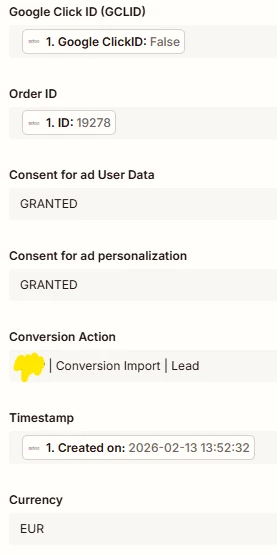


4 replies

Troy Tessalone
Zapier Orchestrator & Solution Partner
Forum|alt.badge.img+14
  • Zapier Orchestrator & Solution Partner
  • February 13, 2026

Hi ​@Dinant 

TIP: Try asking AI for help understanding the error.


Basically, Google Ads thinks you’re trying to report a sale or lead that hasn't happened yet.

The system sees your timestamp and says, "Wait, it's only 10:00 AM, but this record says the customer bought something at 10:05 AM. I can't accept data from the future!"


Why this happens:

  • Clock Desync: Your computer or server clock is a few seconds or minutes faster than Google’s clock.

  • Timezone Confusion: You might be sending the time in your local time, but Google thinks it’s in a different timezone, making it look like it's hours ahead.

  • Wrong Format: A tiny typo in the date or time format is making Google misread the hour.


How to fix it:

The easiest "quick fix" is to set the conversion time to 5 or 10 minutes ago.

This gives the data a "buffer" so it’s guaranteed to be in the past by the time Google processes it.


  • Beginner
  • February 14, 2026

@Dinant 

Since you're sending data from Odoo, here are the 3 things I’d check first:

1. Timezone mismatch (most common cause)
Odoo often stores dates in UTC, but Google requires the timestamp with an offset.
Example of valid format:
2026-02-14 10:30:00+01:00

If you send 2026-02-14 10:30:00 with no offset → it can trigger that error.

2. Conversion date vs click date window
Google only accepts offline conversions that happened:

  • after the ad click

  • within 90 days of the click

If your CRM is sending a later stage date (like “deal closed” weeks later), that could exceed the allowed range.

3. Wrong field mapped
Double-check you didn’t accidentally map:

  • record last updated date
    instead of

  • actual conversion event date

Quick test: manually send a conversion with today’s timestamp + timezone offset.
If that works, you know the integration is fine and the issue is just the date value being sent.


drtanvisachar
Forum|alt.badge.img+5
  • Zapier Solution Partner
  • February 14, 2026

Hello ​@Dinant 
 

That error usually means the conversion_date_time you’re sending is outside Google’s allowed window.

For offline conversions, Google requires:

• The conversion happens after the ad click
• It’s within 90 days of the GCLID
• The timestamp includes a timezone and uses the correct format

Required format:
YYYY-MM-DD HH:MM:SS+TZ
Example: 2026-02-13 15:32:32+01:00

In Zapier, try adding a Formatter by Zapier → Date/Time step to reformat the date and include the timezone. Also double check the GCLID isn’t older than 90 days.

Dr. Tanvi Sachar
Monday Certified Partner, Tuesday Wizard


SamB
Community Manager
Forum|alt.badge.img+11
  • Community Manager
  • February 20, 2026

Hi ​@Dinant 👋 Just wanted to check how you’re getting on. Did the suggestions from Troy, michael O and drtanvisachar help you to get that error sorted?

Let us know which approach worked, or whether you’re still stuck. Want to make sure you’re all set! 🙂