
Question

Formatting changes from Google Calendar Event Start to Discord Send Channel Message

  • April 6, 2026
  • 3 replies
  • 25 views

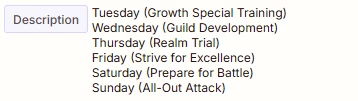
I am trying to send the description field from a Google Calendar event to a Discord channel.  When I select the event in the Event Start action the “description” field shows the proper formatting from the Google Calendar description: 
 However when I then go to the Discord Send Channel Message section the formatting has been wiped away:
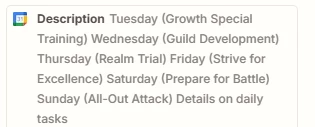
 

What do I need to do so that it keeps the original formatting rather than eliminating all of the line breaks?


3 replies

Sparsh from Automation Jinn
Forum|alt.badge.img+6

Hey ​@OfficialFON,

It’s happening because how discord treats new line. To have a new line in discord, you will have to do double line breaks.
 
You can use a Formatter → Text → Replace to replace a newline with /n/n. You can use [:newline:] for newline. This will result in new line in discord. Hope it helps!

PS: If you need more active help, I’m happy to connect through my Zapier Solution Partner page if you’d like to reach out here- https://zapier.com/partnerdirectory/automation-jinn


Forum|alt.badge.img+2

The fix is usually to add a Formatter step between Google Calendar and Discord.
Zapier’s Formatter is made for changing text before sending it to the next app.

Simple setup:

  1. Google Calendar = get the Description
  2. Formatter > Text > Replace
  3. Replace the line-break part with a real new line
  4. Send the Formatter output to Discord

If your calendar text has HTML like <br>, replace <br> with a new line.
If it already has hidden line breaks, use Formatter to rebuild them before the Discord step. A similar Zapier Community case points to calendar descriptions sometimes carrying HTML/break tags that need cleanup first.

So the flow is:

Google Calendar → Formatter (fix line breaks) → Discord

Also, Discord messages in Zapier support formatting, so once the text is passed correctly, Discord can display it with the breaks.


Forum|alt.badge.img+2
  • Zapier Solution Partner
  • April 7, 2026

Hi ​@OfficialFON 

Here's the Zapier doc that might help: link

Add a Formatter by Zapier step between Google Calendar and Discord:

  1. Action Event: Text → Transform: Replace

  2. Find: [:newline:]

  3. Replace: [:newline:][:newline:]

  4. Input: Map your Google Calendar Description field

  5. In Discord, use the Formatter's output instead of the original field

Why: Discord requires double line breaks. The [:newline:] syntax is Zapier's official way to represent line breaks in Formatter.

If your description has HTML (like <br> tags), add a second replacement:

  • Find: <br> → Replace: [:newline:][:newline:]

If you're still running into issues after trying these steps, feel free to drop a screenshot of the error and a quick description of what your Zap is doing—happy to take a look and help troubleshoot.

And if you'd rather just get it sorted quickly, I offer a free 20-min Zapier troubleshooting call. Book it under Resources on my Zapier Directory profile: https://zapier.com/partnerdirectory/automatemybiz!-->


