
Best answer

Failed to create a spreadsheet row in Google Sheets. The app returned "INVALID_ARGUMENT".

  • December 9, 2025
  • 6 replies
  • 39 views

Hi,

I am creating a zap to update an existing row in Google Sheet and the datasource is coming from Dynamic 365 i.e. Opportunity table.

I tested the zap with a few columns as below 
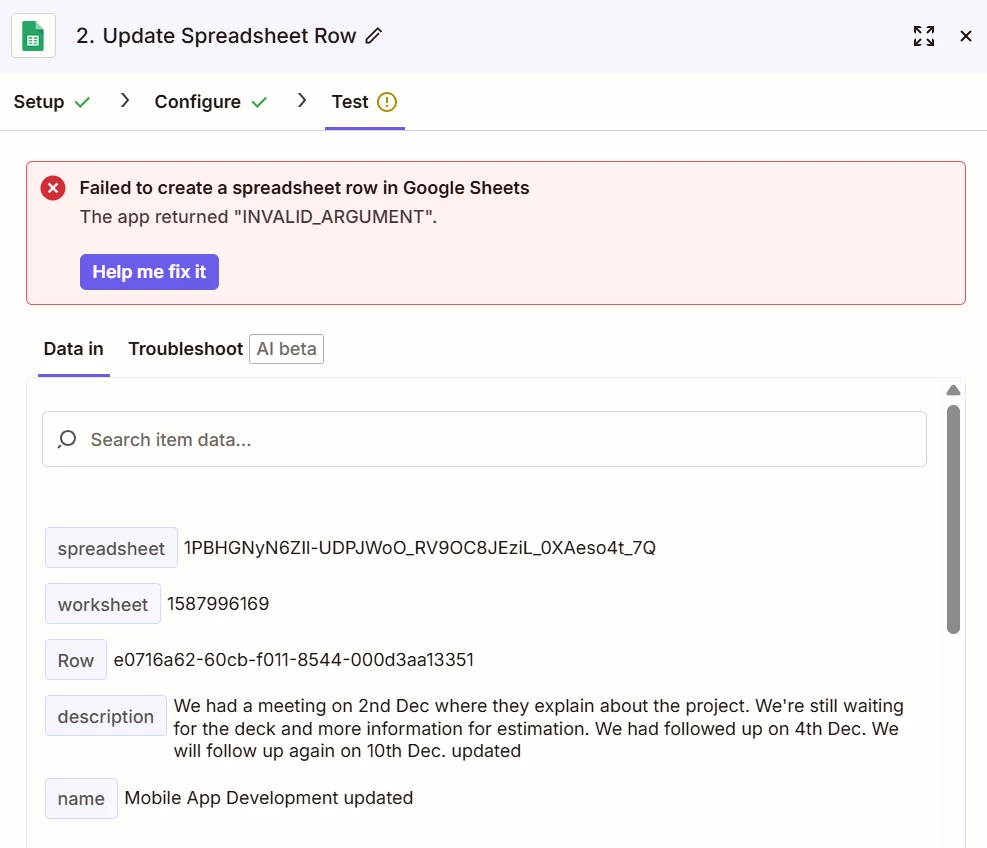
 

Could you help me on this issue?


Thanks,

Erik

Best answer by AndrewJDavison

@Mitrais I can tell just looking at the screenshot that whatever value you’ve mapped into the row field is incorrect.

Can you send a screenshot of the configuration step for that page and I’ll troubleshoot for you.

I’ll DM you.

6 replies

Sparsh from Automation Jinn
Forum|alt.badge.img+6

Hey ​@Mitrais,

The error basically means that you are passing something that is not accepted. 

Make sure to pass the correct Row ID. Usually you have to do a Lookup Spreadsheet Row action before passing it to Update action. You can troubleshoot it better by manually providing less fields and see which field is being problematic in this action. Hope it helps!


AndrewJDavison
Forum|alt.badge.img+11
  • Zapier Solution Partner
  • Answer
  • December 9, 2025

@Mitrais I can tell just looking at the screenshot that whatever value you’ve mapped into the row field is incorrect.

Can you send a screenshot of the configuration step for that page and I’ll troubleshoot for you.

I’ll DM you.


Troy Tessalone
Zapier Orchestrator & Solution Partner
Forum|alt.badge.img+14
  • Zapier Orchestrator & Solution Partner
  • December 9, 2025

Hi ​@Mitrais 

Appears the Row value is invalid as it expects a numeric value. (e.g. Row 3)


Help links for using GSheets in Zaps: https://zapier.com/apps/google-sheets/integrations#help


  • Author
  • Beginner
  • December 10, 2025

Hi ​@Troy Tessalone,

Thanks for your answer, I have fixed the Row value and it worked! Awesome!


  • Author
  • Beginner
  • December 10, 2025

Hi ​@Sparsh from Automation Jinn,

Thanks for your suggestion to lookup the spreadsheet row, I can now pass the correct Row value and it solved the issue.


  • Author
  • Beginner
  • December 10, 2025

Hi ​@AndrewJDavison,

Thanks for your answer, I can now fixed the issue.







