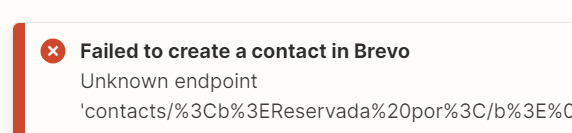
Failed to create a contact in Brevo Unknown endpoint

  • January 17, 2024
  • 5 replies
  • 45 views

Hi! I’m trying to create a zap to get the email from clientes that book a session with me in Google Calendar (with payment) and add its email in a Brevo List. 

The error I get is: 
How can I solve it?

Thank you in advance :)

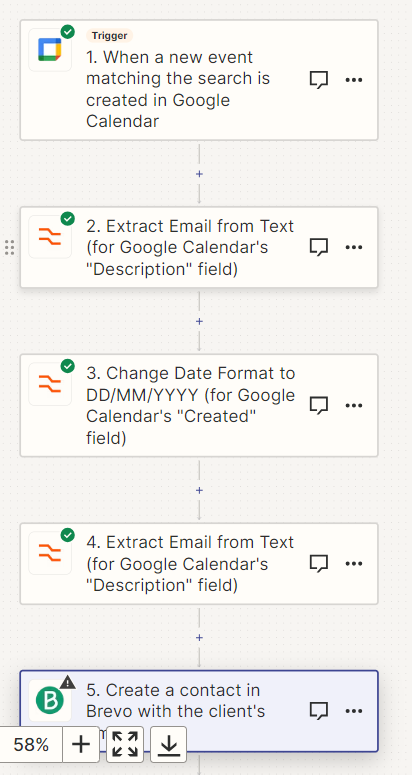
My zap:


This post has been closed for comments. Please create a new post if you need help or have a question about this topic.

5 replies

ken.a
Forum|alt.badge.img+6
  • Zapier Staff
  • January 18, 2024

Hi there @Juanjo Marle,

Welcome to the Community! 🎉

Before we dig deeper into this, could you please share a screenshot of the “Action” section that shows all of its fields of your Brevo step? Like so: 46dd6c0979e3d815d621b8da43084ef1.png
(view larger)

Please don't include personal information in the screenshot, or be sure blur out any personal information.

Thanks!


  • Author
  • Beginner
  • January 19, 2024

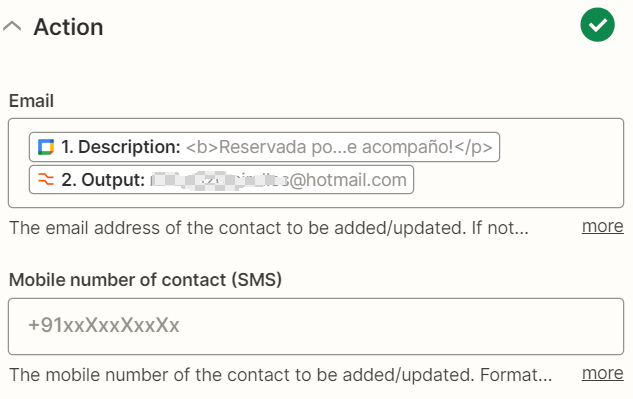
Hi @ken.a ! Thanks for answering :) Of course, here they are: 


ken.a
Forum|alt.badge.img+6
  • Zapier Staff
  • January 19, 2024

Hi @Juanjo Marle,

Thanks for the screenshot!

It looks like you may have mapped an invalid data on the “Email” field of your Brevo actions step. Could you please try removing the mapped “Description” data on that field?

4d2299fd4dcf22a7ede49bf219f95ac6.png
(view larger)

Please keep me posted!


  • Author
  • Beginner
  • January 19, 2024

Hi @ken.a again! Thank you. It worked!


Now I have another problem: I want to add another attribute, the name. I want to extract the name of the user that books my sessions, but I can’t. Any ideas? 


I put “extract name from text of description” but it’s not working :(


Thank you thank you thank you! :)


ken.a
Forum|alt.badge.img+6
  • Zapier Staff
  • January 26, 2024

Hi there @Juanjo Marle,

That’s awesome! I’m glad my suggestion worked!

Regarding your question about extracting the name of the user. Could you please let me know how does the name data is structured in Google Calendar? Is the name within the title of the event or is it in the description?

Please keep me posted!