Question

Facebook Lead Form and Clio Grow Zap Continued Error

  • May 6, 2026
  • 5 replies
  • 48 views

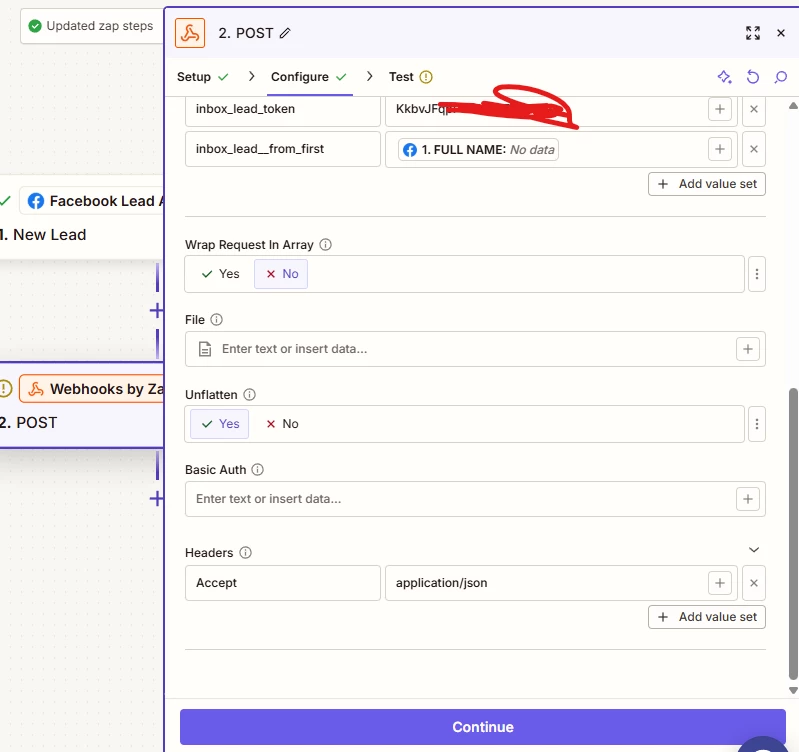
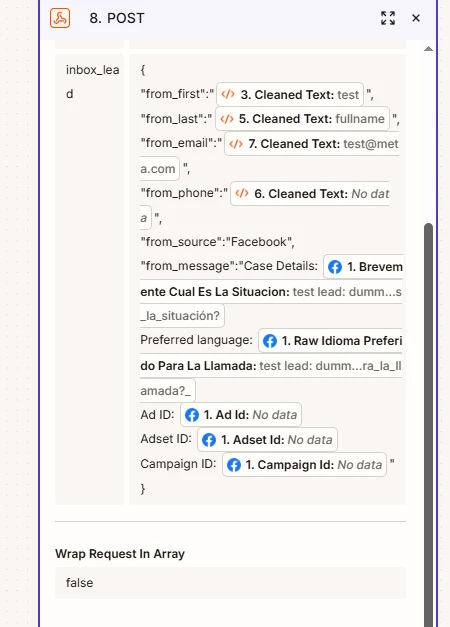
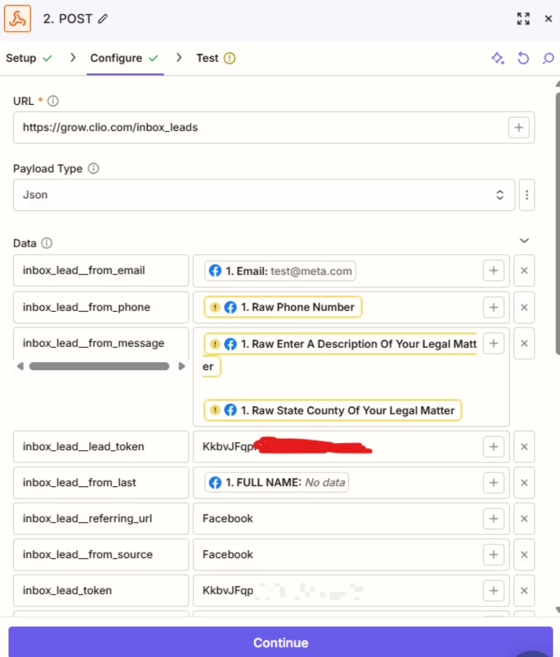
I can’t figure out where to go next to troubleshoot the error I’m getting with this Facebook form lead and Clio Grow Webhook zap. I continue to get a “can’t be blank” error that I think is associated with the first name and last name value sets. Clio Grow inbox api requires a separate first and last name input. Facebook wants to push a Full Name input, but I’ve tried testing it many different ways with many different mapping types available. I’ve tried having the first and last name fields for clio grow both populate the full name, etc. Seems like no combination or setup works and I always get a “can’t be blank.” Admittedly, I don’t have a lot of experience in creating zaps, but I have made a couple of others involving the Zapier - Clio Grow inbox webhook
 

5 replies

Troy Tessalone
Zapier Orchestrator & Solution Partner
Forum|alt.badge.img+14
  • Zapier Orchestrator & Solution Partner
  • May 6, 2026

Hi ​@Olaw 

Based on the screenshots you are using a Zap trigger example record that appears to be dummy data.

Help links for using FB Lead Ads in Zaps: https://zapier.com/apps/facebook-lead-ads/integrations#help


Use the Facebook Lead Ads testing tool to create sample leads

https://help.zapier.com/hc/en-us/articles/8496061345805-Use-the-Facebook-Lead-Ads-testing-tool-to-create-sample-leads


Forum|alt.badge.img+3
  • Zapier Solution Partner
  • May 6, 2026

Hi ​@Olaw 

Use a Code by Zapier step to safely split any kind of full name into First and Last Name so Clio never gets blank fields.

Insert a Code step between your Facebook trigger and Clio Grow action. The code will take the single Full Name from Facebook, split it at the space, and output two separate values: First Name (first word) and Last Name (remaining words). Then map those outputs to Clio Grow's required fields. This gives you more control — for example, you can add logic like "if there's only one name, put it in both First and Last Name fields" so Clio Grow never sees a blank.

If you're still running into issues after trying these steps, feel free to drop a screenshot of the error and a quick description of what your Zap is doing—happy to take a look and help troubleshoot.

And if you'd rather just get it sorted quickly, I offer a free 20-min Zapier troubleshooting call. Book it under Resources on my Zapier Directory profile: https://zapier.com/partnerdirectory/automatemybiz

!-->


SamB
Community Manager
Forum|alt.badge.img+11
  • Community Manager
  • May 8, 2026

Hey ​@Olaw, just checking in! 🙂

Did using Troy's suggestion to create a new test record with Facebook's testing tool help the Zap to see values for those fields? If the test record didn’t have any values filled out for those fields then that could well explain why they’re showing as having “No data” in the Zap.

Keep us posted on how it went, want to make sure this gets sorted!


Forum|alt.badge.img

Hi ​@Olaw based on your above screenshot - fields in the Zap editor appear highlighted in yellow, that means they're referencing outdated or stale sample data from an earlier test or version of a previous step. This usually happens after an upstream step returns data in a different structure.

To fix this , I would recommend trying below steps.
 

  1. In Zapier, open your Zap and select the Zap History tab to view that submission run.
  2. Click on that run and select Use as test record to populate your trigger with real data from an actual submission.
  3. Review and remap any fields in your downstream steps/Paths if needed to ensure they match the new test data.

        4. Click Publish to activate your Zap.
Once done try publishing a fresh lead via testing tool and zap should run successfully, try giving this a try once and check how it goes.

6c43aad5a49a885f0cf14ff45dbba8f1.png

(view larger)

For more help on that ref https://help.zapier.com/hc/en-us/articles/35632951078029-Use-previous-Zap-runs-as-trigger-test-records


Forum|alt.badge.img+3
  • Zapier Solution Partner
  • May 14, 2026

Hi ​@Olaw, just checking — did any of these fixes do the trick for you?