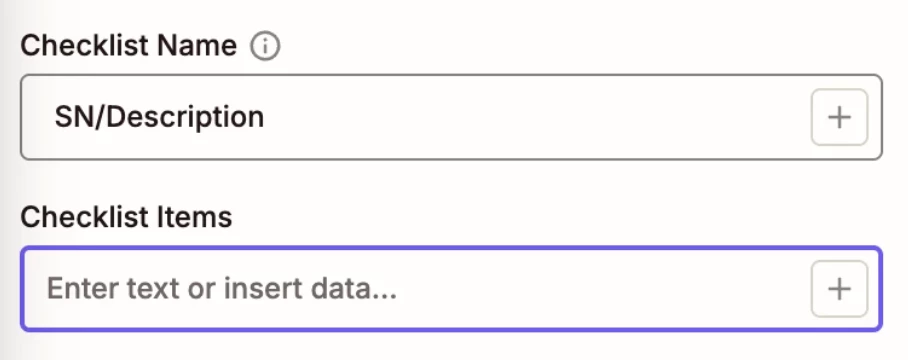


Question

Excel → Trello Checklist via Zapier is splitting line items incorrectly

  • June 2, 2026
  • 7 replies
  • 29 views

JTHOM6

Hi, I’m using Zapier to send Excel data into a Trello checklist.

My Excel setup:

  • Column A = ID
  • Column B = Description (contains commas)

Sample data:

10001 | DEVICE ALPHA, HIGH FLOW, MODEL X  
10002 | SENSOR UNIT, TYPE B, SERIES 200
10003 | CALIBRATOR, PRIMARY FLOW, MODEL Z

Goal: Each row becomes one checklist item, like:
10001 DEVICE ALPHA, HIGH FLOW, MODEL X

Issue: Zapier splits the data into multiple checklist items (one per word/phrase) instead of keeping each row together.

How can I combine Column A + B so each row stays as one checklist item and doesn’t split on commas?

My current Zapier setup:
New Row in Table

Find Row

Formatter (Utilities)

Create Loop from Line Items

Created Card (Trello)

 

7 replies

Troy Tessalone
Zapier Orchestrator & Solution Partner
Forum|alt.badge.img+14
  • Zapier Orchestrator & Solution Partner
  • June 2, 2026

Hi ​@JTHOM6 

For us to have more context, post screenshots showing how your Zap steps are outlined and configured in the CONFIGURE tab while in EDIT mode with the field mappings visible.


JTHOM6
  • Author
  • Beginner
  • June 2, 2026

Hi ​@Troy Tessalone! Please see attached


Troy Tessalone
Zapier Orchestrator & Solution Partner
Forum|alt.badge.img+14
  • Zapier Orchestrator & Solution Partner
  • June 2, 2026

@JTHOM6 

Zap step 2 is configured to already return results as line items.

So you should not need Zap step 3 (Formatter), so remove that step.

Instead, map the data from Zap step 2 to the Looping (Create Loop from Line Items) step.


JTHOM6
  • Author
  • Beginner
  • June 2, 2026

@Troy Tessalone  I removed the Formatter step. I mapped the line items from Step 2 directly into the Looping step. Does this look right? Also, in the Create Card step, what data should  I click?


Troy Tessalone
Zapier Orchestrator & Solution Partner
Forum|alt.badge.img+14
  • Zapier Orchestrator & Solution Partner
  • June 2, 2026

@JTHOM6 

Actually, you don’t need the Looping step, so you can remove the Looping step.

Trello Card field “Checklist Items” supports line items.

So map the data from Zap step 2 (Excel) to the Trello Card step.


JTHOM6
  • Author
  • Beginner
  • June 2, 2026

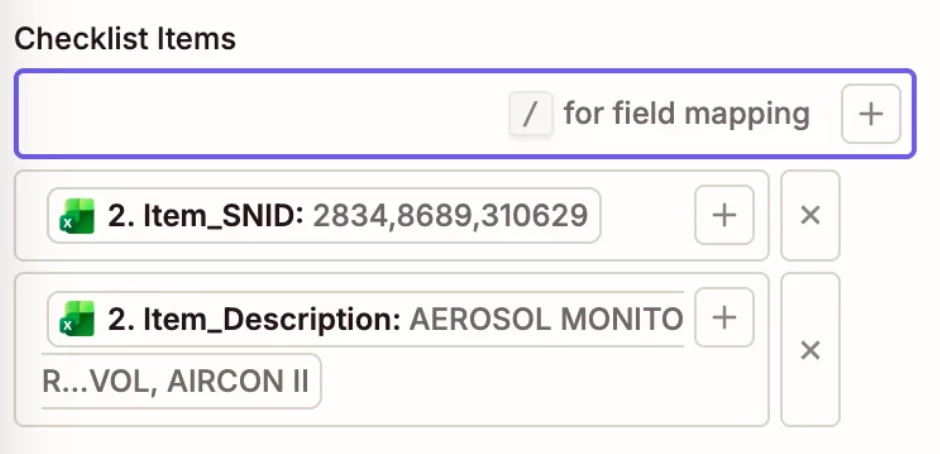
Thanks, Troy, for the continued support. From the dropdown, which option should I choose? For example, if I select Item_SNID and Item_Description, they show up in Trello as separate lists like “SNID1, SNID2, SNID3” and “D1, D2, D3,” instead of being paired as “SNID1 – D1, SNID2 – D2, SNID3 – D3.”


Troy Tessalone
Zapier Orchestrator & Solution Partner
Forum|alt.badge.img+14
  • Zapier Orchestrator & Solution Partner
  • June 2, 2026

@JTHOM6 

Map both variables in the same input field: [SNID] - [Description]