Question

Error when using Heygen Avatar with Video Agent in automation

  • May 12, 2026
  • 5 replies
  • 28 views

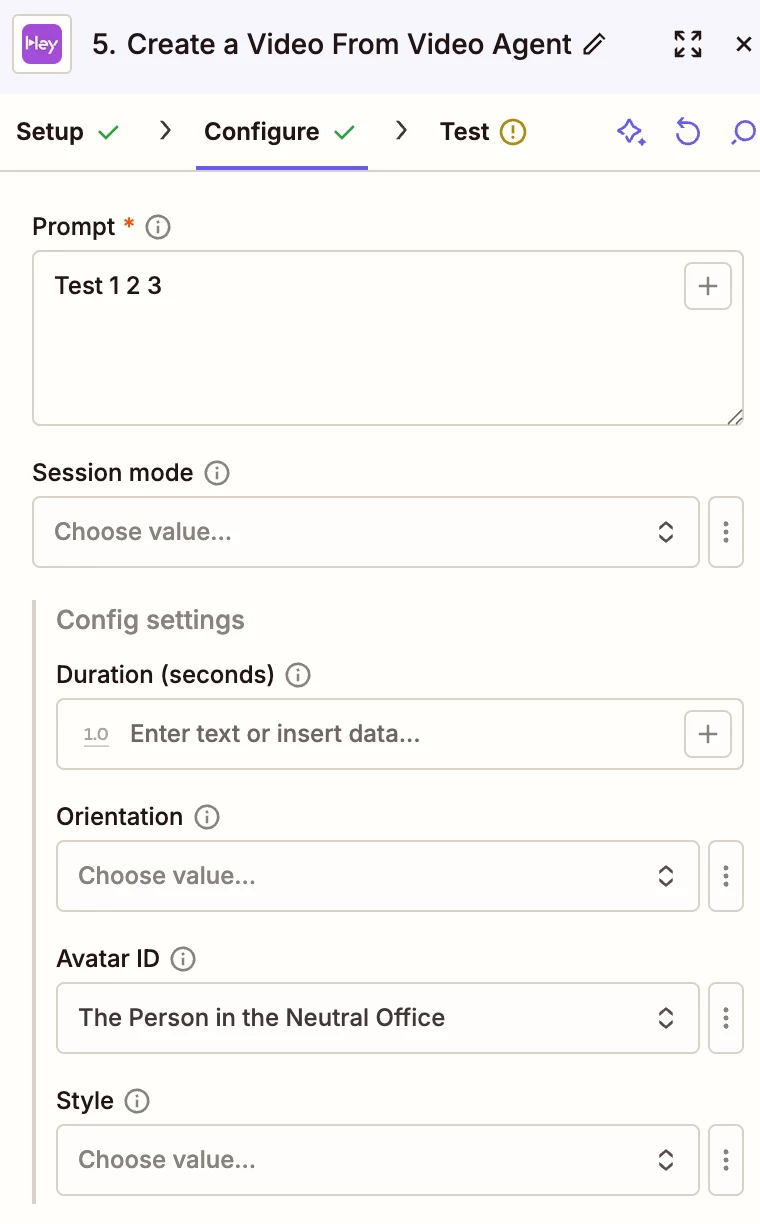
We are building an automation with Heygen and trying to use a predefined Avatar with Video Agent.

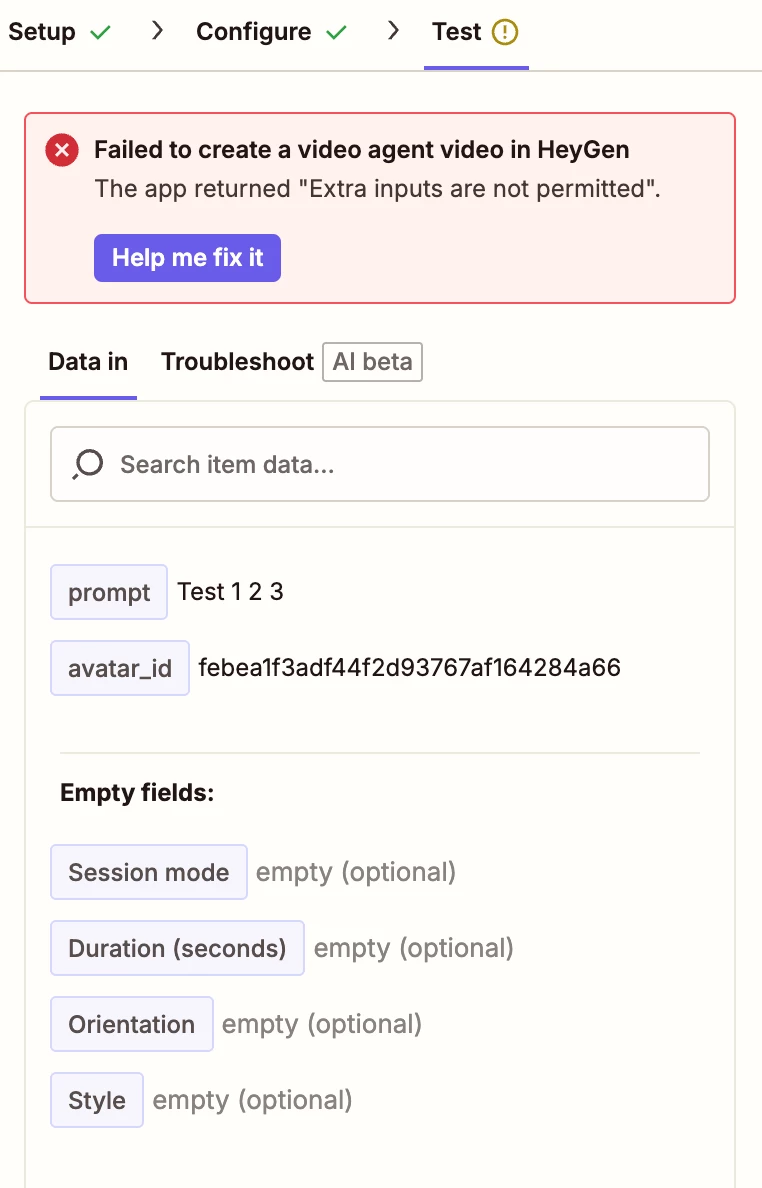
When testing the automation with an Avatar set, we get the error: “Extra inputs are not permitted”. If now config settings are set, the video is successfully generated. 

I assume that the Zapier integration is not up to date with the latest Heygen API and needs be fixed.


5 replies

Troy Tessalone
Zapier Orchestrator & Solution Partner
Forum|alt.badge.img+14
  • Zapier Orchestrator & Solution Partner
  • May 12, 2026

Hi ​@milkyway 

For us to have more info about what you are referring to, post these screenshots:

  • how your Zap steps are outlined
  • how your Zap steps are configured in the CONFIGURE tab while in EDIT mode with the field settings
  • the encountered error testing the Zap step

Forum|alt.badge.img+3
  • Zapier Solution Partner
  • May 12, 2026

Hi ​@milkyway 

Here's the HeyGen doc that might help: Link

If you’re still running into issues, could you share a screenshot and a quick description of what your Zap is doing? That’ll make it much easier to understand what’s going wrong.


drtanvisachar
Forum|alt.badge.img+5
  • Zapier Solution Partner
  • May 13, 2026

Hey ​@milkyway !
 

That error usually means the HeyGen Zapier step is sending a field that the current action does not accept. If the video works with no config settings, but fails as soon as an avatar is added, the issue is probably with how the avatar field is being passed into the action, not the rest of the Zap. I’d try this first: remove the avatar/config fields, test once, then add only the required avatar value back in. Make sure you’re passing the exact avatar ID or value HeyGen expects, not the avatar name or a full object. If it still fails, then yes, it may be a mismatch between the Zapier action and HeyGen’s current API. In that case I’d report it to Zapier support with the task ID from Zap History and mention that the same action works until avatar config is included.

Ethan Marcellus- Automation Expert at Tuesday Wizard | Top Zapier Solution Partner | Zapier Community Contributor


  • Author
  • New
  • May 14, 2026

Hi ​@milkyway 

For us to have more info about what you are referring to, post these screenshots:

  • how your Zap steps are outlined
  • how your Zap steps are configured in the CONFIGURE tab while in EDIT mode with the field settings
  • the encountered error testing the Zap step


Thank you for your replies.

Please find screenshots attached. Note that the zap returns the error not only when setting an Avatar ID, but also when setting any of the other config options.


SamB
Community Manager
Forum|alt.badge.img+11
  • Community Manager
  • May 15, 2026

Hi ​@milkyway 👋

Thanks for sharing those helpful screenshots. I wonder if it might be something to do with it not having a Session mode selected. Maybe the fields under Config settings need a specific type of session mode to be selected in order to use them. 🤔

Can you try selecting a Session mode and let us know if that gets rid of the error?