Question

error 422 with setting up Lead Connector with Passion.io

  • April 27, 2023
  • 9 replies
  • 927 views

recal

Trying to connect funnels from Lead Connector (Go High Level) to video courses on Passion.io, but getting a 422 error.  Passion points to lead connector as the problem, and lead connector points to passion.  I’m at a loss… 


This post has been closed for comments. Please create a new post if you need help or have a question about this topic.

9 replies

ken.a
Forum|alt.badge.img+6
  • Zapier Staff
  • April 27, 2023

Hi there @recal,

Welcome to the Community! 🎉

Before we dig deeper into this, could you please share detailed screenshot with how your Zap is configured? Especially, the full “Action” section of the Podio.com action step? Please don’t include/blur out any personal information in the screenshot.

Thanks! 😊


recal
  • Author
  • Beginner
  • April 27, 2023

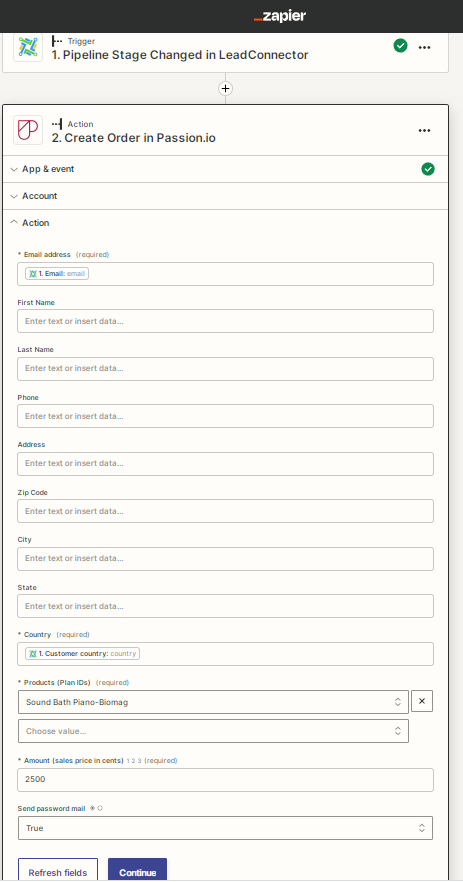
here’s the full action:  


ken.a
Forum|alt.badge.img+6
  • Zapier Staff
  • April 27, 2023

Hi @recal,

Thanks for the screenshot!

Upon investigating the 422 error, it seems that the error message typically pertains to a required field in the Passion.io step. However, based on the screenshot you provided, it appears that you have already mapped the required fields correctly.

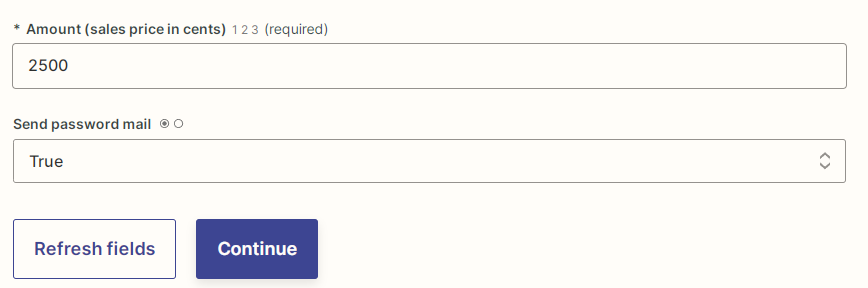
To troubleshoot this issue further, I suggest that you try reconnecting your Passion.io account. To do this, you can click on the three dots located next to the "Change" button in the "Account" section of the Passion.io step. Then, select "Refresh fields" and try testing the action step again.

11036fb02952308a6a355ec2b095160b.png
(view larger)

Please give that a try, and keep us posted! 😊


recal
  • Author
  • Beginner
  • April 27, 2023

We reconnected passion, we tested connection, refreshed the action fields, tested, and failed still. 


shalgrim
Forum|alt.badge.img+8
  • Zapier Staff
  • April 28, 2023

Hi @recal,

The full message from the 422 error from Passion says “{“user_id”: [“can’t be blank”]}”

Which is a little confusing because there’s no User ID field. What I think is happening is that since the test data there is sending `email` instead of an actual email address, Passion can’t find the user with that email address (because none exists)

Can you test the first step in the Zap so that it actually returns an email address that exists in Passion?


recal
  • Author
  • Beginner
  • April 28, 2023

@shalgrim we need more specific instructions.  We only see one test button, so we’re not clear on how to test the “first step” versus any other step for that matter.  Are you talking a step in a trigger or in the action section? 


ken.a
Forum|alt.badge.img+6
  • Zapier Staff
  • April 28, 2023

Hi @recal,

As the data from the trigger step isn't providing a valid email address, I recommend skipping the action step by clicking on the "Skip Test" button in the "Test" section of the action step.

1fc952fd412c725c6a25fce886ffee0a.png
(view larger)

After that, kindly publish the Zap and trigger the Zap, but this time, make sure to use a valid email address.

Thanks! 😊


recal
  • Author
  • Beginner
  • May 1, 2023

When you say to “trigger the Zap” after publishing, where is that trigger button and where would we place the “valid email” info?  We don’t see anything that talks about triggering zaps. 


MohSwellam
Zapier Orchestrator & Solution Partner
Forum|alt.badge.img+8
  • Zapier Orchestrator & Solution Partner
  • May 1, 2023

Hi @recal 


This means you can turn on the zap then got to Go High Level and change one of the leads to the Status that triggers the zap (i.e.: see what happens when the zap is actually live and working as it should). 


Another way to test the zap is hardcoding the email in the first part. i.e.: instead of having the field mapped from LeadConnector, just remove this part for now and type in a valid email address. After testing, you can remove the email you typed and put back the field.