Best answer

Dynamic File Path in New Sharepoint

  • April 10, 2026
  • 8 replies
  • 86 views

I’m having an issue with the new way that the Sharepoint integration handles folder creation. In the configuration stage it asks for the Site value, Document Library Value, Folder Value, and Folder Name Value. Everything seems to work fine for me except for the Folder Value step.

It wants you to select the folder and says “Click folders to drill down through nested folders,” but one of the folders I want the destination to be in is named by the year (so we have a 2023 folder, 2024, 2025, 2026). I need the year to be dynamic. Earlier in the Zap I do pull out the year. When I built out a folder path in the legacy Sharepoint version, I could use the year I pulled out in the Zap:

Legacy:

Site: Estimation

Parent Folder: Shared Documents/(Dynamic Value: 2026)/INSTALL

Current Version:

Site: Estimation

Document Library: Documents

Folder: INSTALL (which is nested in the “2026” folder)

So the year has to be static as I have to click through the nested folders to select the INSTALL folder. It won’t seem to work if I enter something like…

Folder: (Dynamic Value: 2026)/INSTALL

It doesn’t like the final value of 2026/INSTALL


I’m wondering if there’s a way to get it to accept the dynamic values like the previous version does. Seems like a straightforward feature to lose.

Best answer by SamB

Hey there ​@CMB 👋

I can see you also reached out to our Support team about this and they’ve added your vote to a feature request to have dynamic file paths supported again. We can't give any sort of estimate as to when that might be implemented, but we'll definitely send you an email notification once it is.

They also suggested a potential workaround to you, so I wanted to share that here in case it's helpful for other folks looking to dynamically set the file path too:

After your Get Folder Contents step (which returns all folders like Folder1, Folder2, INSTALLATION, Folder4), add an AI by Zapier step. Configure it with a prompt that:
 

  1. Takes the folder list output from Get Folder Contents
  2. Identifies and extracts just the INSTALLATION folder details
  3. Returns the folder ID for that INSTALLATION folder

 
Then pass the output from this AI step into your subsequent Create Folder (or other action) steps. This way, you're using AI to parse through the results and isolate the exact folder you need, completely bypassing the "select all" limitation.
 
This approach lets your Zap dynamically locate the INSTALLATION folder each time without manual updates, and it should work regardless of what other folders exist in your year directory.

Let us know how that goes!

8 replies

Troy Tessalone
Zapier Orchestrator & Solution Partner
Forum|alt.badge.img+14
  • Zapier Orchestrator & Solution Partner
  • April 10, 2026

Hi ​@CMB 

For us to have more info about what you are referring to, post screenshots showing how your Zap steps are outlined and configured in the CONFIGURE tab.


Forum|alt.badge.img+3
  • Zapier Solution Partner
  • April 14, 2026

Hi ​@CMB 

Just checking - have you gotten this sorted, or do you still need help with the dynamic folder path issue?


  • Author
  • Beginner
  • April 30, 2026

Hi ​@CMB 

For us to have more info about what you are referring to, post screenshots showing how your Zap steps are outlined and configured in the CONFIGURE tab.

Hi ​@CMB 

Just checking - have you gotten this sorted, or do you still need help with the dynamic folder path issue?


I have the following folder structure:

Estimation (Site) - Documents (Document Library) - Year - Installation

The issue is in the year level there is 2023, 2024, 2025, 2026. So I can’t just search for the Installation folder, because each Year folder will have one. I need to search within this specific year (2026). The search function doesn’t seem to allow me to search within a subfolder, it just allows me to search the Document Library as a whole. So the search result would return these results for example:

Estimation - Documents - 2024 - Installation

Estimation - Documents - 2025 - Installation

Estimation - Documents - 2026 - Installation

It would find three Installation folders when I only want to find the one in 2026.


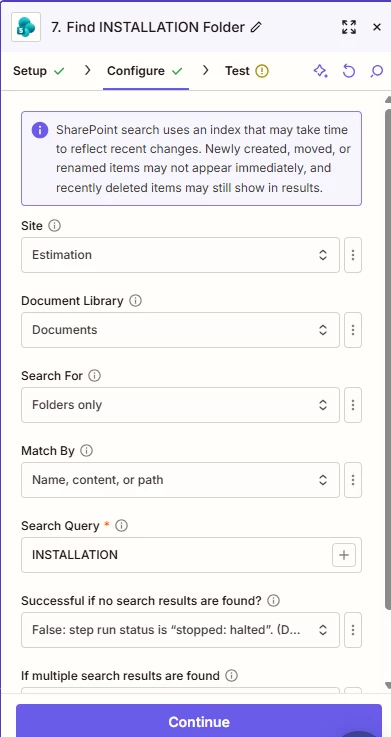
^In this example it is searching for the INSTALLATION folder in the “Documents” Document Library of the Estimation site. This is the top level and it doesn’t let you drill down further. I need it to search for the INSTALLATION folder in the current year folder.

In the previous version of the Sharepoint integration I could give it the folder path. So I could use a formatter step to pull the year, and dynamically pass that into my folder path. I can’t get it to search paths in the updated integration.


  • Author
  • Beginner
  • May 4, 2026

Does this need to be bumped to get a response?


  • Author
  • Beginner
  • May 6, 2026

Hi ​@CMB 

For us to have more info about what you are referring to, post screenshots showing how your Zap steps are outlined and configured in the CONFIGURE tab.

I have posted more information above.


SamB
Community Manager
Forum|alt.badge.img+11
  • Community Manager
  • Answer
  • May 8, 2026

Hey there ​@CMB 👋

I can see you also reached out to our Support team about this and they’ve added your vote to a feature request to have dynamic file paths supported again. We can't give any sort of estimate as to when that might be implemented, but we'll definitely send you an email notification once it is.

They also suggested a potential workaround to you, so I wanted to share that here in case it's helpful for other folks looking to dynamically set the file path too:

After your Get Folder Contents step (which returns all folders like Folder1, Folder2, INSTALLATION, Folder4), add an AI by Zapier step. Configure it with a prompt that:
 

  1. Takes the folder list output from Get Folder Contents
  2. Identifies and extracts just the INSTALLATION folder details
  3. Returns the folder ID for that INSTALLATION folder

 
Then pass the output from this AI step into your subsequent Create Folder (or other action) steps. This way, you're using AI to parse through the results and isolate the exact folder you need, completely bypassing the "select all" limitation.
 
This approach lets your Zap dynamically locate the INSTALLATION folder each time without manual updates, and it should work regardless of what other folders exist in your year directory.

Let us know how that goes!


  • Author
  • Beginner
  • May 8, 2026

Hey there ​@CMB 👋

I can see you also reached out to our Support team about this and they’ve added your vote to a feature request to have dynamic file paths supported again. We can't give any sort of estimate as to when that might be implemented, but we'll definitely send you an email notification once it is.

They also suggested a potential workaround to you, so I wanted to share that here in case it's helpful for other folks looking to dynamically set the file path too:

After your Get Folder Contents step (which returns all folders like Folder1, Folder2, INSTALLATION, Folder4), add an AI by Zapier step. Configure it with a prompt that:
 

  1. Takes the folder list output from Get Folder Contents
  2. Identifies and extracts just the INSTALLATION folder details
  3. Returns the folder ID for that INSTALLATION folder

 
Then pass the output from this AI step into your subsequent Create Folder (or other action) steps. This way, you're using AI to parse through the results and isolate the exact folder you need, completely bypassing the "select all" limitation.
 
This approach lets your Zap dynamically locate the INSTALLATION folder each time without manual updates, and it should work regardless of what other folders exist in your year directory.

Let us know how that goes!


Thanks, Sam. I can understand the AI route, but if it’s based on LLMs, I don’t want to risk hallucinations.

I made the following change:

  1. I use “Find Folder” for the folder I want to search inside (to target its nested folders)
  2. I use “Get Folder Contents” and plug in the Folder ID from the “Find Folder” step to find all the nested folders (one of which will be my INSTALLATION folder).
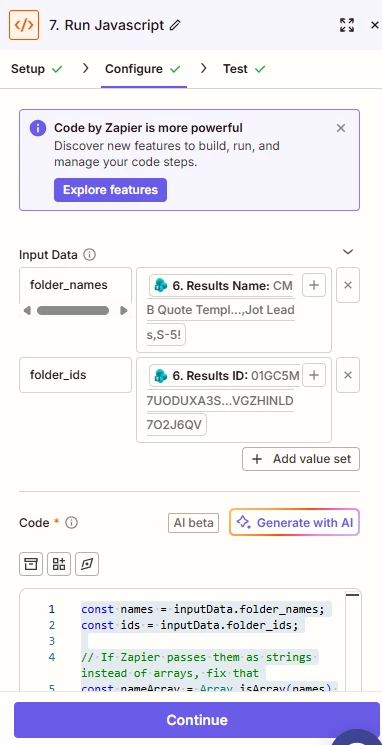
  3. I run a Javascript step with the following code to parse through the results of the “Get Folder Contents” step, find the Folder name (INSTALLATION in my case), and grab its corresponding Folder ID:

const names = inputData.folder_names;

const ids = inputData.folder_ids;


// If Zapier passes them as strings instead of arrays, fix that

const nameArray = Array.isArray(names) ? names : names.split(',');

const idArray = Array.isArray(ids) ? ids : ids.split(',');


// Clean values (important for matching)

const cleanedNames = nameArray.map(n => n.trim());


// Find index of target folder

const target = "INSTALLATION";

const index = cleanedNames.findIndex(n => n === target);


if (index === -1) {

  throw new Error("Folder 'INSTALLATION' not found");

}


// Get matching ID

const folderId = idArray[index];


return {

  folder_id: folderId

};


^Someone with better Javascript knowledge would likely be able to clean this up. Not sure if either of the strings to arrays step, or the trim step are needed.


Here are the “Code by Zapier” configurations for this Javascript step, with the input data pulling from the “Get Folder Contents” step. 


I then take the folder ID from the Javascript output and use it in a Create Folder step. I tested this and it seems to be working fine.

Having said that, I’m glad dynamic file paths have at least been discussed because these four steps used to be ONE. That’s very disappointing. Not a fan of “updates” that degrade capability.

It’s pretty crazy that grabbing a folder in a group of nested folders dynamically is not a thing. It seems like such a basic function someone might run into. The only goal here is to create a folder inside a nested set of folders. The nested folder just changes with the year because we’re grouping business activity within the year. It just seems like a very basic functionality.

Hopefully it can get resolved. This seems like more of a Microsoft (Sharepoint) issue than a Zapier issue, but regardless this has become very inefficient and hopefully there’s a resolution.


SamB
Community Manager
Forum|alt.badge.img+11
  • Community Manager
  • May 11, 2026

That's a great workaround to use a Code step instead ​@CMB. 🙌 Really appreciate you taking the time to share details of the setup you put in place for that.

Totally agree, it's definitely not as efficient as it could be if dynamic paths were supported. I do hope the team are able to get it implemented soon 🤞