Question

Dynamic File Path in New Sharepoint

  • April 10, 2026
  • 3 replies
  • 40 views

I’m having an issue with the new way that the Sharepoint integration handles folder creation. In the configuration stage it asks for the Site value, Document Library Value, Folder Value, and Folder Name Value. Everything seems to work fine for me except for the Folder Value step.

It wants you to select the folder and says “Click folders to drill down through nested folders,” but one of the folders I want the destination to be in is named by the year (so we have a 2023 folder, 2024, 2025, 2026). I need the year to be dynamic. Earlier in the Zap I do pull out the year. When I built out a folder path in the legacy Sharepoint version, I could use the year I pulled out in the Zap:

Legacy:

Site: Estimation

Parent Folder: Shared Documents/(Dynamic Value: 2026)/INSTALL

Current Version:

Site: Estimation

Document Library: Documents

Folder: INSTALL (which is nested in the “2026” folder)

So the year has to be static as I have to click through the nested folders to select the INSTALL folder. It won’t seem to work if I enter something like…

Folder: (Dynamic Value: 2026)/INSTALL

It doesn’t like the final value of 2026/INSTALL


I’m wondering if there’s a way to get it to accept the dynamic values like the previous version does. Seems like a straightforward feature to lose.

3 replies

Troy Tessalone
Zapier Orchestrator & Solution Partner
Forum|alt.badge.img+14
  • Zapier Orchestrator & Solution Partner
  • April 10, 2026

Hi ​@CMB 

For us to have more info about what you are referring to, post screenshots showing how your Zap steps are outlined and configured in the CONFIGURE tab.


Forum|alt.badge.img+3
  • Zapier Solution Partner
  • April 14, 2026

Hi ​@CMB 

Just checking - have you gotten this sorted, or do you still need help with the dynamic folder path issue?


  • Author
  • Beginner
  • April 30, 2026

Hi ​@CMB 

For us to have more info about what you are referring to, post screenshots showing how your Zap steps are outlined and configured in the CONFIGURE tab.

Hi ​@CMB 

Just checking - have you gotten this sorted, or do you still need help with the dynamic folder path issue?


I have the following folder structure:

Estimation (Site) - Documents (Document Library) - Year - Installation

The issue is in the year level there is 2023, 2024, 2025, 2026. So I can’t just search for the Installation folder, because each Year folder will have one. I need to search within this specific year (2026). The search function doesn’t seem to allow me to search within a subfolder, it just allows me to search the Document Library as a whole. So the search result would return these results for example:

Estimation - Documents - 2024 - Installation

Estimation - Documents - 2025 - Installation

Estimation - Documents - 2026 - Installation

It would find three Installation folders when I only want to find the one in 2026.


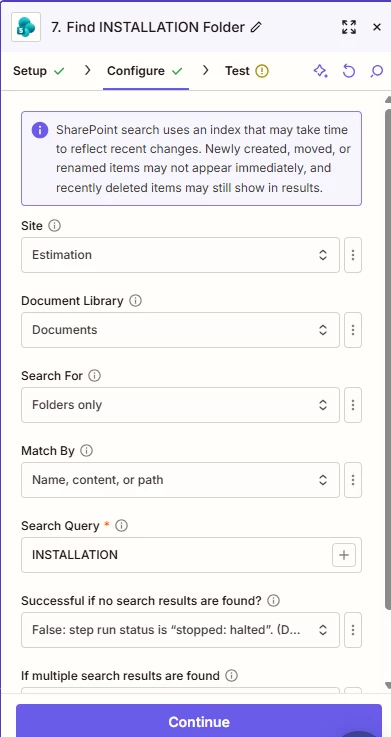
^In this example it is searching for the INSTALLATION folder in the “Documents” Document Library of the Estimation site. This is the top level and it doesn’t let you drill down further. I need it to search for the INSTALLATION folder in the current year folder.

In the previous version of the Sharepoint integration I could give it the folder path. So I could use a formatter step to pull the year, and dynamically pass that into my folder path. I can’t get it to search paths in the updated integration.