
Question

Create new Google Drive folder based on a new or updated row in Google Sheets

  • March 23, 2026
  • 10 replies
  • 59 views

Hello,

I’m trying to achieve the following → create a new google drive folder (and subfolders afterwards) when a new or updated row is modified


the triggered is in Column AQ which have a header and Arrayformula which populate the cell with the folder name based on the values of other cells in that row.

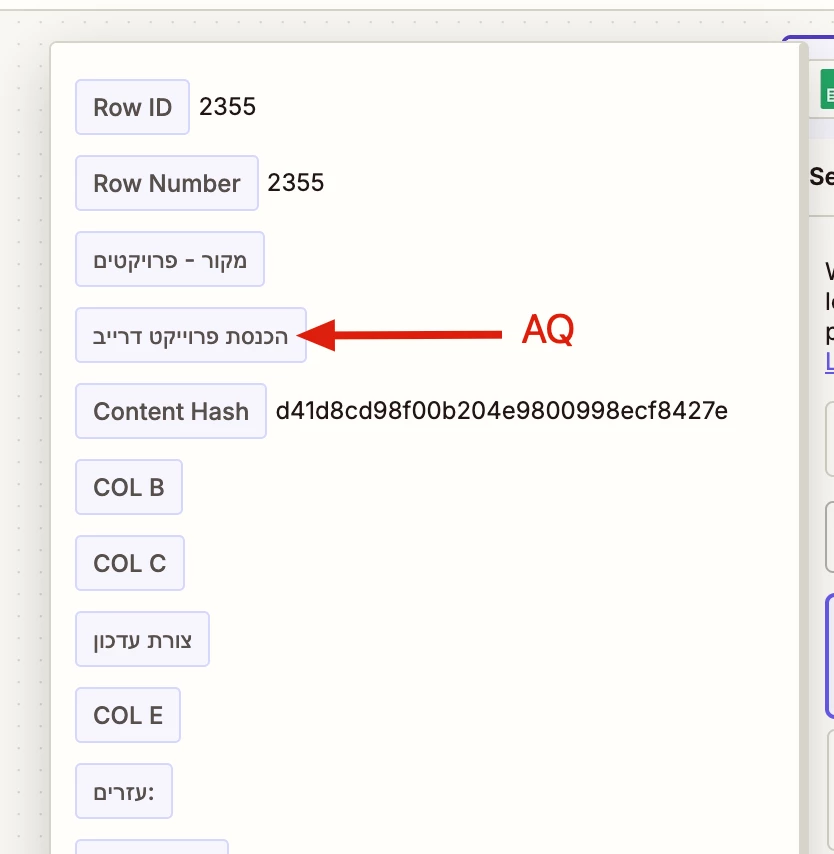
when testing the steps and clicking on the “find new records” I see only the bottom rows which are empty and I cannot use the rows with the data I need to continue the test.
I’ve tried to use a new tab in the worksheet with Unique formula that will give me just the rows with text but again if I make a change the “find new records” pulls the outdated data.. 

is there a way to clear the cache so it will show new data? is there a way to select the specific row I would like to use for the test?  


this is the formula I use in col AQ: 
=ARRAYFORMULA(IF(ISBLANK(A1524:A),,"project" & " " & A1524:A & " - " & C1524:C & " - " & E1524:E))

I’ve tried to delete all information in col AQ also the formula and still I get to see the old cached blank history from previous attempts  (rows 2355 is the last row of the spreadsheet I also getting the last 3 rows) 
 

10 replies

Troy Tessalone
Zapier Orchestrator & Solution Partner
Forum|alt.badge.img+14
  • Zapier Orchestrator & Solution Partner
  • March 23, 2026

Hi ​@Mosh1 

Try turning the Zap ON and testing live to get an example to use to configure the Zap.

How to use a previous Zap Run as a Zap trigger example record: https://help.zapier.com/hc/en-us/articles/35632951078029-Use-previous-Zap-runs-as-trigger-test-records


Forum|alt.badge.img+2
  • Zapier Solution Partner
  • March 23, 2026

Hi ​@Mosh1 

You can try this:

Use a helper timestamp column instead of triggering from AQ.

Step 1: Keep your formula in AQ

That’s fine for generating the folder name.

Step 2: Add a helper column (e.g., AR = Timestamp)

Use Apps Script to write a static timestamp when AQ gets a value:

Here is the sample code (Apps Script):

function addTimestamps() {
const sheet = SpreadsheetApp.getActiveSpreadsheet().getSheetByName("Sheet1"); // change name
const data = sheet.getDataRange().getValues();

const AQ = 42; // column AQ (0-based index)
const AR = 43; // column AR

for (let i = 1; i < data.length; i++) {
const aqValue = data[i][AQ];
const arValue = data[i][AR];

if (aqValue && !arValue) {
sheet.getRange(i + 1, AR + 1).setValue(new Date());
}
}
}

Then add a time-driven trigger (every 1–5 minutes).

Step 3: Use AR as the Zap trigger

In Zapier:

  • Trigger: New or Updated Spreadsheet Row
  • Use the timestamp column (AR)

Hope this helps you get it sorted! And let me know how it goes — happy to dig deeper if needed!

If you're still stuck, I offer a free 20-min Zapier troubleshooting call. Book it through my Zapier Directory profile — it's listed under Resources on the left side: https://zapier.com/partnerdirectory/automatemybiz!-->


  • Author
  • New
  • March 24, 2026

Hi ​@Mosh1 

Try turning the Zap ON and testing live to get an example to use to configure the Zap.

How to use a previous Zap Run as a Zap trigger example record: https://help.zapier.com/hc/en-us/articles/35632951078029-Use-previous-Zap-runs-as-trigger-test-records

Thanks but I’m trying to build a new ZAP so no previous runs.. 

Thanks ​@Fahad S Fahad S, I’ve also added the helper column with a timestamp and still I’m getting the last 3 rows as a records to use to test my zaps..  

It’s like the ZAP cache is stock and won’t let me clear it no matter what.. 


  • Author
  • New
  • March 24, 2026

I’ve used appscript to create that folder in Google Drive.. I don’t know why ZAPIER is acting weird.. 


Forum|alt.badge.img+2
  • Zapier Solution Partner
  • March 24, 2026

Hey ​@Mosh1, glad to hear you got the Apps Script working for folder creation!

Since you've already moved folder creation to Apps Script and Zapier is still giving you trouble, you might not need Zapier for this workflow at all. Your Apps Script could handle both the timestamp and the folder creation in one go—simpler and no caching headaches.

Let me know if you want help tweaking the script to do that!


Troy Tessalone
Zapier Orchestrator & Solution Partner
Forum|alt.badge.img+14
  • Zapier Orchestrator & Solution Partner
  • March 24, 2026

@Mosh1 

Here’s how to get a live Zap Run to use to configure your Zap action steps.


First, configure a dummy Zap with 3 steps.

STEPS

  1. Trigger: GSheets - New or Updated Row
  2. Action: Filter
    1. With a condition that will NEVER be TRUE
  3. Action: GDrive - Create Folder
    1. You will update this step config once you have Zap trigger step representative data to work with 


NEXT

  1. Turn the Zap ON
  2. Test Live
  3. Check your Zap Run history for the live Zap Run
  4. Follow the help link to select the live Zap Run to use as a Zap trigger example
    1. https://help.zapier.com/hc/en-us/articles/35632951078029-Use-previous-Zap-runs-as-trigger-test-records

  • Author
  • New
  • March 24, 2026

@Mosh1 

Here’s how to get a live Zap Run to use to configure your Zap action steps.


First, configure a dummy Zap with 3 steps.

STEPS

  1. Trigger: GSheets - New or Updated Row
  2. Action: Filter
    1. With a condition that will NEVER be TRUE
  3. Action: GDrive - Create Folder
    1. You will update this step config once you have Zap trigger step representative data to work with 


NEXT

  1. Turn the Zap ON
  2. Test Live
  3. Check your Zap Run history for the live Zap Run
  4. Follow the help link to select the live Zap Run to use as a Zap trigger example
    1. https://help.zapier.com/hc/en-us/articles/35632951078029-Use-previous-Zap-runs-as-trigger-test-records

thanks but I cannot make it work.. for some reason the Zap is stuck on the last rows even if I’m using a secondary tab just for the project names and with Arrayformula.. even if I change the headers of the designated columns it will still show the previous column name… I’ve upgraded my account just for the additional steps..


Troy Tessalone
Zapier Orchestrator & Solution Partner
Forum|alt.badge.img+14
  • Zapier Orchestrator & Solution Partner
  • March 24, 2026

@Mosh1 

If you are looking to hire help, there is a directory of Zapier Partners: https://zapier.com/partnerdirectory


Forum|alt.badge.img+1

This is usually not a cache issue.

Zapier often keeps showing rows it has already seen before. That is why old, blank, or wrong rows can still appear in testing.

Also, formula columns can make this more confusing, because Zapier may not treat them like normal fresh data.

Best way to test:

  • make a brand new row at the bottom

  • put a real new value in the trigger column

  • then click Find new records again

If needed, choose a different sample from the test records list.

So the main trick is: use a brand new row/value that Zapier has never seen before.


SamB
Community Manager
Forum|alt.badge.img+11
  • Community Manager
  • March 26, 2026

Hey there ​@Mosh1 👋

If it’s still caching the test records then it might be worth trying to edit the Zap from a completely different web browser to see if that sorts it.

Alternatively, you could modify the values directly in one the existing test records. Check out our Modify test records in Zaps guide for more details on how to do that. That would allow you to test the Zap with the desired value into the AQ column field, so you can finish setting up the rest of the Zap.

Let us know how it goes, want to make sure this gets sorted! 🙂







