Question

Connection to SimpleKPI using SharePoint Lists

  • March 17, 2026
  • 6 replies
  • 27 views

I am trying to use SharePoint with the trigger of “new list item”, pushing that data to my KPIs in SimpleKPI. I’ve got the connections and Zapier will pull sample data, however the mapping is in one of the formats SimlpeKPI will accept which is with the KPIs going down in rows. From SimpleKPIs website you can input Excel (or SP List) by, “Additional Data Structures There is also a secondary data structure that is compatible with SimpleKPI, this involves arranging the column names to match the names of the KPI. Please note that this data input structure does not allow for notes, Targets and KPI ID’s to be entered against a KPI. It is therefore only suitable for bulk loading KPI data when there are either no targets or the targets are consistent and there are no notes to be added to the entries.”

Does anyone know if I can map the Zap to the column names instead of the rows?

 

6 replies

Troy Tessalone
Zapier Orchestrator & Solution Partner
Forum|alt.badge.img+14
  • Zapier Orchestrator & Solution Partner
  • March 17, 2026

Hi ​@ejb 

Help us have more context by posting screenshots about what you are referring to in the Zap steps config.


drtanvisachar
Forum|alt.badge.img+5
  • Zapier Solution Partner
  • March 17, 2026

Hey ​@ejb !
 

Zapier maps based on the data structure it receives from the trigger. SharePoint sends each list item as a single record with fields, not as a reshaped table. So you cannot just “switch” it to column based format in the mapping step.

What you can do instead is reshape the data before sending it to SimpleKPI.

Two ways to handle it:

  1. If each KPI is already its own column in SharePoint
    Then you are actually fine. You just map each SharePoint field to the matching field name in SimpleKPI. In this case, you are already working in a column style structure.

  2. If your data is coming in as rows (one KPI per item)
    Then you need to transform it. Usually this means adding a Formatter or Code step to build the payload in the format SimpleKPI expects.

For example, you would take something like:
KPI Name = Sales
Value = 100

And turn it into:
{ "Sales": 100 }

Then pass that into SimpleKPI.

The key point is Zapier will not pivot rows into columns automatically. You have to reshape the data in a step before the final action.

If you can share what your SharePoint fields look like, I can show you exactly how to structure that step.

Dr. Tanvi Sachar
Monday Certified Partner, Tuesday Wizard


  • Author
  • New
  • March 17, 2026

@drtanvisachar is this what you’re talking about? Here’s one of my SharePoint lists and those columns match the names of my SimpleKPI KPIs.


drtanvisachar
Forum|alt.badge.img+5
  • Zapier Solution Partner
  • March 17, 2026

@ejb  Yes, that’s exactly what I meant.

Since your SharePoint columns already match your KPI names, you are already using the column based structure SimpleKPI is referring to. You do not need to reshape anything.

Each new list item will come through Zapier as one record with fields like Production, Doctor Collection, Hygiene Collection, and so on. You can map those directly into SimpleKPI.

If it is not working, it usually comes down to one of these:

The field names do not match exactly between SharePoint and SimpleKPI
The SimpleKPI step you selected is expecting a different format
One of the fields is coming through as text instead of a number

But based on your screenshot, your structure is correct.


  • Author
  • New
  • March 17, 2026

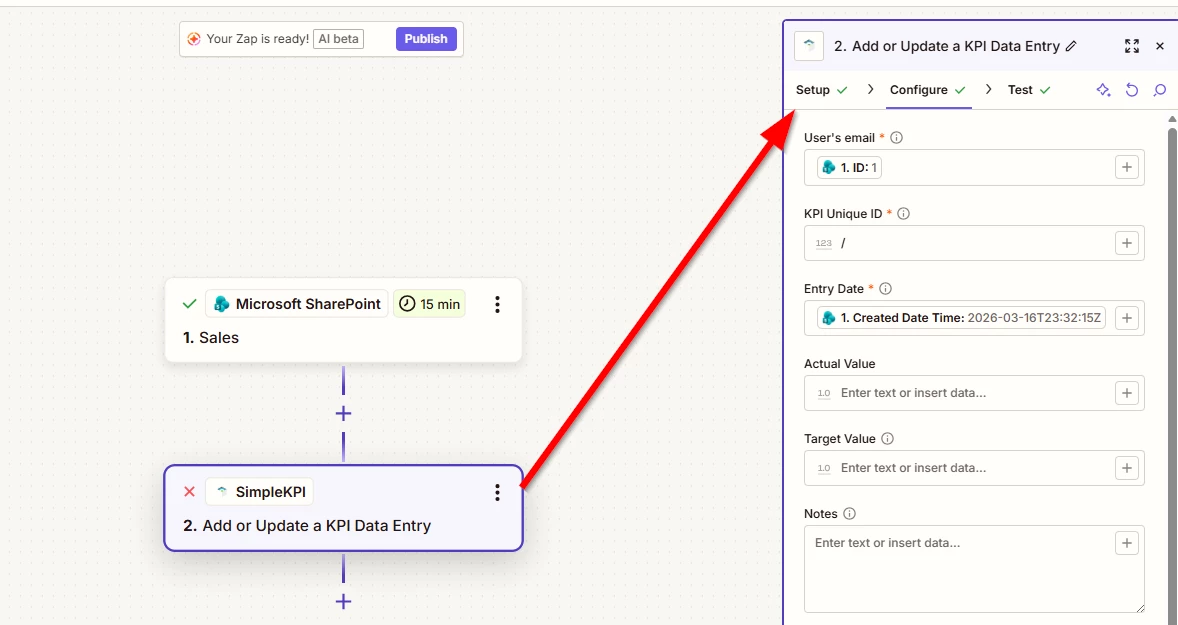
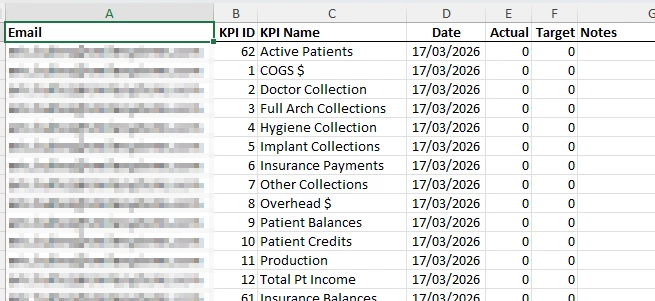
@drtanvisachar thank you, I appreciate your help! Here’s the step I’m running into, when trying to configure the SimpleKPI step when it’s asking for the “vertical” setup, that has a new line for each KPI and the value to the right of the KPI label.
Zapier:


SimpleKPI Sample File:


Forum|alt.badge.img
  • New
  • March 17, 2026

Hi ​@ejb 

Here's the SimpleKPI doc that might help: https://support.simplekpi.com/GettingStarted/DataImport#4

Zapier doc: https://help.zapier.com/hc/en-us/articles/16774279432205-How-to-get-started-with-Microsoft-SharePoint-on-Zapier#Prerequisites


And if you'd rather just get it sorted quickly, I offer a free 20-min Zapier troubleshooting call. Book it under Resources on my Zapier Directory profile: https://zapier.com/partnerdirectory/automatemybiz

!-->