Answer

Connecting Razorpay to Kajabi: Where to find payment page URL for Zapier configuration?

  • September 25, 2024
  • 6 replies
  • 48 views

Hi - I am trying to connect an India payment gateway called Razorpay to Zapier to Kajabi.


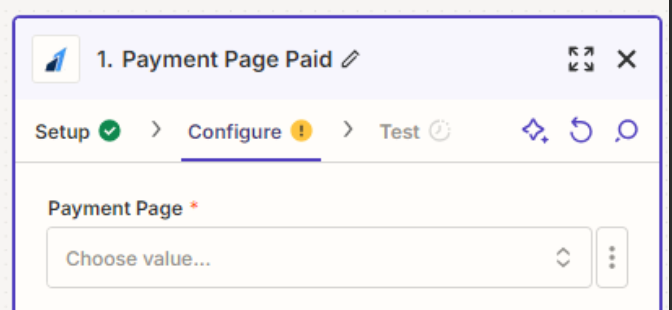
My Razorpay seems to be connected as you can see in screenshot attached Zapier 1.  But the next step “zapier 2” is asking for a configuration of payment page URL. 

Is this from my Kajabi website? And where do I find this link if so?

OR

Is this from some URL that I need to get from my payment gateway Razorpay?  Any idea how to find it?  See Zapier 3.


Thanks.

Tina

Best answer by blueskiesprep

Troy - you were absolutely right - can’t believe it was such a simple fix!  


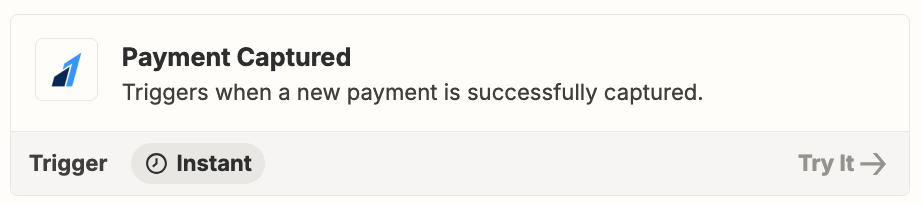
For those reading this - it is “payment captured” which is the razorpay trigger.  This at least got the zap setup.  Now onto the next step.  P.S. there is one issue with razorpay which is that people can use it on phone number rather than on email - which upsets the whole marketing email chain.

This post has been closed for comments. Please create a new post if you need help or have a question about this topic.

6 replies

Troy Tessalone
Zapier Orchestrator & Solution Partner
Forum|alt.badge.img+14
  • Zapier Orchestrator & Solution Partner
  • September 25, 2024

Hi @blueskiesprep 

Did you try selecting an option from the field dropdown list?


Help links for using Razorpay in Zaps:


Troy thank you so much! Will take a look - thanks for the super quick reply.


From my understanding, I will need a cart page that is not on Kajabi if I want a 3rd party payment solution? And then, it is this cart page I need to plug in to the zap?

Is that so, because my payment gateway doesn't offer a cart.

Does it make sense then that I would be buying Shopify (which works with Indian payment gateways) and then connect kajabi to their cart page?


Troy Tessalone
Zapier Orchestrator & Solution Partner
Forum|alt.badge.img+14
  • Zapier Orchestrator & Solution Partner
  • September 25, 2024

@blueskiesprep 

Perhaps try a different Razorpay Zap trigger such as Payment Captured.


  • Author
  • New
  • Answer
  • September 26, 2024

Troy - you were absolutely right - can’t believe it was such a simple fix!  


For those reading this - it is “payment captured” which is the razorpay trigger.  This at least got the zap setup.  Now onto the next step.  P.S. there is one issue with razorpay which is that people can use it on phone number rather than on email - which upsets the whole marketing email chain.


JammerS
Forum|alt.badge.img+6
  • Zapier Staff
  • September 26, 2024

Hi @blueskiesprep,


That's great news! We're glad that Troy's recommendation made your Zap work again and thank you for sharing the resolution.