Question

Clio Manage → Zapier → Mailchimp: Step 3 shows data, but Mailchimp contact is not updating

  • July 30, 2026
  • 2 replies
  • 27 views

Hello Zapier Community!

I am trying to update client contact information from Clio Manage into Mailchimp using Zapier.

My Zap setup is:

  1. Clio Manage – New Contact
  2. Clio Manage – Find Person by ID
  3. Mailchimp – Create/Update Subscriber

The issue is that the data appears correctly throughout Zapier. In Step 3 (Mailchimp Create/Update Subscriber), I can see the contact information being sent, including fields such as name, address, phone number, and birthday.

However, when I check the contact record in Mailchimp after the Zap runs, the information is not updated or does not appear.

My Mailchimp audience fields and merge tags are set up:

  • FNAME
  • LNAME
  • ADDRESS
  • PHONE
  • BIRTHDAY

The Zap run shows success, but Mailchimp does not reflect the updated information.

Questions:

  1. Is there a Mailchimp setting that prevents Create/Update Subscriber from updating existing contacts?
  2. Do I need to map the Mailchimp merge fields in a specific way?
  3. Is there a difference between updating a subscriber and updating contact profile fields in Mailchimp through Zapier?

Any advice would be appreciated. Thank you.

2 replies

Troy Tessalone
Zapier Orchestrator & Solution Partner
Forum|alt.badge.img+14
  • Zapier Orchestrator & Solution Partner
  • July 31, 2026

Hi ​@mas123 

For us to have true context, post screenshots showing how your Zap steps are outlined and configured in the CONFIGURE tab while in EDIT mode with the field mappings visible.


Help links for using Mailchimp in Zaps: https://zapier.com/apps/mailchimp/integrations#help


SamB
Community Manager
Forum|alt.badge.img+11
  • Community Manager
  • August 18, 2026

Hi ​@mas123 👋

Not sure if you've already got this sorted, but wanted to make sure your 3 questions get answered:

1. Is there a Mailchimp setting that prevents Create/Update Subscriber from updating existing contacts?

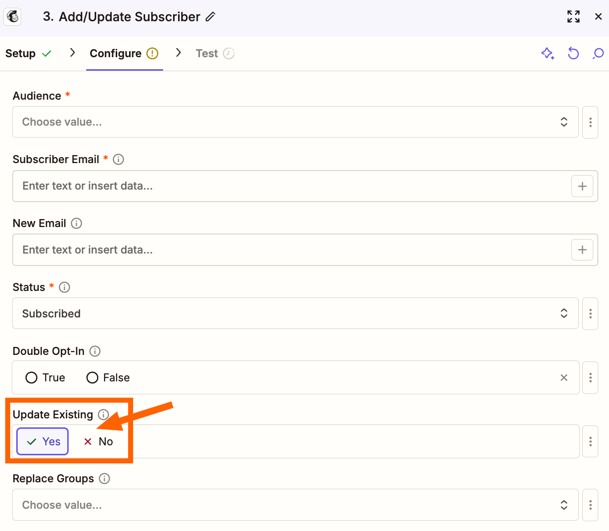
Yes, there’s a Update Existing setting on the Add/Update Subscriber action:

ebbf963cfe030889bb864dc71c9727bf.png
If that is set to No then that may be why the Zap isn’t updating the existing subscribers in Mailchimp.


2. Do I need to map the Mailchimp merge fields in a specific way?

It depends on the type of field. For example if the field appears in the Zap as a dropdown menu field then you’d need to map the ID for the option you’re wanting to select for that field. But generally, it should be fine to map fields from other steps to a merge field.

With the address fields, are you updating all the address fields or only some? Asking as when one address field has a value supplied then the rest of the address fields become required instead of optional. If some of the address fields are empty, can you map values to the remaining address fields and retest to see if that fixes it?
 

3. Is there a difference between updating a subscriber and updating contact profile fields in Mailchimp through Zapier?

I couldn’t find anything on our end to confirm there’s a difference in how they are updated.

That said, for new subscribers, sometimes they won’t be added if double opt-in is enabled as the contact will need to opt in before they’ll be added into Mailchimp. If the email address the Zap is given doesn’t exactly match that of the existing subscriber it’ll consider it a new contact, and if double opt-in is enabled then I wonder if that might be why you’re not seeing either new or existing contacts being updated.

Do you think that could be the case?