Best answer

autosave lost 6 steps in my zap, which was not visible during publishing

  • Jan 31, 2023 12:38 PM UTC
  • 2 replies
  • 108 views

I was editing a zap to add functionality. The old Zap had 10 steps. After publishing the newer version. I lost 6 steps in the process, Please make reverting to an older version possible if these things can happen without error messages.

If only by being able to delete the latest version, so it reverts automatically to the version published before last.

Best answer by jesse

Hey @Eric D! I’m so sorry this happened - that sounds quite frustrating. 😔 Troy is correct that we do have some planned improvements around this experience:

Hi @Eric D 

Good question.


I recommend reaching out to Zapier Support about this issue: https://zapier.com/app/get-help


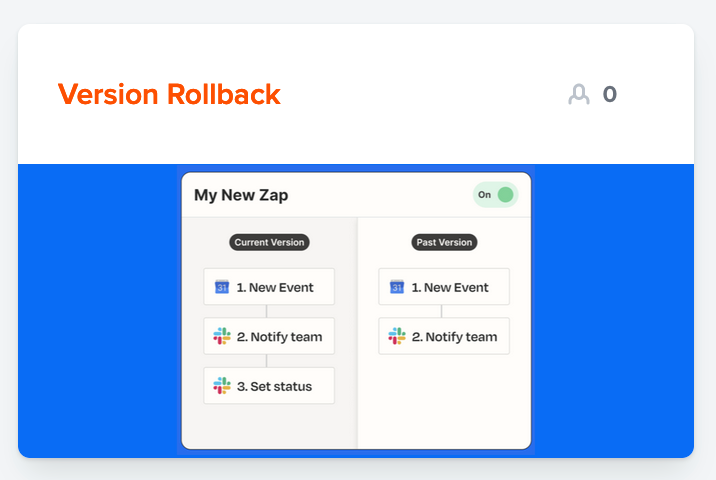
Version Rollback is on the Zapier product roadmap:


In the meantime, I am going to make a note to our product team about thread/frustration incase they choose to follow-up with you for further feedback.

View original
This post has been closed for comments. Please create a new post if you need help or have a question about this topic.

2 replies

Troy Tessalone
Zapier Orchestrator & Solution Partner
Forum|alt.badge.img+14
  • Zapier Orchestrator & Solution Partner
  • Jan 31, 2023 3:50 PM UTC

Hi @Eric D 

Good question.


I recommend reaching out to Zapier Support about this issue: https://zapier.com/app/get-help


Version Rollback is on the Zapier product roadmap:


jesse
Forum|alt.badge.img+9
  • Architect
  • Answer
  • Feb 3, 2023 11:13 PM UTC

Hey @Eric D! I’m so sorry this happened - that sounds quite frustrating. 😔 Troy is correct that we do have some planned improvements around this experience:

Hi @Eric D 

Good question.


I recommend reaching out to Zapier Support about this issue: https://zapier.com/app/get-help


Version Rollback is on the Zapier product roadmap:


In the meantime, I am going to make a note to our product team about thread/frustration incase they choose to follow-up with you for further feedback.