
Question

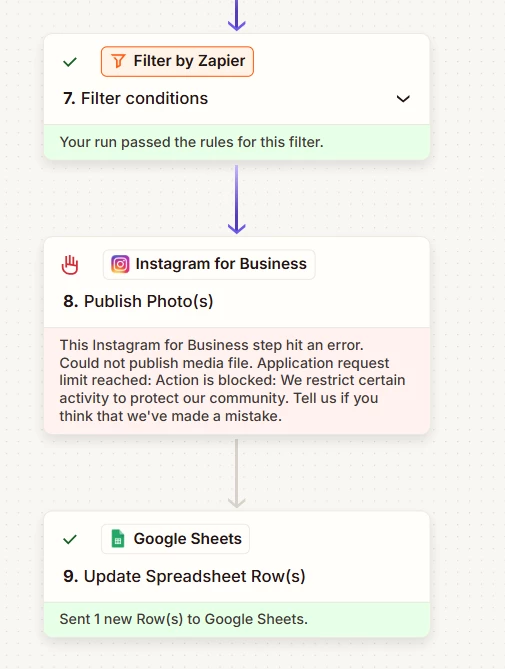
Error: Instagram API request limit reached when using Zapier

  • February 17, 2026
  • 3 replies
  • 17 views

I have set up a Zapier to upload images on my Instagram page daily. Since I was uploading an image hourly, the API must’ve been exhausted. Or so I had thought. But after having waited for days (four), it still gives limit reached error. How long will this last, is this a bug, is there a fix, or am I toast?

 

3 replies

Troy Tessalone
Zapier Orchestrator & Solution Partner
Forum|alt.badge.img+14
  • Zapier Orchestrator & Solution Partner
  • February 18, 2026

Hi ​@Rishujeet 

Instagram blocked the post because you hit a usage limit.


Their system thinks your account or the app posting for you is posting too much, too fast, or in a way that looks automated.


To prevent spam, they temporarily stopped the post.


It is an Instagram restriction.


Common reasons:

  • Too many posts in a short time
  • Posting very similar content repeatedly
  • Heavy automation activity
  • New or low trust account
  • Unusual recent activity


What usually fixes it:

  • Wait a few hours or up to a day
  • Post less frequently
  • Add delays between posts
  • Avoid bulk posting
  • Make the account activity look more human


If the issue persists, try reaching out to Meta Support for help with your IG account.


  • Author
  • New
  • February 18, 2026

Hi ​@Rishujeet 

Instagram blocked the post because you hit a usage limit.


Their system thinks your account or the app posting for you is posting too much, too fast, or in a way that looks automated.


To prevent spam, they temporarily stopped the post.


It is an Instagram restriction.


Common reasons:

  • Too many posts in a short time
  • Posting very similar content repeatedly
  • Heavy automation activity
  • New or low trust account
  • Unusual recent activity


What usually fixes it:

  • Wait a few hours or up to a day
  • Post less frequently
  • Add delays between posts
  • Avoid bulk posting
  • Make the account activity look more human


If the issue persists, try reaching out to Meta Support for help with your IG account.

I have already waited for 2 days and 4 days on two separate instances. And other tools like Pipedream don't have this problem, only Zapier. My auto-posting workflows still work for Pipedream for the same account. 


Troy Tessalone
Zapier Orchestrator & Solution Partner
Forum|alt.badge.img+14
  • Zapier Orchestrator & Solution Partner
  • February 18, 2026

@Rishujeet 

The error response is from Meta, not from Zapier.

It’s likely you will have to try to resolve the issue with Meta.


You can try opening a ticket with Zapier Support: https://zapier.com/app/get-help





