



Building upon the work we did last year, enabling users to duplicate and re-order Zap steps, we’re now launching the ability to copy and paste steps!
TLDR;
Reduce the tedium of building Zap workflows (and build complex workflows even faster). Leverage work you’ve already done by copying and pasting steps in a single Zap and across multiple Zap workflows.
How It Works
- In your Zap, find the step you’d like to reuse.
- Click on the … to the right of that step’s label.
- Click on Copy to add that step to your “clipboard”.
NOTE: you can either Paste below or Paste to replace an existing step
- Click on the … for the step you’d like to paste below or paste to replace.
Demo: Paste Below (Same Zap)
Here we will copy the Webhooks by Zapier step and paste it below an existing step.

Demo: Paste to Replace (Same Zap)
Here we will copy the Formatter by Zapier step and paste to replace an existing step.

Demo: Paste Below + Paste to Replace (Different Zap workflows)
In this case, lets copy a step from one Zap then try both paste options inside a new Zap.

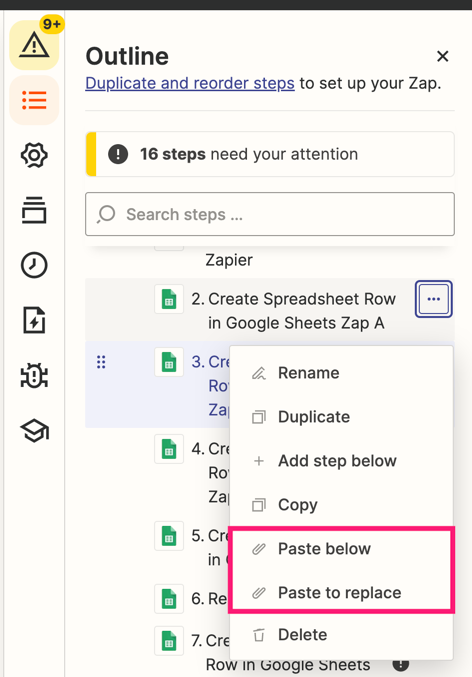
NOTE: Anything you can do in the main editor, in terms of copying and pasting steps, you can also do in the sidebar. For example...
More Details
There are a few rules around copying and pasting that you should be aware of:
- Trigger steps can only replace other trigger steps
- Trigger steps cannot be pasted below other steps since there can only be 1 trigger step per Zap
- Action steps cannot replace trigger steps
Over to You!
What are you most excited to use Copy & Paste with? Are there any huge pain points that are now alleviated by this new feature? For me, it’s Webhooks steps and ones where I’ve spent a lot of time mapping fields :)