

Best answer

zap when monitored Drive inactive after X time

  • March 25, 2021
  • 5 replies
  • 76 views

paulgailey

let’s say a team regular backup to Google Drive fails due to Murphy’s Law*

Can a Zap run when nothing happens in Drive after X time? 

Can such a trigger be concocted?

Ideal scenario: I have a zap populating cumulative Sheet of Drive backups metadata in dated rows.

If that or the google drive upload failed, my private bot tweets me that Drive was inactive/dormant.

So i want my zap to run when my backups fail.

Supplementary: Can this be achieved on a single step Zap?

My community searches haven’t proven fruitful, i’m sure this use case has been replicated.

Perhaps I need to look at this from a different perspective.


Thanks for reading!


*use case: google file system sync was manually disabled and a subsequent OS crash wiped the hard drive. Data was lost.

Best answer by jesse

Hey @paulgailey! It sounds like you were able to find a solution to your use case! I am going to sum up your post and Troy’s helpful suggestions for others to benefit from:

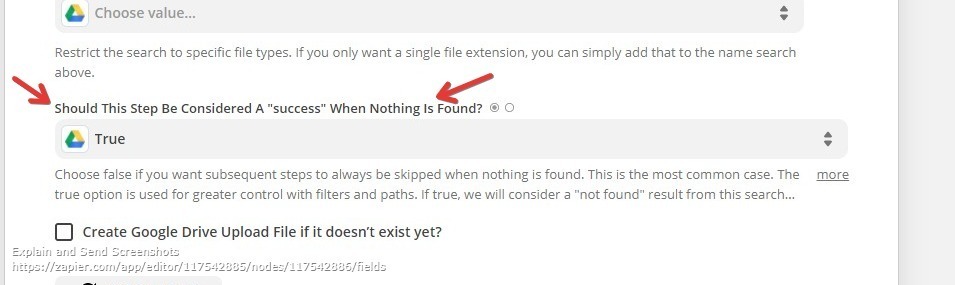
I had a dig around and found this setting within Google Drive Zaps (searching for X) appears to meet my needs:


To clarify this setting found on Zap app search steps…

If set to TRUE, this logic to allows a Zap to proceed to the next step when the search returns NO match.

If set to FALSE, this logic prevents a Zap from proceeding to the next step when the search returns NO match.


The Should This Step Be Considered A “success” When Nothing Is Found? field allows you to choose how the Zap should proceed if no record was found.

  • If you select True, the search will always be a success even if nothing is found.
  • If you select False, this step will halt if no record is found.


This post has been closed for comments. Please create a new post if you need help or have a question about this topic.

5 replies

Troy Tessalone
Zapier Orchestrator & Solution Partner
Forum|alt.badge.img+14
  • Zapier Orchestrator & Solution Partner
  • March 25, 2021

Hi @paulgailey 

I think you’ll need to further define what data point from where indicates something needs to be rerun.

Seems like you may need to involve some sort of logging to check against.

You can use a Schedule as a Zap trigger: https://zapier.com/apps/schedule/integrations#triggers-and-actions


paulgailey
  • Author
  • March 25, 2021

Thanks @Troy Tessalone for that.

I had a dig around and found this setting within Google Drive Zaps (searching for X) appears to meet my needs:

I confess I have been a long time lurker and admirer of Zapier but think i will be delving in deep to flywheel a load of processes from now as I scale up activities.


Troy Tessalone
Zapier Orchestrator & Solution Partner
Forum|alt.badge.img+14
  • Zapier Orchestrator & Solution Partner
  • March 25, 2021

@paulgailey

To clarify this setting found on Zap app search steps…

If set to TRUE, this logic to allows a Zap to proceed to the next step when the search returns NO match.

If set to FALSE, this logic prevents a Zap from proceeding to the next step when the search returns NO match.


The Should This Step Be Considered A “success” When Nothing Is Found? field allows you to choose how the Zap should proceed if no record was found.

  • If you select True, the search will always be a success even if nothing is found.
  • If you select False, this step will halt if no record is found.

AndrewJDavison
Forum|alt.badge.img+11
  • Zapier Solution Partner
  • May 25, 2021

@paulgailey 
Just checking in to see if you still need help with this? 


jesse
Forum|alt.badge.img+9
  • Architect
  • Answer
  • May 23, 2022

Hey @paulgailey! It sounds like you were able to find a solution to your use case! I am going to sum up your post and Troy’s helpful suggestions for others to benefit from:

I had a dig around and found this setting within Google Drive Zaps (searching for X) appears to meet my needs:


To clarify this setting found on Zap app search steps…

If set to TRUE, this logic to allows a Zap to proceed to the next step when the search returns NO match.

If set to FALSE, this logic prevents a Zap from proceeding to the next step when the search returns NO match.


The Should This Step Be Considered A “success” When Nothing Is Found? field allows you to choose how the Zap should proceed if no record was found.

  • If you select True, the search will always be a success even if nothing is found.
  • If you select False, this step will halt if no record is found.








