Best answer

Zap ignoring 30 minute gaps when scheduling to Buffer

  • May 28, 2021
  • 3 replies
  • 62 views

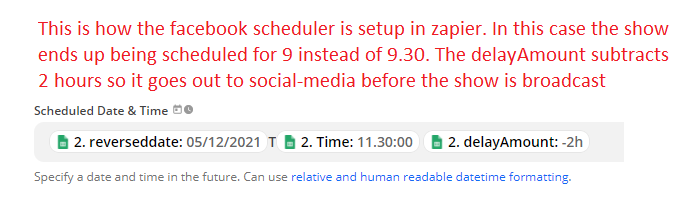
We have a Zap which schedules social media posts to Buffer. The posts are to promote radio shows which go out every 30 minutes but for some reason it’s ignoring the minutes.

e.g an 11am show will be scheduled in buffer at the same time as an 11.30 show.

Does anyone know why this is happening or is it a bug in the buffer side of things?


Best answer by Troy Tessalone

Hi @meganf 

Try removing the static “T” and replacing it with a space

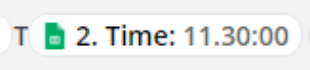
The Time value is not configured correctly, notice the . between 11 and 30 that should be a colon :


Here's a help article about the Formatter > Date & Time options: https://zapier.com/help/create/format/modify-date-and-time-formats-in-zaps

This post has been closed for comments. Please create a new post if you need help or have a question about this topic.

3 replies

AndrewJDavison
Forum|alt.badge.img+11
  • Zapier Solution Partner
  • May 28, 2021

@meganf 

It’s probably related to how you’ve constructed that time input - I’d add a ‘Formatter → Date/Time → Format’ step beforehand.


Troy Tessalone
Zapier Orchestrator & Solution Partner
Forum|alt.badge.img+14
  • Zapier Orchestrator & Solution Partner
  • Answer
  • May 28, 2021

Hi @meganf 

Try removing the static “T” and replacing it with a space

The Time value is not configured correctly, notice the . between 11 and 30 that should be a colon :


Here's a help article about the Formatter > Date & Time options: https://zapier.com/help/create/format/modify-date-and-time-formats-in-zaps


  • Author
  • Beginner
  • May 31, 2021

Thanks Troy. I replaced the dot with a colon and it fixed the problem.

J