Best answer

When running my Zap, the company name and number showed as the question asked, not the responses.

  • October 13, 2022
  • 3 replies
  • 54 views

Forum|alt.badge.img

This post has been edited by a moderator to remove personal information. Please remember that this is a public forum and to remove any sensitive information prior to posting.

Hello, 


I am working to connect our calendly to our salesforce and I am running into an error. 

The Goal: When a new calendly event is created it will create a lead in salesforce. Calendly requests their name, email, company name, and phone number.


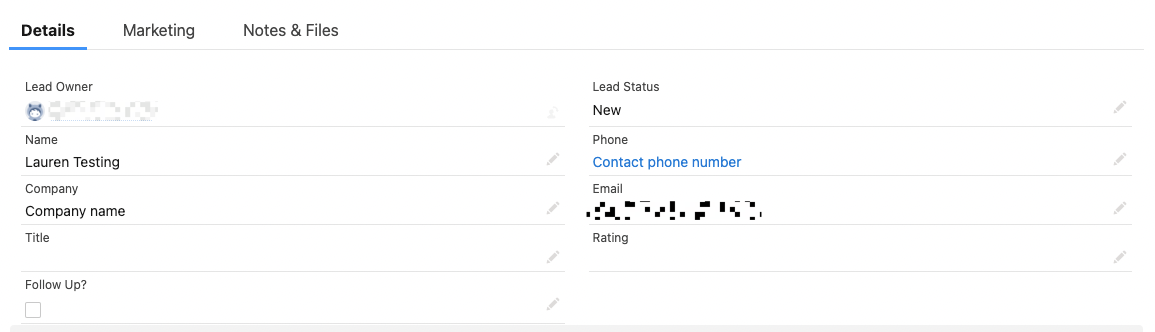
However, when I run the zap the company name and number show as the question asked and not the responses.  where is says company name should say enrich. phone number should be a number
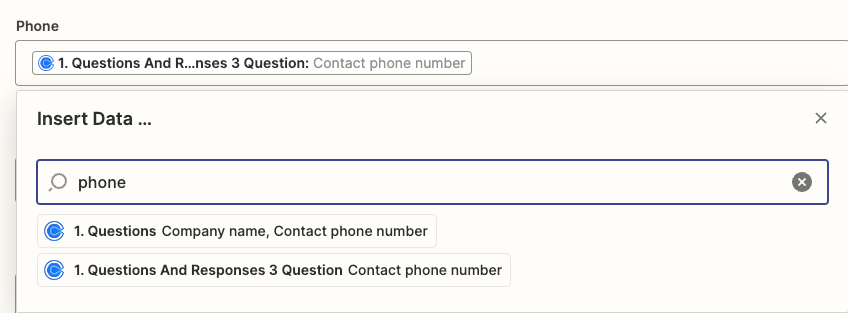
​​This is the options it shows when creating the connections in zapier, I have tried both and neither generate the correct answer. 


Best answer by Lkampan

I figured it out. I needed to find the responses in the data

This post has been closed for comments. Please create a new post if you need help or have a question about this topic.

3 replies

MohSwellam
Zapier Orchestrator & Solution Partner
Forum|alt.badge.img+8
  • Zapier Orchestrator & Solution Partner
  • October 13, 2022

Hi @Lkampan 


I would suggest you search for “Answer” instead of searching for “Phone” 


Better yet, check Calendly for the phone number of the person in the trigger above then search for said phone number to get the accurate field. 


Forum|alt.badge.img
  • Author
  • Beginner
  • Answer
  • October 13, 2022

I figured it out. I needed to find the responses in the data


Liz_Roberts
Forum|alt.badge.img+8
  • Zapier Staff
  • October 14, 2022

Nice @Lkampan - thanks for letting us know!

Glad you were able to find the necessary data. We’ll be here if you run into any other bumps!