Best answer

When an Airtable record enters, exits, and re-enters the view, will the Zap trigger again?

  • June 2, 2026
  • 7 replies
  • 44 views

Forum|alt.badge.img

I am creating a zap that triggers when a record is added to an airable, table. 

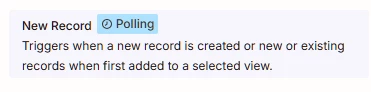
The  description shows,(see attached), that the zap is triggered “when 1st added to a selected view”

Does anybody know is a air table record enters, exists, and re-enters the airtable view - will the zap trigger? 


Thanks :)  !
 

Best answer by JoeNeedsToKNow

I think I found a solution:

The zap that was not working was Triggered by a New Record Step, filtered by record entering a View, which only allows 1st Time. 

I changed that to Trigger by Updated Record. 


This Worked!


Thank you for the help!

7 replies

Troy Tessalone
Zapier Orchestrator & Solution Partner
Forum|alt.badge.img+14
  • Zapier Orchestrator & Solution Partner
  • June 3, 2026

Hi ​@JoeNeedsToKNow 

Help links for using Airtable in Zaps: https://zapier.com/apps/airtable/integrations#help


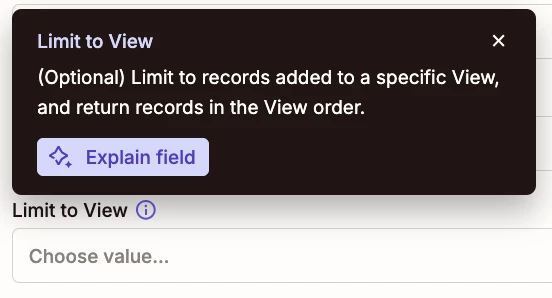
View is an optional field in the Airtable Zap trigger config.

Zapier has built in deduplication for trigger steps.

So if the same Airtable record triggers the Zap 2+ times while the Zap is ON, then only the first instance will result in a Zap Run.


TIP: When in doubt, test it out.


Forum|alt.badge.img

Thank you!


Im working to get past this limitation -- my use case is:


I have a airtable field called ‘Status’ which updates frequently. 

How do I setup a zap to trigger every time the status = “pending” 


Can Anybody help? 

Thanks 


Troy Tessalone
Zapier Orchestrator & Solution Partner
Forum|alt.badge.img+14
  • Zapier Orchestrator & Solution Partner
  • June 10, 2026

@JoeNeedsToKNow 

Create an Airtable View with a Filter that has a condition Status = Pending.

Select that View in the Zap trigger step.

See screenshot below.


Forum|alt.badge.img

FYI

I did try to setup the zap to trigger when an AirTable record is added to a specific View;

A Filter that has a condition Status = Pending, but was not successful (in getting the zap to trigger on a previously triggered AirTable record).

The record did enter the AirTable filter, but the zap did not trigger.


Any help would be appreciated 🤗

Thank you


Troy Tessalone
Zapier Orchestrator & Solution Partner
Forum|alt.badge.img+14
  • Zapier Orchestrator & Solution Partner
  • June 10, 2026

@JoeNeedsToKNow 

Then you would need to create an Airtable Automation that triggers a Zap.


Airtable Automation trigger: When record enters view

This will trigger each time a record enters a view, even for the same record


Zap trigger: Webhook - Catch Hook

This generates a unique webhook URL to configure in the Airtable Automation Run Script action step.


Follow this guide: 


Forum|alt.badge.img
  • Author
  • Beginner
  • Answer
  • June 10, 2026

I think I found a solution:

The zap that was not working was Triggered by a New Record Step, filtered by record entering a View, which only allows 1st Time. 

I changed that to Trigger by Updated Record. 


This Worked!


Thank you for the help!


SamB
Community Manager
Forum|alt.badge.img+11
  • Community Manager
  • June 11, 2026

That's great news ​@JoeNeedsToKNow! 🎉 Glad you got it working by switching to the “New or Updated Record" trigger instead. Thanks ​@Troy Tessalone for helping out here. I'll mark this as answered! 😁