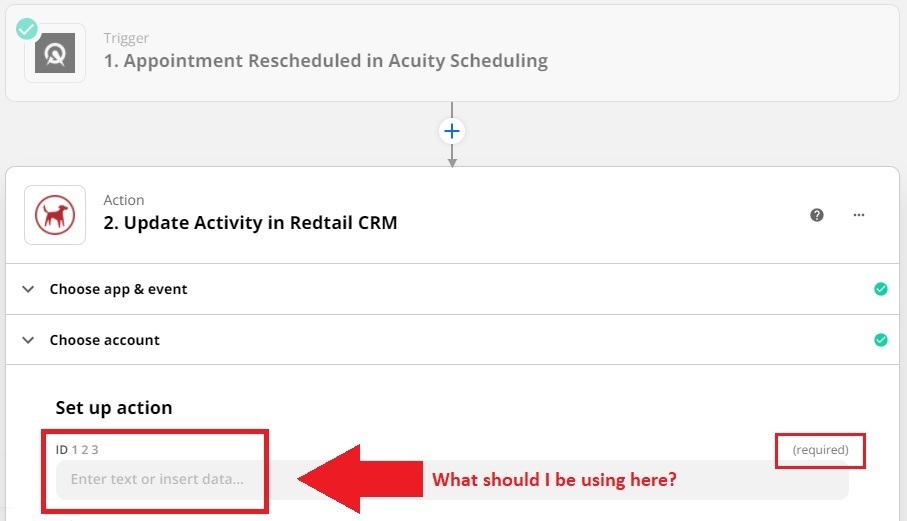
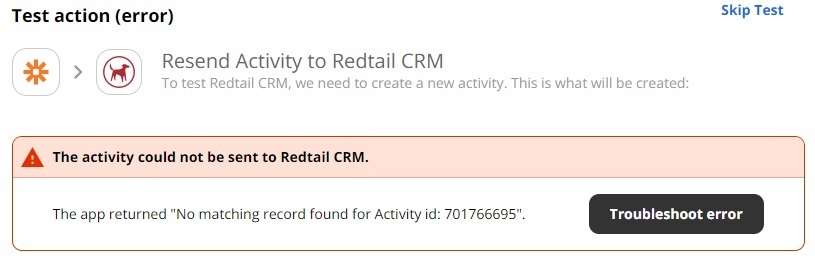
What am I supposed to use within the required ID field when creating a zap so that activities changed in Acuity are fed to RedTail using Zapier’s “Update Activity in RedTail CRM” as the zap action? I’ve testing using every form of “ID” I could frond from the dropdowns but still get an error message. (See screenshot below)
Best answer by SamB
Quick update: a Find Activity action was added to the Redtail CRM app on Zapier! 🎉
With this action you can now search for existing activities in Redtail without needing the workaround suggested above. If you run into any issues, start a new topic or reach out to Support and we’ll be happy to help! 🙂
The field expects a number as indicated by the icon next to the field name.
In this case, the field expects the internal ID of the Activity in Redtail.
Unfortunately the Redtail Zap app integration doesn’t have a Find Activity action available, that could be used to find the Activity to get the Activity ID to use in the Update Activity action step.
As Troy mentioned, there isn’t currently Find Activity search action which would be able to give you the ID for the activity to use in that ID field. That said, we do have a feature request open for a Find Activity action to be added to the Redtail integration, so I’ve added your vote for that. I don’t have an ETA for when that will be added but we’ll contact you by email as soon as it is.
In the meantime, do you have a Zap that creates the activities in Redtail initially? If so, I’m thinking that you could potentially add another step to that Zap to make a record of the activity’s details, including the ID (this info should be output by the Create Activity step), in an app like Google Sheets.
Then in the Zap that’s looking to update the activity, you would add a Lookup Spreadsheet Row Google Sheets search action. This would allow you to search the Google Sheet for the activity and obtain it’s ID. Then in the Update Activity step, you’d select the ID that was found by the Lookup Spreadsheet Row step.
Sam, thanks for the temporary “hack” tip! Sounds like that’ll work so I’ll give it a try and just use that until the Find Activity feature requests gets implemented. I appreciate the prompt feedback from both of you :)
Quick update: a Find Activity action was added to the Redtail CRM app on Zapier! 🎉
With this action you can now search for existing activities in Redtail without needing the workaround suggested above. If you run into any issues, start a new topic or reach out to Support and we’ll be happy to help! 🙂
Early access
Next Gen Zaps
Build and deploy automations from AI tools you already use. With Agentic Management, if anything breaks, the agent diagnoses the issue and proposes a fix.