Best answer

Webhook to capture wordpress page data to google sheets

  • October 15, 2022
  • 4 replies
  • 54 views

Hello hello,

I would love to know if there is a possible workflow that will…
1. Capture the data field that are input in a Wordpress sheet (developer side- its dates and times that are set on  templated Wordpress pages) 
2. Put them in a google sheets doc.

Please help.`


Thanks so much

 

Best answer by chanelle

Hi @nic_dowley! This page should be pretty helpful for you. It’ll allow you to see all of your options and decide best course of action for your specific needs. If you have any questions after reviewing, or run into any problems, feel free to pop back over here! 

This post has been closed for comments. Please create a new post if you need help or have a question about this topic.

4 replies

Danvers
Forum|alt.badge.img+12
  • Zapier Staff
  • October 17, 2022

Hi @nic_dowley, welcome to the Community!


The best way to think about Zaps is as a when/then statement - when something happens in WordPress, then put the information into Google Doc. So, we’ve got the ‘then’ part, but I’m not quite sure on what you need for the ‘when’ of the Zap. You said that you’d like the data input into a field, when is the data added to the field (eg when a new post is added)?

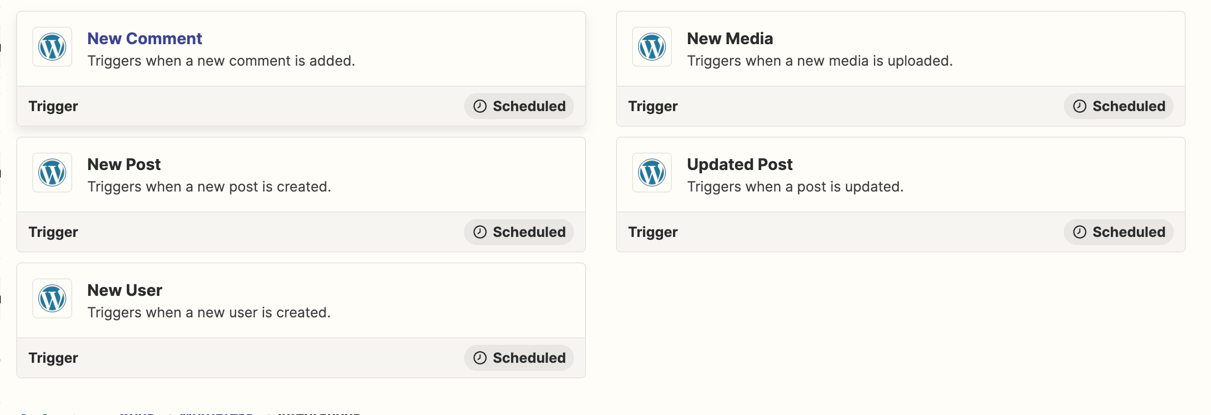
Here are the triggers that are available for the WordPress Zapier integration, does it look like any of them would fit what you’re looking for?


  • Author
  • Beginner
  • October 20, 2022

Thank you for your answer, 

The when part is a little tricky to explain.

We have a schedule of classes that we run.
Our admin enters the dates/names of these courses into a wordpress page template, that creates a page with its own page link for each course and date.

I would like to get this unique link, date and name from wordpress to sheets each time its created or once a day- in which everything is uploaded

Is this possible, is Zapier able to read a wordpress database?


chanelle
Forum|alt.badge.img+8
  • Zapier Staff
  • Answer
  • October 21, 2022

Hi @nic_dowley! This page should be pretty helpful for you. It’ll allow you to see all of your options and decide best course of action for your specific needs. If you have any questions after reviewing, or run into any problems, feel free to pop back over here! 


  • Author
  • Beginner
  • November 18, 2022

Thank you so much for your help I have resolved this.