


Question

Using Paths to skip an action, but cannot duplicate the loop

  • March 6, 2025
  • 4 replies
  • 32 views

Forum|alt.badge.img+1

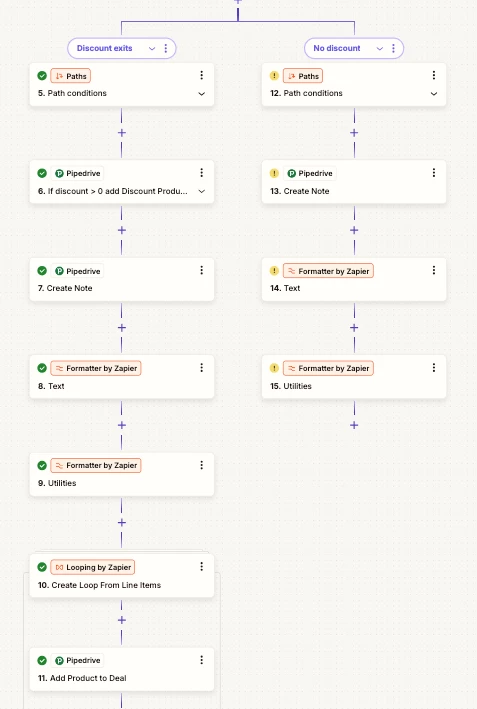
Hi, I’m wondering if this is the right way to. I want Zapier to only add a discount product to Pipedrive if there is a discount value > 0 so I set up a path. If the condition is not met step 6 is skipped and the patch continues as normal.

However as I was cutting and pasting steps I realised I can’t copy the loop as only 1 loop is found.

So if I have a list of products that need to be added to Pipedrive can I apply some logic to only apply a certain product if it meets the criteria. In Pipedrive Products have to be added 1 at a time hence the loop. My formatter steps create an array of line items which then loop through to be added to PIpedrive.

Thanks in advance


This post has been closed for comments. Please create a new post if you need help or have a question about this topic.

4 replies

Troy Tessalone
Zapier Orchestrator & Solution Partner
Forum|alt.badge.img+14
  • Zapier Orchestrator & Solution Partner
  • March 6, 2025

Hi ​@Bizzer 

Some options:


Help links for Looping: https://zapier.com/apps/looping/integrations#help


Forum|alt.badge.img+1
  • Author
  • Beginner
  • March 6, 2025

What is this dark magic. I’ll take a look at it Troy, might be pushing my skills here, but its probably easier than it sounds. Many thanks 


ken.a
Forum|alt.badge.img+6
  • Zapier Staff
  • March 7, 2025

Hi ​@Bizzer,

Please keep us updated regarding this one and if you encounter any issues please let us know as well. We’re happy to assist further! 🤗


Forum|alt.badge.img+1
  • Author
  • Beginner
  • March 7, 2025

I think I’ll park it for now. In another Zap I’ve managed to use a bit of Code to strip out the discount field and only add it as a line item if it has a value




