



Best answer

Updating email address for Community notifications

  • April 4, 2025
  • 3 replies
  • 37 views

Todd Harper
Forum|alt.badge.img+8

Hey there Zapier Community admins!

I updated the email address I use with Zapier a long while ago, and while that new email address is the one I use to log in to this community, I suspect notifications are still going to the old address. I logged in for the first time in a long time a few weeks ago to find dozens of DMs and post comments that I never knew existed, presumably because they’re being sent to my old (and defunct) email address!

Searching settings, I don’t see any place to update my notifications email address. Are you able to check this on the backend of the system to ensure my email notification settings are correctly going to the same email address I use to log in to the community?

The Zapier Experts support team reportedly made this change on March 12th, but I still haven’t received any notifications (despite continuing to receive them in-app).

HELP!

(also, I’ll keep this tab open so I can peek in on it on occasion, but since I’m not getting notifications right now, it’d be great if you could send me an email instead of just commenting here)

Best answer by SamB

Hi there, ​@Todd Harper 👋

Sorry to hear you’ve not been getting those notifications from us! If the email address for your Zapier account was updated then that will have automatically been updated on your community account as well—the current email address for the community account would be the one we send notifications to, not your old one.

If you’re not getting the email notifications then its likely email notifications are disabled in your community account. 🤔

To check they’re enabled:

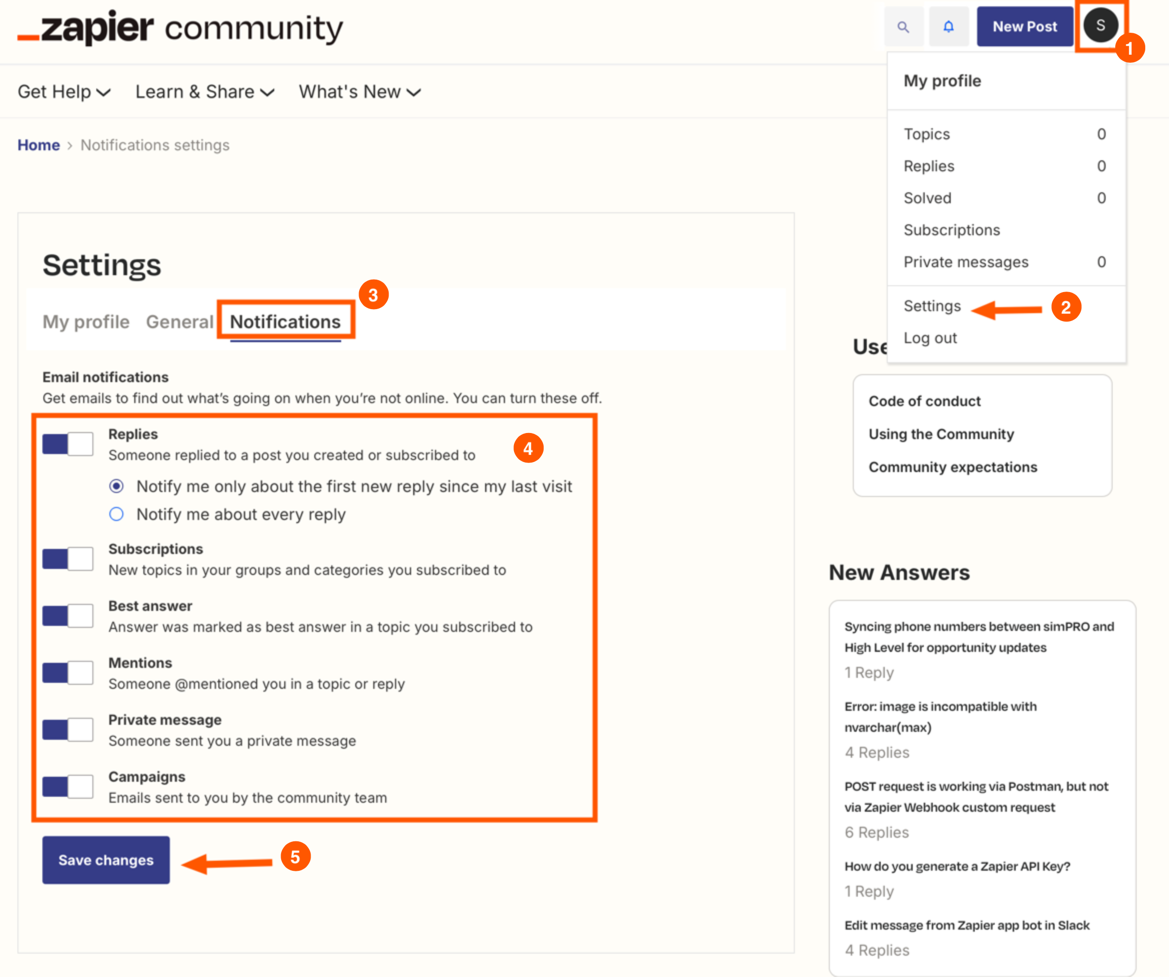
  1. Click on your profile icon.
  2. Select the Settings option from the menu that appears. 
  3. Then click on the Notifications tab.
  4. Enable the relevant email notifications that you’d like to receive that might be disabled.
  5. When you’re finished, use the Save changes button to save the updated notification settings.

0a29379fe81c8fb553e96de209d0c084.png
 

Can you give that a try and confirm that email notifications are either already enabled, or are now enabled?

And I’d recommend checking your spam or junk folder, or searching your inbox for emails from zapier.com, just in case the email notifications ended up in the wrong place.

I’ll also send you an email to make sure you don’t miss my reply here. Looking forward to hearing from you! 🙂

This post has been closed for comments. Please create a new post if you need help or have a question about this topic.

3 replies

SamB
Community Manager
Forum|alt.badge.img+11
  • Community Manager
  • Answer
  • April 8, 2025

Hi there, ​@Todd Harper 👋

Sorry to hear you’ve not been getting those notifications from us! If the email address for your Zapier account was updated then that will have automatically been updated on your community account as well—the current email address for the community account would be the one we send notifications to, not your old one.

If you’re not getting the email notifications then its likely email notifications are disabled in your community account. 🤔

To check they’re enabled:

  1. Click on your profile icon.
  2. Select the Settings option from the menu that appears. 
  3. Then click on the Notifications tab.
  4. Enable the relevant email notifications that you’d like to receive that might be disabled.
  5. When you’re finished, use the Save changes button to save the updated notification settings.

0a29379fe81c8fb553e96de209d0c084.png
 

Can you give that a try and confirm that email notifications are either already enabled, or are now enabled?

And I’d recommend checking your spam or junk folder, or searching your inbox for emails from zapier.com, just in case the email notifications ended up in the wrong place.

I’ll also send you an email to make sure you don’t miss my reply here. Looking forward to hearing from you! 🙂


Todd Harper
Forum|alt.badge.img+8
  • Author
  • Zapier Solution Partner
  • April 8, 2025

Wow - can’t believe I didn’t think to check spam 🤦🏻‍♂️ Disregard! I’ve got them.


SamB
Community Manager
Forum|alt.badge.img+11
  • Community Manager
  • April 9, 2025

No worries, ​@Todd Harper! Really glad you found them and that our system isn’t broken 😅
