Best answer

Update Spreadsheet for my upsell with click funnels (already create a new spreadsheet)

  • September 22, 2020
  • 9 replies
  • 214 views

Hello community!


I’ve created a Zap for a new purchase on Click Funnel in which i create a new spreadsheet on google sheets.

After the first purchase I’m having an up sell and i would like to updated the same row of the purchase with the up sell information.

I tried but was always updating same row.

any tips on how doing it??

Thanksss


Jarobmia



Best answer by Troy Tessalone

For the second  upsell, you’ll need a common data point that can be used to lookup the existing row to update found row with data.

Action: GSheets - Lookup Row

Action: GSheets - Update Row

This post has been closed for comments. Please create a new post if you need help or have a question about this topic.

9 replies

Troy Tessalone
Zapier Orchestrator & Solution Partner
Forum|alt.badge.img+14
  • Zapier Orchestrator & Solution Partner
  • 34020 replies
  • September 22, 2020

Please provide screenshots of how your Zap step is configured, thanks.


  • Author
  • Beginner
  • 4 replies
  • September 23, 2020

hello Troy!!

thanks for your time! 


here you can see the zap using “New Successful Purchase” from my Funnel (1st step) and then “Create Spreadsheet Row” from Google Sheet

so far is good because i’m collecting the info of first purchase but when i try to get information of OTO up sell (which is steps 2 on that funnel) i don’t know how to make it happend.

As far as i can get is duplicating this zap and getting that ORO info in a different row of the google sheet (but the idea is to get the information from both steps of my funnel in the same row)


is good enough that info??


Troy Tessalone
Zapier Orchestrator & Solution Partner
Forum|alt.badge.img+14
  • Zapier Orchestrator & Solution Partner
  • 34020 replies
  • Answer
  • September 23, 2020

For the second  upsell, you’ll need a common data point that can be used to lookup the existing row to update found row with data.

Action: GSheets - Lookup Row

Action: GSheets - Update Row


  • Author
  • Beginner
  • 4 replies
  • September 23, 2020

hello troy!


thanks for the help.


in order to use it with the  upsell i should creat a new different zap ??

click funnels new purchase UP SELL → GSheets - Lookup Row → GSheets - Update Row


like this?


Troy Tessalone
Zapier Orchestrator & Solution Partner
Forum|alt.badge.img+14
  • Zapier Orchestrator & Solution Partner
  • 34020 replies
  • September 23, 2020

Yes, that the concept.
Again, the key to making this work is that there is a common data point from each ClickFunnels step that will allow you to do the GSheet lookup.


  • Author
  • Beginner
  • 4 replies
  • September 24, 2020

hello again troy!


i may be stock in step 3 GS-Update row


what do i missed ? 


thank you again for your help


Troy Tessalone
Zapier Orchestrator & Solution Partner
Forum|alt.badge.img+14
  • Zapier Orchestrator & Solution Partner
  • 34020 replies
  • September 24, 2020

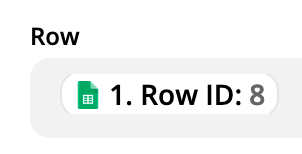
Row value should be the Row ID (number) returned from the previous step GSheet Lookup Row.


  • Author
  • Beginner
  • 4 replies
  • September 25, 2020

not working… i think i would not do it cos i don’t wanna waste more of your time. :( 


Troy Tessalone
Zapier Orchestrator & Solution Partner
Forum|alt.badge.img+14
  • Zapier Orchestrator & Solution Partner
  • 34020 replies
  • September 25, 2020

Row input in the Zap step should look like this…