Best answer

Update Podio item with URL from newly created Jira Issue

  • August 9, 2021
  • 5 replies
  • 40 views

Hello,

I’ve just created my first zap. This Zap automatically creates a new Jira issue when a Podio item is created. Now I want to add the URL from the Jira issue to a field in my Podio item. 

How can I do this? How can I make Zapier find the right issue to connect with?

Best answer by Leinad1989

@Troy Tessalone 


thanks, that didn't work. But I managed to get it fixed. All I had to do is type the beginning of the URL (which is always the same) and put the ID behind it.

This post has been closed for comments. Please create a new post if you need help or have a question about this topic.

5 replies

Troy Tessalone
Zapier Orchestrator & Solution Partner
Forum|alt.badge.img+14
  • Zapier Orchestrator & Solution Partner
  • August 10, 2021

Hi @Leinad1989 

Add another step in your Zap.

Map the ID of the trigger step to the Podio Update Item step.

Help article: https://zapier.com/help/create/basics/set-up-your-zap-action#set-up-your-action


  • Author
  • New
  • August 10, 2021

Hi @Troy Tessalone ,


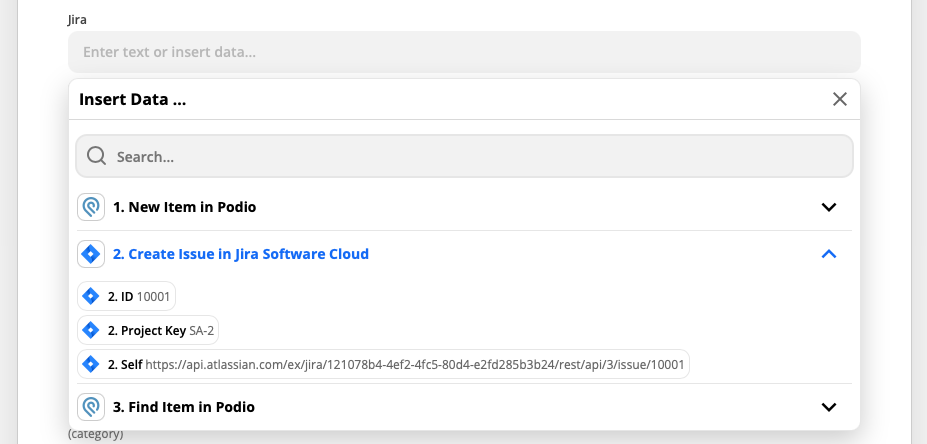
Thank you for your reaction. Seems to be working now, just one question, maybe you can help me. I want to return the Jira Issue URL, but I can’t seem to figure out which field to use. Do you have any idea?


Troy Tessalone
Zapier Orchestrator & Solution Partner
Forum|alt.badge.img+14
  • Zapier Orchestrator & Solution Partner
  • August 10, 2021

@Leinad1989 

Search for http

Looks to be the Self parameter value

Notice the /issue/ at the end


  • Author
  • New
  • Answer
  • August 11, 2021

@Troy Tessalone 


thanks, that didn't work. But I managed to get it fixed. All I had to do is type the beginning of the URL (which is always the same) and put the ID behind it.


SamB
Community Manager
Forum|alt.badge.img+11
  • Community Manager
  • August 11, 2021

Hey @Leinad1989, that’s great news! Thanks for sharing your solution with the Community! :)