

Answer

Update Hubspot Records Based on Calendly Info

  • January 4, 2023
  • 3 replies
  • 122 views

Hey. I’m struggling to set-up a workflow that will automatically update existing Hubspot records based on a Calendly submission.


When a prospective customer books a Calendly meeting with me, they are automatically created in Hubspot. I would like to create a zap that automatically updates their Lifecycle Stage. However I’m getting stuck as it needs an Object ID from Hubspot to run the zap which I wouldn’t know how to source within the workflow. 


Any ideas on what this could look like as a zap?
Best answer by nicksimard

Hey @J8900!

What you can do there is add a Find Contact step. Something like this:

Trigger: Calendly — New Submission
Action: HubSpot — Find Contact
Action: HubSpot — Update Contact

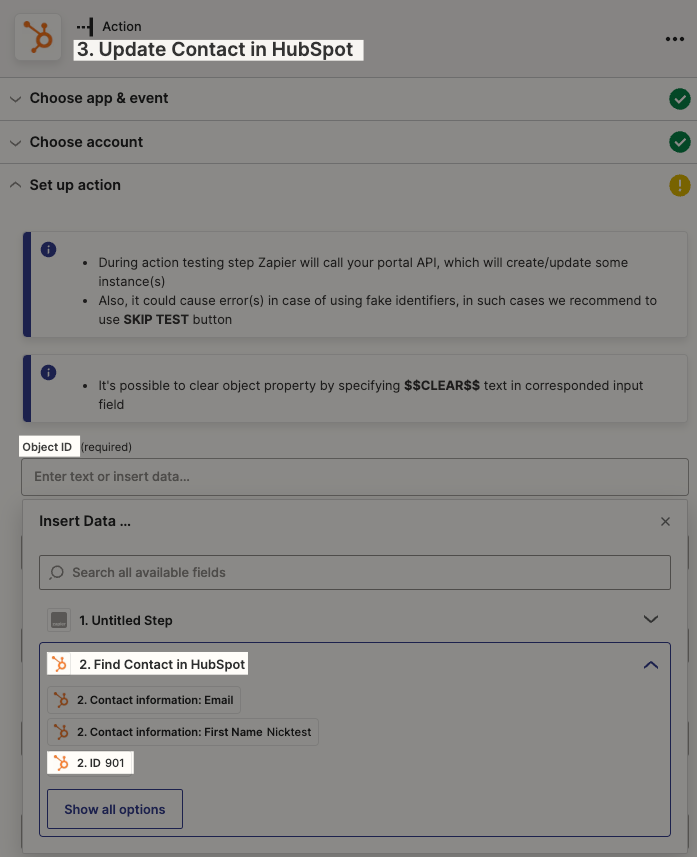
That way you can map the ID field from your search step, into the Object ID field of your update step:


Can you give that a try to see if it gets you the result you need 😀

This post has been closed for comments. Please create a new post if you need help or have a question about this topic.

3 replies

nicksimard
Forum|alt.badge.img+11
  • Zapier Staff
  • Answer
  • January 5, 2023

Hey @J8900!

What you can do there is add a Find Contact step. Something like this:

Trigger: Calendly — New Submission
Action: HubSpot — Find Contact
Action: HubSpot — Update Contact

That way you can map the ID field from your search step, into the Object ID field of your update step:


Can you give that a try to see if it gets you the result you need 😀


  • Author
  • Beginner
  • January 5, 2023

This worked! Thanks.


nicksimard
Forum|alt.badge.img+11
  • Zapier Staff
  • January 5, 2023

Awesome @J8900! I’m happy to hear that :) Thanks for letting me know.


