Question

Trying to find the LAST card in a multi-card related order to send an update email to a customer

  • May 5, 2026
  • 3 replies
  • 38 views

We create costumes for customers.  We use Cognito Forms to start an order with specifics about the costume.  Each piece gets a separate Cognito form which in turn creates a separate Trello card for workflow/productdion.   As the Trello cards move through the workflow, they trigger update and notification events.  

I wouid like to send an email to our customer when their costume order reaches a specific point in the workflow… BUT, there may be several cards in the workflow that are associated with an order (say 222222 in this case) and I want to use the related card with the longest due date for delivery.  For example: Card 1 may take 5 days to produce, but Card 2 (related by order number (222222-A, 222222-B, 222222-C, etc) may take 14 days to produce.  I only want to update the customer when Card 2 reaches a workflow point as that item will take the longest to manufacture.  We ship orders complete which mean all pieces have to be finished.

My question is:  Is there a way to have Zapier (AI, etc) figure out all of the related cards in Trello and pick the card that has the longest delivery date and use THAT card to produce the update message to the customer.  (e.g. I don’t want to trigger a message using Card1 with a 5 day cycle, but use Card 2 with a 14 day cycle because that Card drives the actual delivery date.).   The easiest way is to have the sales associate check a box in Cognito that says “use this card for status updates”, but that is prone to errors.  I am trying to figure out a way to achieve this without physically having to check a box.  

I am not sure how to achieve this…  any suggestions are appreciated!  

Ken

3 replies

Troy Tessalone
Zapier Orchestrator & Solution Partner
Forum|alt.badge.img+14
  • Zapier Orchestrator & Solution Partner
  • May 6, 2026

Hi ​@khlevin 

Solution will likely involve some custom code.
 

Try these Zap actions:

  • Action: Trello - Find Card
    • CONFIG
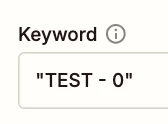
      • Keyword
        • Map the common Card value to search
        • Put in double quotes
          • See screenshot below
      • If multiple search results are found = Return all results as line items.
        • See screenshot below
  • Action: Code (JavaScript)
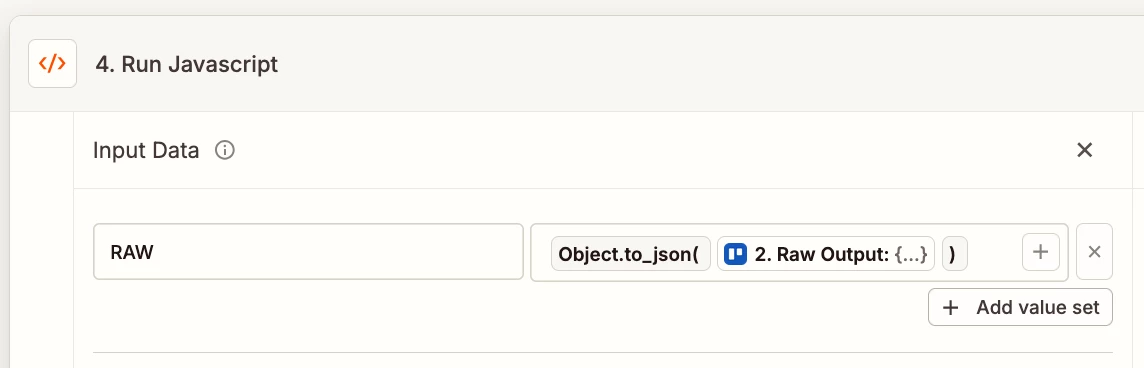
    • Inputs
      • RAW
        • See screenshot below
    • Code
      • See code below


CODE

// Zapier Code Step: Find the card with the latest due date

const raw = inputData.RAW;

if (!raw) {
throw new Error("RAW is required.");
}

const data = JSON.parse(raw);
const cards = data.results || data.cards || data;

const cardsWithDueDates = cards.filter(card => card.due);

if (cardsWithDueDates.length === 0) {
return {
found: false,
message: "No cards with due dates found."
};
}

cardsWithDueDates.sort((a, b) => new Date(b.due) - new Date(a.due));

const card = cardsWithDueDates[0];

return {
found: true,
card_name: card.name,
card_due: card.due,
card_url: card.url,
card_id: card.id
};


Other Options:

  1. Try creating a Trello Custom Action with the help of AI
    1. Help: https://help.zapier.com/hc/en-us/articles/16277139110157-Create-a-custom-action
  2. Try using the Trello API
    1. App: API by Zapier
      1. Help: https://zapier.com/apps/api-by-zapier/integrations#help
    2. App: Webhooks by Zapier
      1. Help: https://zapier.com/apps/webhook/integrations#help
  3. Try using custom Code
    1. Help: https://zapier.com/apps/code/integrations#help
  4. Try working with a Zapier Solution Partner
    1. https://zapier.com/partnerdirectory


Sparsh from Automation Jinn
Forum|alt.badge.img+6

Hey ​@khlevin,

Yes, it’s possible to achieve using Zapier. Your workflow will look something like this-

  • Card moved to list trigger
  • Formatter by Zapier(Extract the base order number)
  • Find Card by Custom Query action
  • Code by Zapier for finding the longest timeline card
  • Filter
  • Send Customer Email

Here is a helpful article about Code in Zapier- https://help.zapier.com/hc/en-us/articles/8496310939021-Use-JavaScript-code-in-Zaps


I know this is a bit more complex and technical that you would have liked but if it’s important for you, you can give this approach a try. Hope it helps!

PS: If you need more active help, I’m happy to connect through my Zapier Solution Partner page if you’d like to reach out here- https://zapier.com/partnerdirectory/automation-jinn


SamB
Community Manager
Forum|alt.badge.img+11
  • Community Manager
  • May 11, 2026

Hi there ​@khlevin 👋 Have you had a chance to test out the approaches Troy and Sparsh suggested yet?

Let us know how it goes when you do! 🙂