Question

Trouble identfying specific Paypal transactions

  • July 20, 2025
  • 6 replies
  • 24 views

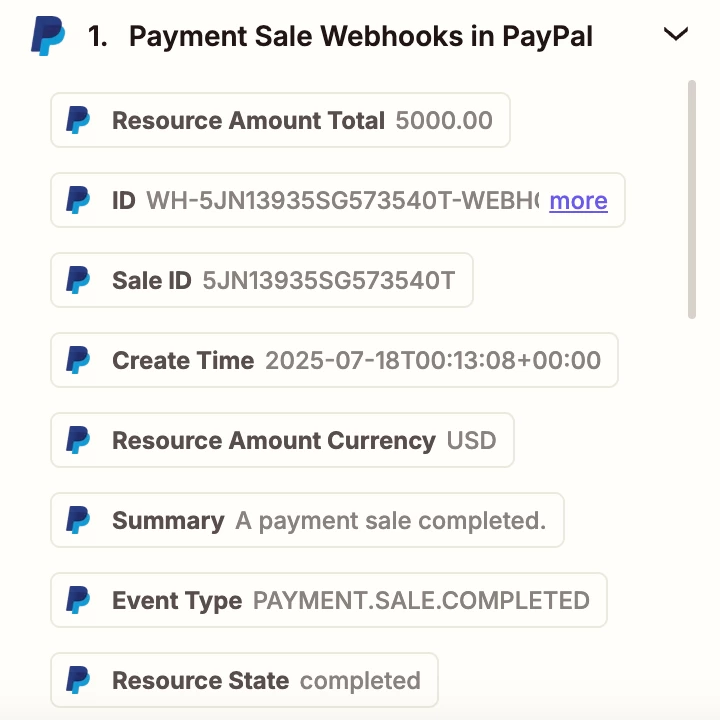
I’m selling an online course via Paypal and I want to set up a Zap so that whenever someone purchases the course on Paypal they are automatically emailed a Zoom invitation. I’m struggling with the very first step here of identifying purchases of the course. I set up a trigger for Paypal ‘Payment Sale Webhooks’, and now I’d like to set up a filter to identify the transactions by ‘Item Name’ but I can’t seem to find that as an option. That’s a solution that was recommended in a post on this forum but it was four years ago so I’m wondering if that is no longer an option, or maybe I’m just missing something obvious? All of the course sales are through a specific payment link, I’d just like a way to identify them in Zapier. Would appreciate some guidance on this, thank you!


This post has been closed for comments. Please create a new post if you need help or have a question about this topic.

6 replies

Troy Tessalone
Zapier Orchestrator & Solution Partner
Forum|alt.badge.img+14
  • Zapier Orchestrator & Solution Partner
  • July 21, 2025

Hi ​@KarenM 

Add a Filter as Zap step 2: https://zapier.com/apps/filter/integrations#help


SamB
Community Manager
Forum|alt.badge.img+11
  • Community Manager
  • July 30, 2025

Hi there, ​@KarenM 👋

How did you get on with adding that Filter action to the Zap? Were you able to get it filtering out the relevant item names?

Want to make sure you’re all set, keep us posted on how it’s going! 🙂


  • Author
  • Beginner
  • August 5, 2025

Hi ​@SamB & ​@Troy Tessalone ! Thanks for your help. I know that I do need to add a filter but I’m struggling with how to implement that. I’d like to filter for ‘Item Name’ but that is not showing up as a filter option. None of these options seem to be what I’m looking for. Can you please advise on how to choose the correct filter for this situation? Thank you!


Troy Tessalone
Zapier Orchestrator & Solution Partner
Forum|alt.badge.img+14
  • Zapier Orchestrator & Solution Partner
  • August 5, 2025

@KarenM 

Your screenshot shows a scrollbar, meaning if you scroll down there will be more data points, which might include one you can use in the Filter condition.


  • New
  • August 29, 2025

Hello, this is the exact same problem I am encountering when integrating PayPal with Zapier.  I just signed up a few days ago and wondering if I made a mistake???  Has this been resolved, and if so, what is the answer?  It’s obvious that using the scroll button to review all fields is available.  None of the basic fields that you would expect to see (email, item name,  transaction ID, etc.) appear on the list when using the Payment Sale Webooks for Event=Completed - A payment sale completed under Configure menu.

Thank you for any update


Troy Tessalone
Zapier Orchestrator & Solution Partner
Forum|alt.badge.img+14
  • Zapier Orchestrator & Solution Partner
  • August 29, 2025

@jmanfr 

Try testing the event in PayPal AFTER the PayPal Zap trigger was configured.

Here’s a workaround to try: https://help.zapier.com/hc/en-us/articles/35632951078029-Use-previous-Zap-runs-as-trigger-test-records